

 ONLYOFFICE
Problems with Sinhala language
What is the current behavior?
Script name: සිංහල (Sinhala) Code: සිං | si Language name: Sinhalese or also, sinhala
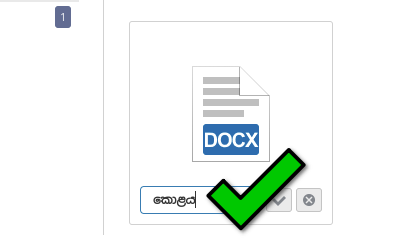
Cannot type some vowel signs on document, spreadsheet, presentation editors etc.. but we can type everything properly for folder names, file names, talk (jabber client)
If the current behavior is a bug, please provide the steps to reproduce and if possible a minimal demo of the problem.
Steps to enable sinhala script: Settings --> Region & Language --> Input Sources --> + --> Sinhala --> Sinhala (wijesekara (m17n))
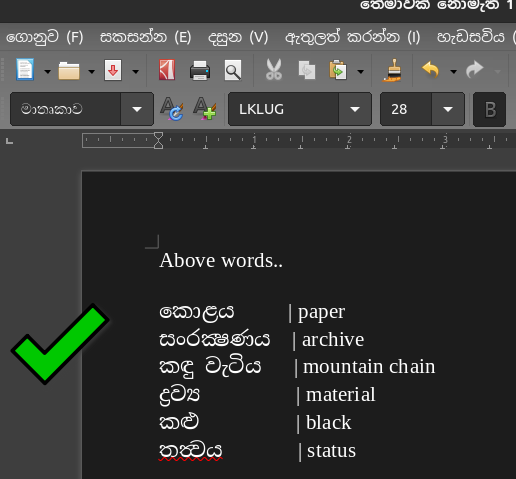
No problem on LibreOffice and other solutions.
Operating System: Ubuntu 20.04.03
Browser version: Chromium 101.0.4919.0 (Official Build) snap (64-bit)
Additional Request Editors already come with "noto serif sinhala" then please add "noto sans sinhala" as well. https://fonts.google.com/noto/specimen/Noto+Serif+Sinhala https://fonts.google.com/noto/specimen/Noto+Sans+Sinhala

Hi, am I right that you cannot correctly type those symbols but if you open a file with those symbols - they are rendered correctly
So the problem in typing, not in rendering?
but we can type everything properly for folder names, file names, talk (jabber client)
This may be correct, since ONLYOFFICE CommunityServer use completely another framework and seems that it just call browser methods directly, not like DocumentServer

So the problem in typing, not in rendering?
Just typing doesn't work as mentioned so i think rendering cannot work too because application doesn't know how to function it. may be you can check libreoffice source too.
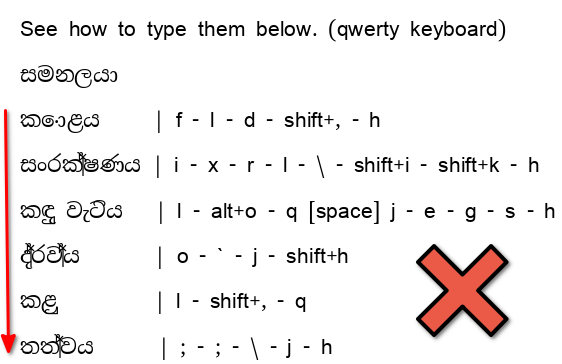
Also, you can enable sinhala input method and test typing by following the steps above and screenshot 2
- Problem with characters binding (supported characters can bind using " \ " key)
https://user-images.githubusercontent.com/63988538/159638691-0b2b57ff-87db-496f-9d30-56bb3321f557.mp4
- Unable to write some signs (appear as its pronunciation form)
https://user-images.githubusercontent.com/63988538/159639241-4d0a5653-28e6-417e-8bc3-a8448ed9a5b1.mp4
- Problem with specific vowels signs (they are not get converted)
https://user-images.githubusercontent.com/63988538/159638966-c73071c8-1c2d-4ce5-a219-49e20867a3a3.mp4
- Appear duplicate character, if has "්" vowel sign in previous character
https://user-images.githubusercontent.com/63988538/159638249-4e5cebe4-8628-4e26-9063-035a3803ab5b.mp4
- Signs do not appear in the correct format
https://user-images.githubusercontent.com/63988538/159639647-0e5bd5cd-4797-4d4c-995b-1d3eadc60865.mp4
- Other problems with vowel signs
https://user-images.githubusercontent.com/63988538/159638557-e8210f4e-1078-40dc-9c6b-3f8a90392a03.mp4
@ShockwaveNN Can you assign someone to work on this bug from right now? because that is urgent; and our managers intend to remove all onlyoffice deployments from offices and switch to MSoffice. If onlyoffice team able to fix this soon then we can use a edge build.
Furthermore, how long will take to fix this?
@TatianaKirillova
because that is urgent;
Hi, I'm sorry, but we handle all issues as soon as we can
If you need this issue with real high priority - it's better to contact [email protected] / [email protected] And they can promise some time frame of fixing it, but seems this issue is not easy to fix right now, so better to discuss estimates with support team. We (QA team) cannot promise any estimates

Resources: If necessary, You can check opensource LibreOffice source code (it doesn't have this sinhala typing problem)
@Aikatsui Hello, thank you for your report. We are working on fixing many typing issues right now. This issue will be fixed in one of the future releases.

We cannot use this office software in our country :( As i see, this is a several years old bug. You have a partner for sri lanka but it seems, they have give-up too https://www.onlyoffice.com/find-partners.aspx
Digital Services Colombo (Pvt) Ltd. Digital Services Colombo (Pvt) Ltd. is a provider of digital solutions, hosting and cloud services for education segment, technology, infrastructure and economy development, agriculture and exports.
@ShockwaveNN @KirillovIlya

Hi, some (or maybe even all) of the issues with Sinhala are resolved in 7.2 (which will be released probably next month), but we need some time to actualize all the problems
in 7.2 (which will be released probably next month)
Thanks. i like to test edge builds
Thanks. i like to test edge builds
You can check them by installing in docker via
docker run -itd -p 80:80 onlyoffice/4testing-documentserver-ee:7.2.0.148
But please do not use it in production env
Please keep things well - This is an office suite that use for typing, editing etc; If you break its main things then people will switch to other solutions or never try again.
Document server 7.2.0.148 No typing errors / problems as @OperaART said.
Ubuntu 22.04.01 | x11 | Chromium 107.0.5304.10 (Official Build) snap (64-bit)
i found 1 old bug and 2 new bugs in 7.2.1.5 (picked randomly) and desktop editors (snap 7.2.0).
(a). 1 old bug
- Appear a duplicate character, if has " ්" vowel sign in previous character
(new examples: 7.2.0.148 vs new versions) (note: i forgot to use same font but not a font problem)
https://user-images.githubusercontent.com/63988538/193427480-d83ba183-d63a-4c70-b9c9-e1cc9c46c82d.mp4
How to type them?
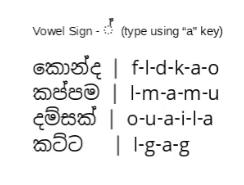
(old examples: onlyoffice vs libreoffice)
https://user-images.githubusercontent.com/63988538/193422188-337e9f70-f65e-444b-8631-e044354245e0.mp4
(b). 2 new bugs
- onlyoffice doesn't print 5 consonants and 1 vowel
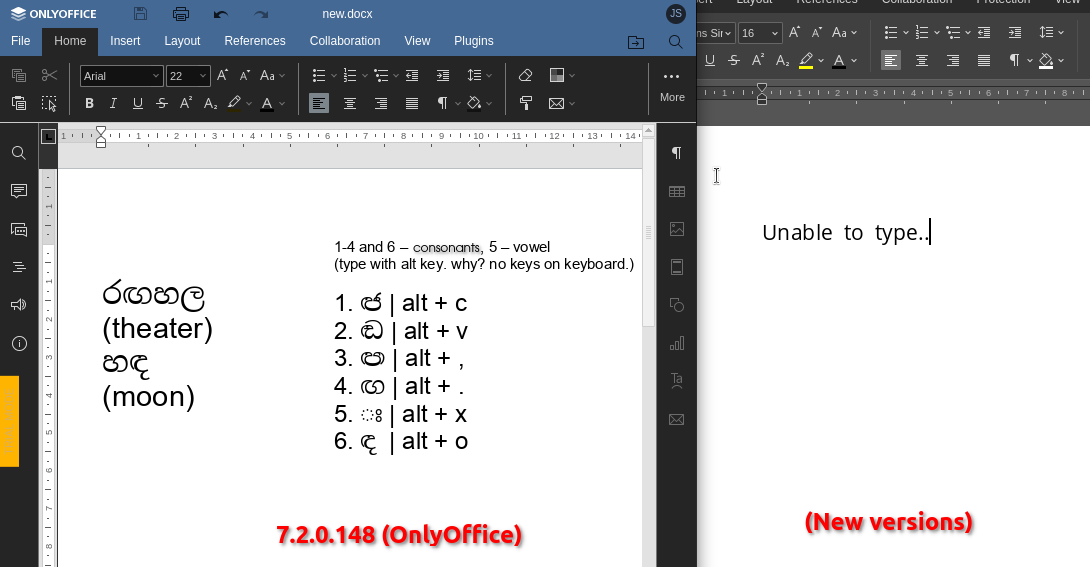
- If fix a typo (single word) then onlyoffice print many characters
https://user-images.githubusercontent.com/63988538/193427975-e49c7889-d368-4465-9e57-5cdecc222884.mp4
Note: However i couldn't find any sinhala typing bug / problem in current onlyoffice cloud. i can type anything without trouble.
Affected: onlyoffice document server (tested: 7.2.1.5) onlyoffice desktop editors (tested: snap candidate / edge builds)
Note: This bug is partially persist in 7.2.0.148 (including onlyoffice cloud) because sometimes it occurs for e.g. (1), (4) words but almost persist in new versions
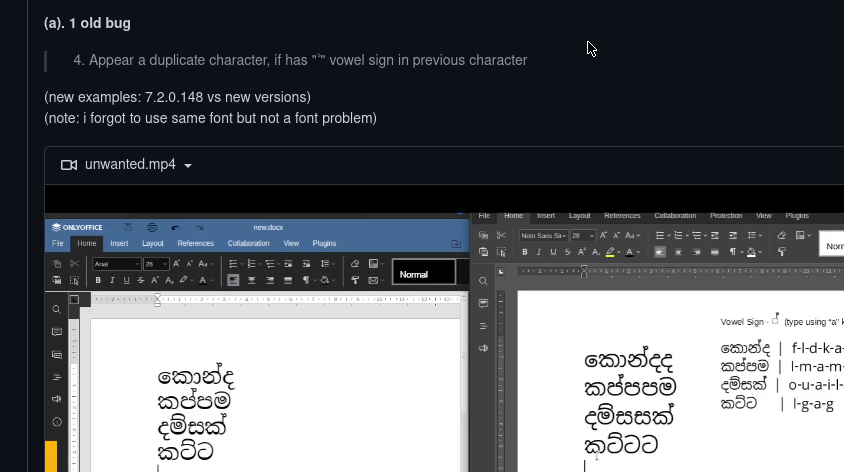
Don't confuse with above comments.
This is for 7.2.0.148 (see quotes) (but applies to new versions)
@ShockwaveNN Hi, some (or maybe even all) of the issues with Sinhala are resolved in 7.2 (which will be released probably next month), but we need some time to actualize all the problems
You can check them by installing in docker via
docker run -itd -p 80:80 onlyoffice/4testing-documentserver-ee:7.2.0.148
@OperaART checked. no typing problem now.
You haven't applied any bug fixes to the spreadsheet. Previously, I only tested document editor (apparently, @OperaART too) but today tested document, spreadsheet, presentation editors
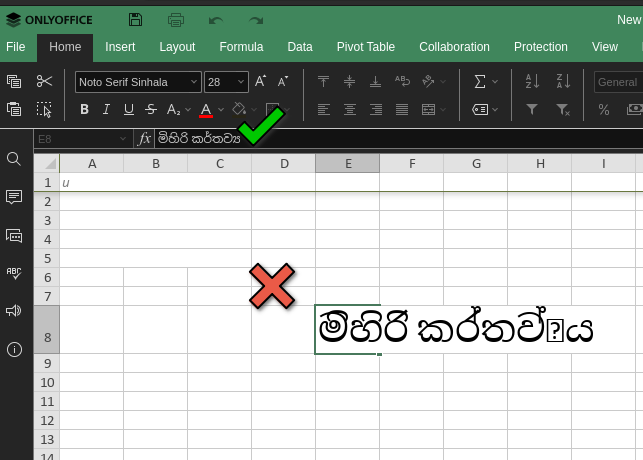
Hey, @Aikatsui! The Spreadsheet editor does not yet have language support, but we are working on it. In one of the next versions the problem will be solved.
Hello, @Aikatsui!
The problem in the table editor persists. Entering characters in the document editor is similar to the MS Word editor. Do you have repeated problems in the document editor?
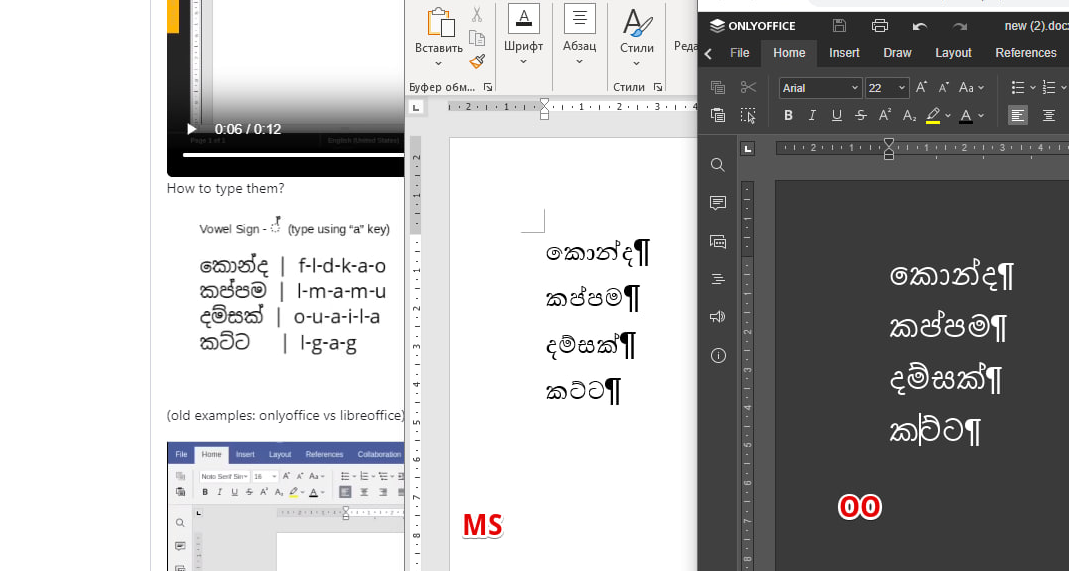
Entering characters in the document editor is similar to the MS Word editor.
Okey. but sometimes they bring bugs with new updates. if you can keep everything well for all languages; people can switch to onlyoffice.
The problem in the table editor persists.
Sorry, i didn't understand. Did you mean document editor -> insert -> table? (*create & edit table)
Do you have repeated problems in the document editor?
Note: i didn't reproduce other typing bugs today. @TatianaKirillova Yes. duplicate character appear after pressed the space bar. (a & b & c)
(a) OnlyOffice Cloud
(b) OnlyOffice Desktop Editor (Snap) (7.3.3 rev. 147 latest/stable)
(c) OnlyOffice Desktop Editor (Snap) (7.3.3 rev. 153 latest/edge)
We cannot type anything with current onlyoffice desktop editor edge build. It doesn't print any e.g. sinhala, chinese, korean characters and only print english characters instead.
First, please discuss a solution for that with developers. If you break that again and again with new updates, you'll definitely loss customers and Next, fix all sinhala typing problems.
Ubuntu 22.04.2 LTS
Hello, @Aikatsui I can confirm that the problem exists. I created ticket 63011 in our internal tracker with your issue
Hello, @Aikatsui It is a chromium bug. In our desktop editor we use this web engine. Please check the problem in chrome - and you will help us if you report a bug on google chrome/chromium.

@K0R0L Can you please submit this to the chromium bug tracker (google chrome/chromium)? I don't know much about the technical side of this bug. Maybe you can submit it as an individual. Please share the link here.
Hello, @Aikatsui It is a chromium bug. In our desktop editor we use this web engine. Please check the problem in chrome - and you will help us if you report a bug on google chrome/chromium.
Don't worry. I'll submit a bug report to https://bugs.chromium.org/p/chromium and i didn't notice this bug when using onlyoffice cloud on firefox browser and only on chromium browser and onlyoffice desktop.
Hey, @Aikatsui! The Spreadsheet editor does not yet have language support, but we are working on it. In one of the next versions the problem will be solved.
@Rita-Bubnova @TatianaKirillova Can you share ETA? Due to this reason, We can not switch to the onlyoffice platform.
@Aikatsui Work on this problem is underway. In one of the major releases, we expect a fix of the problem
link to issue in chromium bug tracker - https://bugs.chromium.org/p/chromium/issues/detail?id=1478610

@Aikatsui I'm happy to announce that the problem in the table editor has also been fixed and is already included in version 8.1.0. Don't miss updates)
DocumentServer v8.1.0 is released so I close this issue. Feel free to comment or reopen it if you got further questions.
