
DocumentServer
 DocumentServer copied to clipboard
 ONLYOFFICE
Excel - multiline table column name error
Do you want to request a feature or report a bug? Bug
What is the current behavior?
Multiline column names (ALT + ENTER) of cells formatted as table create problems (not displaying correctly in Onlyoffice and corrupting Excel file.
I create a new Excel document with Excel native application. I select some cells and format them as a table. Then when I enter a multiline column name and view/edit the document later in Onlyoffice the document is displayed with _x000a_ instead of a newline. When opening the file again in Excel it says that the document is corrupted.
If the current behavior is a bug, please provide the steps to reproduce and if possible a minimal demo of the problem. Create a new spreadsheet in native Excel, select some cells and insert a multiline column name. Open the spreadsheet in Onlyoffice.
Excel
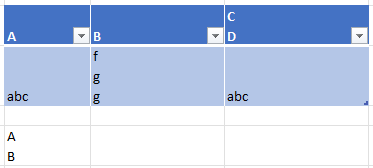
Onlyoffice
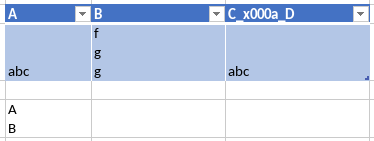
What is the expected behavior? The newline should be displayed correctly and the document shouldn't be corrupted.
Did this work in previous versions of DocumentServer? No
DocumentServer version:
Docker image onlyoffice/documentserver:latest which is 7.0.1.37
Operating System: Windows 11, tested also on Windows 10, iOS, Android
Browser version: Latest versions of Firefox, Edge, Google Chrome.

@mr-manuel I can confirm - this is bug, issue 48891 in our private issue tracker. Thank you for report.

Hi,
i can confirm the bug on onlyoffice/docs-docservice-ee:7.1.1-2.
Do you know if a fix is in progress on new release maybe.
Regards,

Sorry, we cannot guratnee any ETA for this fix
If this is really important to you - better to contact [email protected]

Thanks for feedback.
We have an enterprise license so i will contact my supplier who have support from onlyoffice.
This problem is fixed in https://github.com/ONLYOFFICE/sdkjs/commit/5870b4502492a955a63ddd600641bb8fd7382d0d It will be released as v7.3.0
DocumentServer v7.3.0 is released so I close this issue. Feel free to comment or reopen it if you got further questions.
