

 ONLYOFFICE
Cross-referencing a heading by heading number always inserts 0
Do you want to request a feature or report a bug? Bug.
What is the current behavior? The document editor always inserts 0 when you insert a cross-reference to a heading with any of the heading number options selected.
If the current behavior is a bug, please provide the steps to reproduce and if possible a minimal demo of the problem.
- Create a new empty document
- Create a heading with style Heading 1 and name it
1. Testing - Below this header, insert a new cross-reference with the following settings, where "Insert reference to" is set to any of the Heading number options:
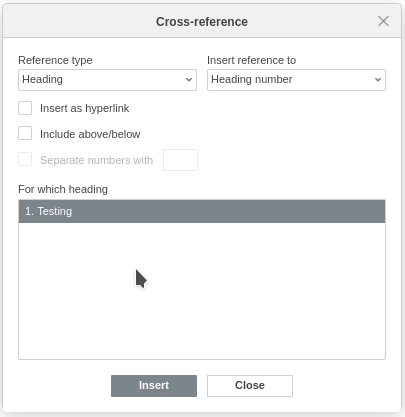
What is the expected behavior? The heading number 1 gets inserted.
Did this work in previous versions of DocumentServer? Unsure. This bug is present in versions 7.0.0 and 7.0.1.
DocumentServer version: 7.0.1
Operating System:
Client: Ubuntu 20.04.4
Server: Fedora 35, but OnlyOffice is running in podman 3.4.4 with the onlyoffice/documentserver container.
Browser version: Firefox 97.0 and Chromium 98

Hello, @NanoSector. Sorry for the delay in responding. I was unable to reproduce your problem. It could be that you haven't applied the numbering style to the heading. If the problem is still happening to you now, please record a video with the reproduction of the problem. This will help us a lot.

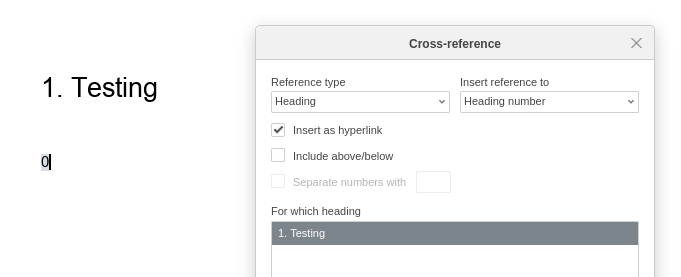
I can still reproduce this with DocumentServer 7.1.0 using the exact steps I described in the issue. Unfortunately I can't record my desktop on this machine, but I have attached a screenshot showing the issue in a blank document.
Could this be a locale issue?
Hi @NanoSector! I've been browsing through existing issues and found yours. Looks like I reported something similar or at least related, what do you think? https://github.com/ONLYOFFICE/DesktopEditors/issues/1107

Hi @HectorB-2020, I don't think these issues are related; as you can see in my screenshots I do get the heading names in those lists.
I haven't used OnlyOffice in a while though so it might be possible this bug has escalated to there.
Hello, @NanoSector. Sorry for the delay in responding. I can confirm - this is bug, issue 61442 in our private issue tracker. Thank you for report.
