

 ONLYOFFICE
Incorrect error message if user session is interrupted
Hi, I have a problem with Onlyoffice * .xlsx when working with it 3-4 users On out.log: nodeJS - error description: docId = LuYb9axk_zNEo_bOoxy2uqcdWY6A3JdO5U5I_Elzd0c_ errorId = Restore error. Document modified. I tried using another browser, Edge, Chrome, Firefox (and inkognito mode)doesn't work

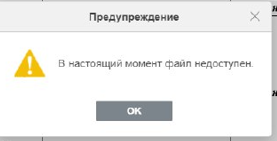
version 6.4.0.121

I think we need more details
Which host os are you using, which DMS (owncloud, nextcloud, ONLYOFFICE CommunityServer)
We got similar issues https://github.com/ONLYOFFICE/DocumentServer/issues/1004 and https://github.com/ONLYOFFICE/DocumentServer/issues/903 but never able to localize this problem and reproduce it

I am installing according to this tutorial on Windows Server 2016 ONLYOFFICE Workspace https://helpcenter.onlyoffice.com/installation/workspace-install-windows.aspx "We got similar issues #1004 and #903 but never able to localize this problem and reproduce it" -- I have read these issues but do not see a solution
Is this error happens to some specific file or to any files?
Could you update DocumentServer to v6.4.2 and see if problem persists
"Is this error happens to some specific file or to any files?" - any files When one employee works with the file, there are no problems, if a second one connects, it starts loading longer, and the more people connect to the file, the faster the error appears. There may also be such a situation: Two users connected to the file, one is working with it, and the second left for half an hour, but left the file open, and when it returns and tries to work with the file, an error appears.
"Could you update DocumentServer to v6.4.2 and see if problem persists" - I'll try tonight
When one employee works with the file, there are no problems
I'll ask once again - judging by error in logs - all those troubles for some specific file? If you copy it, edit copied file - is this problem still occurs?
"I'll ask once again - judging by error in logs - all those troubles for some specific file?" - For all files "If you copy it, edit copied file - is this problem still occurs?" - Yes
I update DocumentServer to v6.4.2, problem is still there
@DenisDeeSign Please take a look at this issue, I'm out of ideas that happened

I reproduced your scanario in strict co-editing, but the cause of an error is the same in fast one. After a discussion with our dev team, I found out that our co-editing logic works so. If second user is disconnected and any changes have been made by first user in this period, second user will not be able to continue editing without page reload and will get this error on a client side.
You can set sessionidle timeout in minutes at default.json config to prevent the error and make the message more understandable, but is just a temporary solutuion and we have no idea how to change an algorithm.
Also I created an issue 54883 in our internal tracker to change the message.
DocumentServer v7.2 is released. This issue should be fixed
Feel free to comment or reopen it if you got further questions