

 ONLYOFFICE
New feature : OnlyOffice sheets drag and drop of rows or columns
OnlyOffice should add drag and drop of rows or columns just like Apple Numbers or Quip do. That's way more convenient than inserting then copying then pasting and finally removing the previous raws/columns.
Currently, to move a column or a row, it necessary co copy its whole content, then insert a new column or row, paste the content inside and delete the previous one.
By enabling drag and drop it would save time and bring things easier. You click on the field and move it away. Several columns or rows should be movable together.
Moving several rows in Apple Numbers.
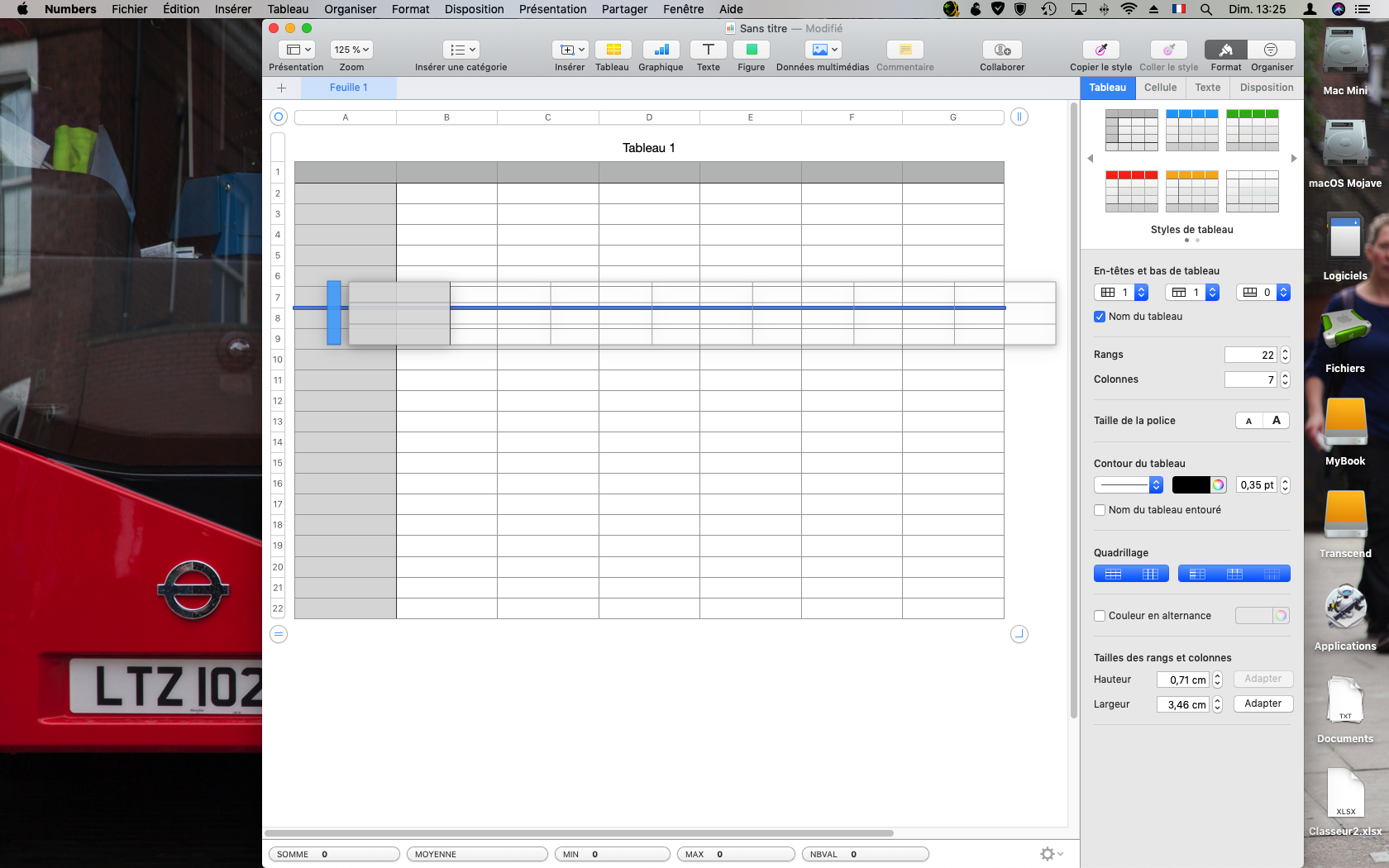

I vote for both columns and rows. It's a very practical feature that I am sorely missing in OnlyOffice.

Hello, @M-Rick, @m5x. I create new issue 49461 in our private issue tracker for discuss your enhancement with our team.
This issue actual in Document Server.

Moving this issue to DocumentServer repo, since it's our base product and problem actual there too

May I suggest that the drag&rop feature is implemented similarly to Excel?
- It should work for cells, rows and columns
- Shift + drag&drop = move it by inserting it
- Ctrl + Shift + drag&drop = duplicate it by inserting it
- Ctrl + drag&drop = duplicate it by replacing the existing data

May I suggest that the drag&rop feature is implemented similarly to Excel?
- It should work for cells, rows and columns
- Shift + drag&drop = move it by inserting it
- Ctrl + Shift + drag&drop = duplicate it by inserting it
- Ctrl + drag&drop = duplicate it by replacing the existing data
How does it work because I tried your shortcuts and there is no drag & drop, it didn't work in my case anyway. In my knowledge, there is no drag & drop of entire rows or columns included in Excel for now.
You can try the feature here. https://www.icloud.com/numbers/09DVgD0tkbmxKcOh1VGWTQYPw#Analyse_de_la_rentabilit%C3%A9
@biva Sorry no news, we'll close this issue as soon as we got some movement in that question
@M-Rick is this video helpful? https://www.youtube.com/watch?v=RoBPzX_RPoI
I didn't know this feature in Excel. But I find it less intuitive ans so easy to use. The other one, there is no key to click-on just select the colony and move in. So simple.
Both would be OK for me, as long as there is this possibility included in OnlyOffice ;)
Astounded that there is not an elegant way to move a row or column.
Please implement Excel style drag and drop, plus a keyboard shortcut to Move Column Left / Right, Move Row Up / Down.
Thank you.
The lack of this feature really does prevent me using OnlyOffice. For now I stick with WPS Office, which I hate due to its intrusive ads and self promotion!

This is very needed.
I would be fine with almost any implementation, but the simplest, most discoverable and effective is the one used by Google Spreadsheets:
- Click a column/row header to select, or drag to select several columns/rows.
- Drag to move the selected columns/rows.
As simple as that. No modifiers, no need to very precisely aim, etc.

I would definitely vote for the Google way of handling this. Excel is in many areas overcomplicated. We're now moving from Google Drive with the whole company and I really miss the drag and drop in OnlyOffice. We have some sheets with hundreds of rows and collumns, which work fine in Sheets but ordering them in OnlyOffice is very painful now.
Please. <3

Adding my voice to the others. We truly need to be able to insert rows (at least) via drag and drop. Further, this needs to be available for formatted table columns as well as entire page columns.
This one feature is a show-stopper for some as we attempt to migrate people off of Microsoft Excel.

Hey there! Are there any news from the development team regarding this? I too would love to see this implemented.


Hello, is there any news about this feature? It would be incredibly useful if added.

I'm still surprised this isn't a thing. Also coming from Gsuite. It seems... not that complicated.. UX/UI wise


I'm not sure if this is the right repository, but I could test the following behaviors in the desktop version:
- shift + drag: move columns and insert them at position
- ctrl+shift+drag: copy columns and insert them at position
- drag: move columns and replace data at position

Shift + drag adds empty column/line at original position. Anyone else experiencing this?
I'm on 7.5.1, tested on Linux and mac.

@jrom99 Thanks for pointing this out! I didn't know that was already available. And yes, I'm also experiencing the empty column/line issue @pztrn mentions.
But that's all on the desktop app. The online version is still lacking this feature, right?
Shift + drag adds empty column/line at original position. Anyone else experiencing this?
I'm on 7.5.1, tested on Linux and mac.
As I understood, it doesn't delete the old column, but only inserts at position and moves everything after. So, more of a cut/copy behavior than a move one.
This is my first day using OnlyOffice (I stumbled here trying to move a column lol), so I'm not sure what are the available shortcuts and if ctrl or shift hold special meaning for copy/cut.
Hello! @jrom99 and @eldelacajita I have created a ticket #65425 with your problem. At the moment our editor can only move columns and rows. Thanks for your report.


I need this feature too: any other table processors (Apple, MS, Google, MyOffice) already implemented this.
