

 ONLYOFFICE
Wrong vertical alignment in table cell
Do you want to request a feature or report a bug? Bug
What is the current behavior? Vertical center alignment in cell:
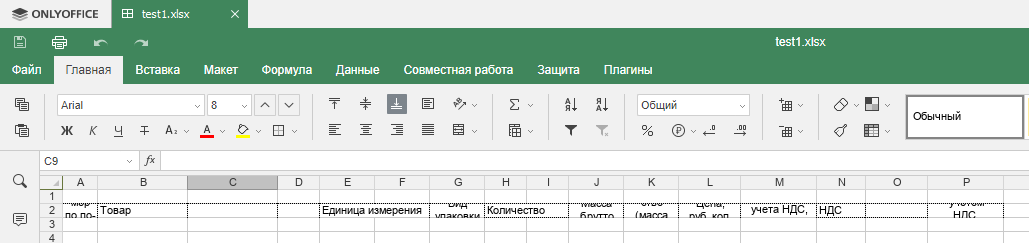
If the current behavior is a bug, please provide the steps to reproduce and if possible a minimal demo of the problem. Sample file: test1.xlsx
What is the expected behavior? Vertical top alignment in cell:
Excel 2003:
 Excel 2016:

Which versions of DesktopEditors, and which OS are affected by this issue? Did this work in previous versions of DesktopEditors? Tested on Windows 10 with ONLYOFFICE Desktop Editors 5.4.2.30.

Hello, @q4a. Thank you. I can confirm - this is known issue 36556 in our internal issue tracker. Problem reproduces in Document Server.

@q4a, are still observing this issue? I've tried adjusting vertical alignment and it seemed to work.
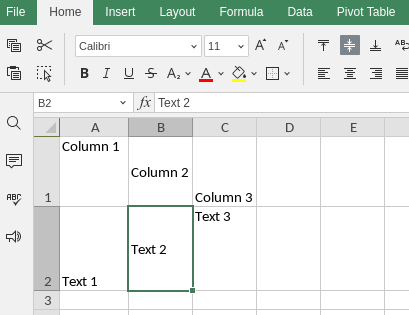

@HectorB-2020 Yes. I provided sample file: test1.xlsx in 1st message.
Just tested last release: https://github.com/ONLYOFFICE/DesktopEditors/releases/tag/v7.2.1
ONLYOFFICE Desktop Editors version 7.2.1.36 (deb package)
Same wrong behavior:
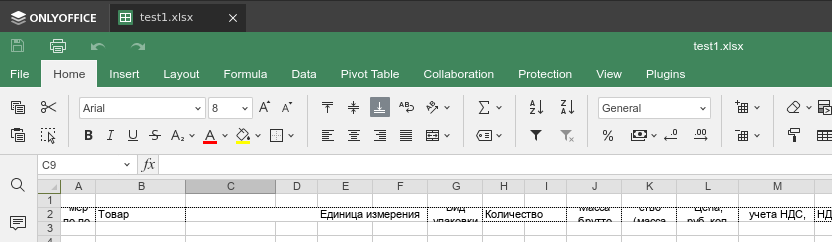
Thanks for checking. Though I'm still not following I'm afraid.
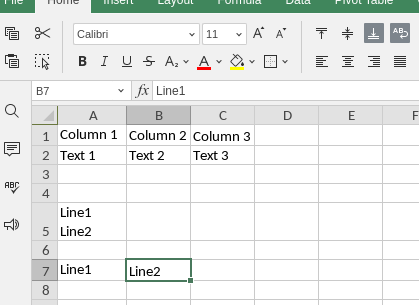
I took the previous example and clenched first two rows to fit minimal vertical size. Although they all had varied alignment, they are still visible. Plus I added a multi-line cell A5 and spread it to narrow cells A7 and B7.
A7 got Align top and B7 got Align bottom. Both are visible, please see below.
any news on this bug? I am trying to slowly migrate my team to OnlyOffice for windows too but we need vertical alignment to work for many of our spreadsheets. I am open to help with QA if you need.
