

 OGRECave
Different normals exported with or without tangents
When I export a mesh (without any changes in the actual geometry) with or without tangets, there are different normal vectors exported (no matter if I choose "with parity" or "generate").
An example:
<vertex>
	<position x="-1.060429" y="0.286983" z="0.142367"/>
	<normal x="0.114350" y="-0.993431" z="0.004228"/>
	<tangent w="1.000000" x="-0.016834" y="-0.999858" z="-0.000000"/>
	<texcoord u="0.043342" v="0.342279"/>
</vertex>
is with tangents. This is without tangents
<vertex>
	<position x="-1.060429" y="0.286983" z="0.142367"/>
	<normal x="0.577349" y="0.577349" z="0.577349"/>
	<texcoord u="0.043342" v="0.342279"/>
</vertex>
I should point out that I am talking about 0.7.5. I am not an expert in 3D geometry so maybe I am missing something but as far as I understand, the normals should be the same? Thank you for checking it out. I am happy to provide more details if required.


we are actually reading a different source, depending on whether tangets are on: https://github.com/OGRECave/blender2ogre/blob/f83e05698a73152028733b69df99443dabe95e72/io_ogre/ogre/mesh.py#L241-L258

we are actually reading a different source, depending on whether tangets are on:
I am sorry, I am not that familiar with the exporter code. Is this something I can change in the blender config or properties so this works as it should?
Excuse me, but why are you using such an old version?
Can you switch to 2.79b or 2.8+?
What Blender version are you using?
I am using Blender 2.76b.
Excuse me, but why are you using such an old version?
Can you switch to 2.79b or 2.8+?
Yes, I am sorry. I should have done it before I posted it (just to be sure that it is not already fixed). I updated to 2.79b and the result is the same.
I am also attaching the settings with which I exported those two different results. The only difference is in tangents. In first case, it is set to "with parity" in second to "none".

OK, I have been looking at this for a moment.
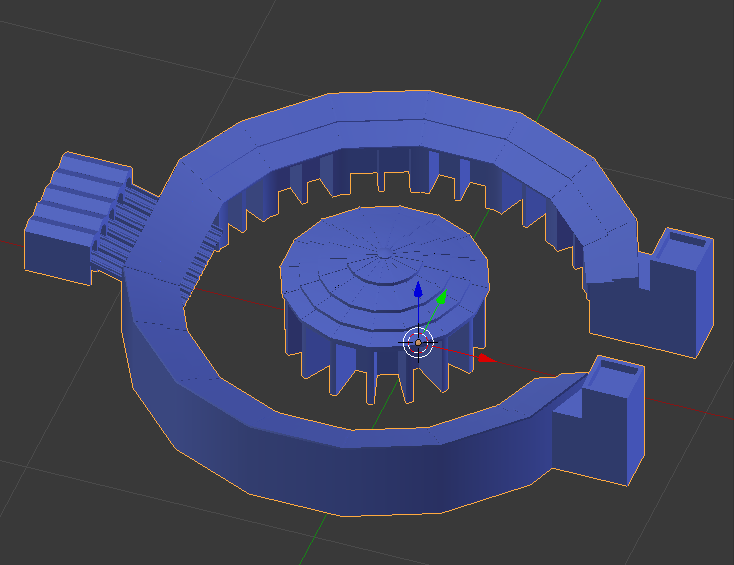 Original model in Blender 2.79b with "Shade Smooth" and "Auto Smooth" (cheating).
Take note that models exported with "Auto Smooth" won't look the same because Blender is messing with the normals in order for the model to have hard edges where you would normally have a bad shading.
You have to use normal mapping in order to perform this cheating with OGRE.
Original model in Blender 2.79b with "Shade Smooth" and "Auto Smooth" (cheating).
Take note that models exported with "Auto Smooth" won't look the same because Blender is messing with the normals in order for the model to have hard edges where you would normally have a bad shading.
You have to use normal mapping in order to perform this cheating with OGRE.
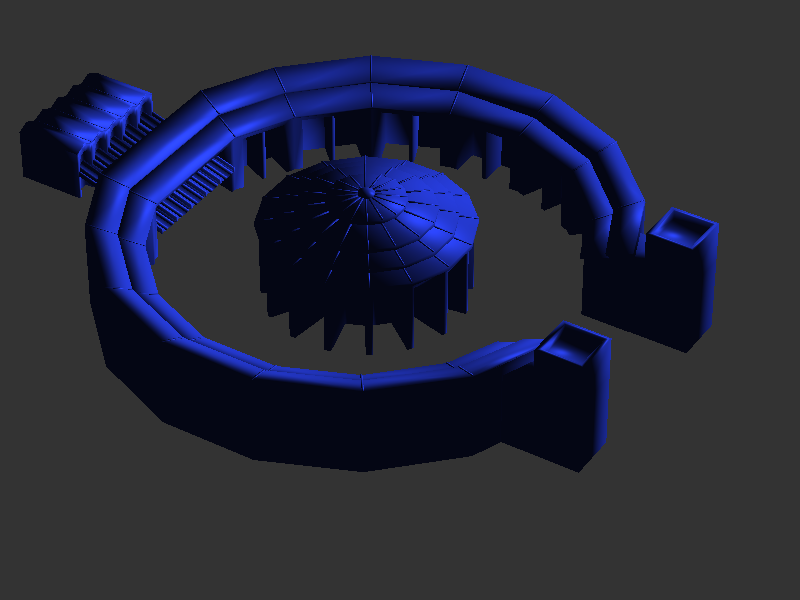 Exported model with no generated tangents
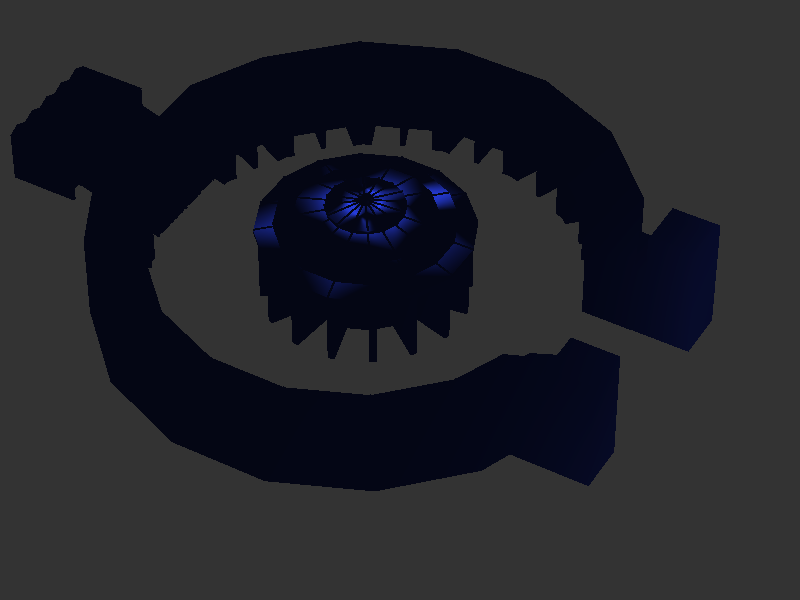 Exported model with generated tangents
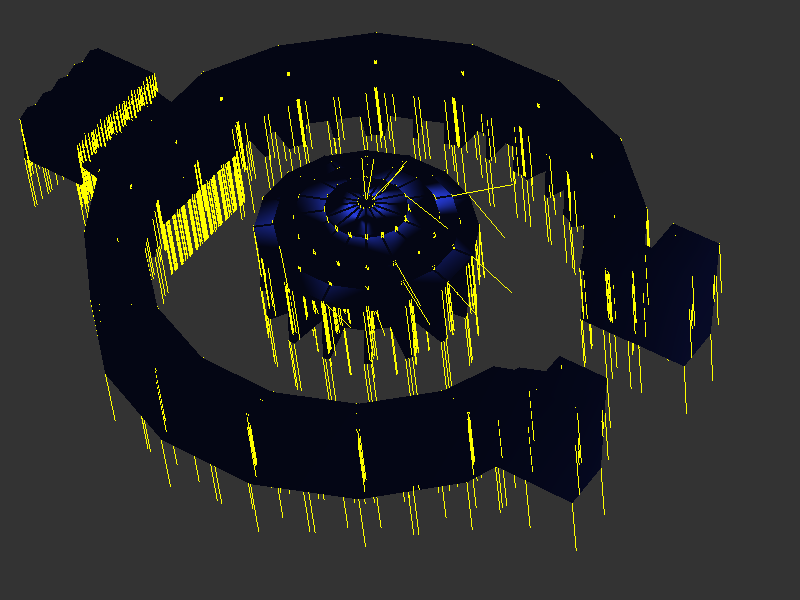 Exported model with generated tangents and normals showing
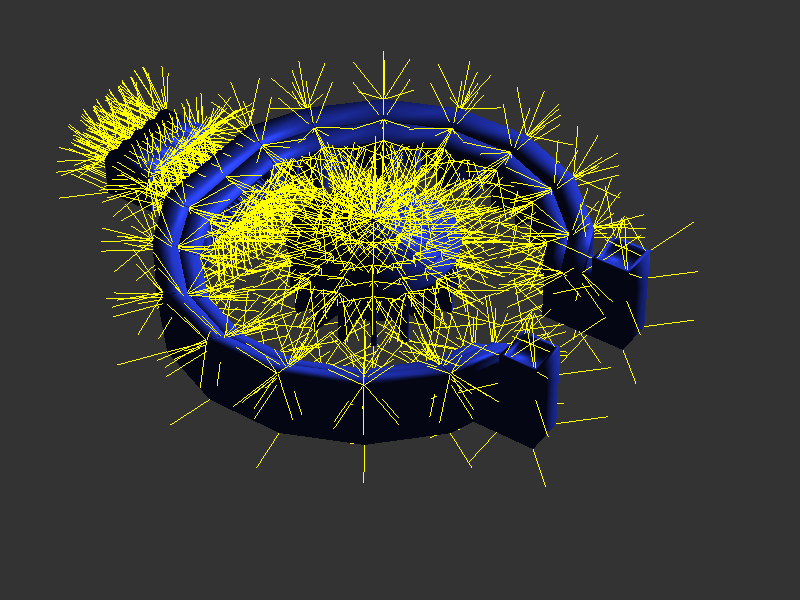 Exported model with generated tangents, but "Custom Split Normals Data" cleared.
So the problem seems to be that you are using "Custom Split Normals", can you tell us how you created them?
Thanks.
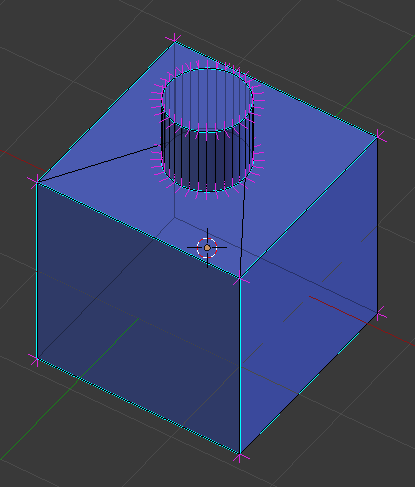
OK, now I understand better the Custom Split Normals thing from Blender and was able to reproduce the problem with a much simpler shape.
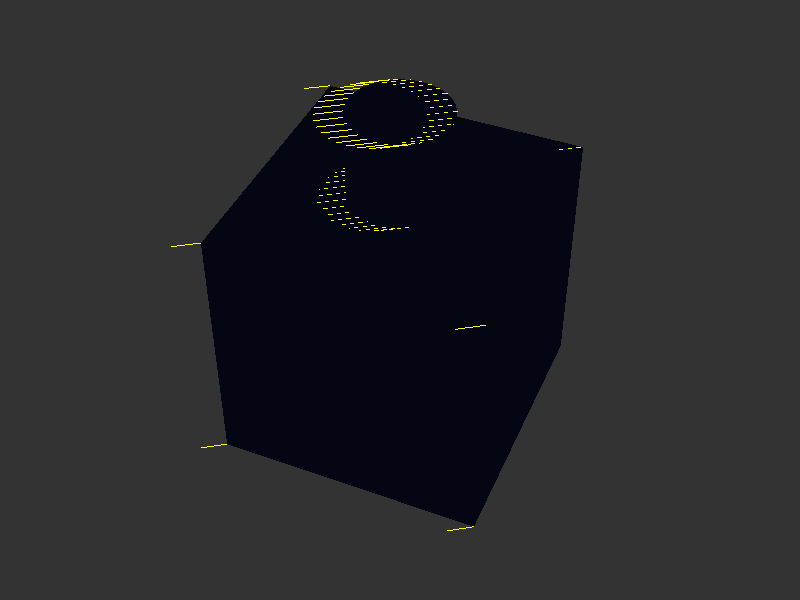
It seems that we are exporting custom normals, but only when generating tangents and they are wrong.
These are the normals we should be seeing in OGRE (the cyan lines are edges marked as sharp):
And this is the result in OGRE:
@pavelkux, I was able to solve the problem for your case.
I'm not pushing any changes to the repo until I have done more tests to ensure that other workflows would not be broken by this change.
In fact I want to do a proper revision of the code path in cuestion because there seems to be some possible redundancy or legacy code.
For now you can fix this very easily changing the code in ogre/mesh.py like this:
(line 247)
                if tangents:
                    nx,ny,nz = swap( mesh.loops[ loop_idx ].normal )
                    tx,ty,tz = swap( mesh.loops[ loop_idx ].tangent )
                    tw = mesh.loops[ loop_idx ].bitangent_sign
Hello sercero. Thank you very much for your help. I applied the change in code you had mentioned. It didn't make any difference on its own but when I also cleared Custom Split Normals Data, it was finally exported as it should. It looks way better now.
Well, thats strange.
In my case it works, it seems taht more testing is needed.
The problem is that if you clear Custom Split Normals Data, then you are erasing the sharp edges.
It looks better because before it was very bad, but you are losing the information of the sharp edges.
What I mean is that the object should look even better.
@pavelkux did you restart Blender or reload scripts after changing the ogre/mesh.py script?
I did some tests, how normals looked like before and after applying the script change and there is a difference indeed. Nevertheless, it is not exactly as it should be. Here is screenshot
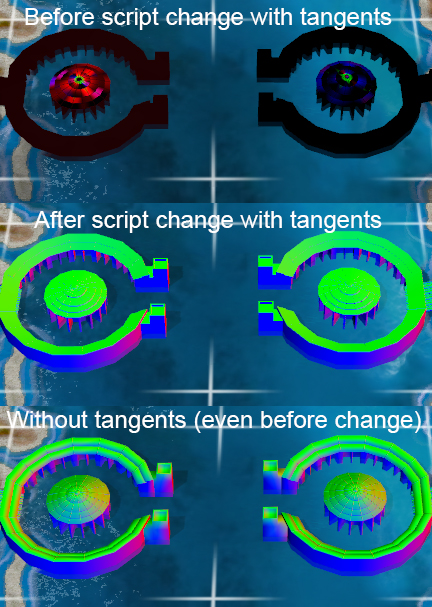 Please note that the colours represent faces' normals like this float4(normal.xyz,1)
All three screenshots are taken with model where the Custom split normals data are not removed.
Only the third screenshot (where no tangents are exported) is correct. Maybe it is my mistake?
Please note that the colours represent faces' normals like this float4(normal.xyz,1)
All three screenshots are taken with model where the Custom split normals data are not removed.
Only the third screenshot (where no tangents are exported) is correct. Maybe it is my mistake?
One more note - once I remove the custom split normals data and export it with tangents, the normals look exactly like on the third screenshot (which should be correct per my opinion?).
The second screenshot is the good one, because it preserves the hard edges where they should be but leaves the normals smooth where the model should be smooth.
This model is somewhat too low poly to tell, perhaps.
Can you compare the 2nd and 3rd screenshots but with a shader that does lighting instead of showing the normals?.
The one that looks good to you (without the split normals data) is like setting the flat shading to the model.
Parts that shoud be smooth will have hard edges.
As soon as I have some time I intend to create some documentation about this.
I am sorry about the delay.
Can you compare the 2nd and 3rd screenshots but with a shader that does lighting instead of showing the normals?.
Sure, I attach it to this comment. The order is the same as in the previous screenshot (in upper part "After script change with tangents" and in bottom part is ""Without tangents (even before change)". I am a bit surprise that you are saying that the upper part is correct. With that one you dont see any lit at all (there is directional light as you can see in the bottom one).
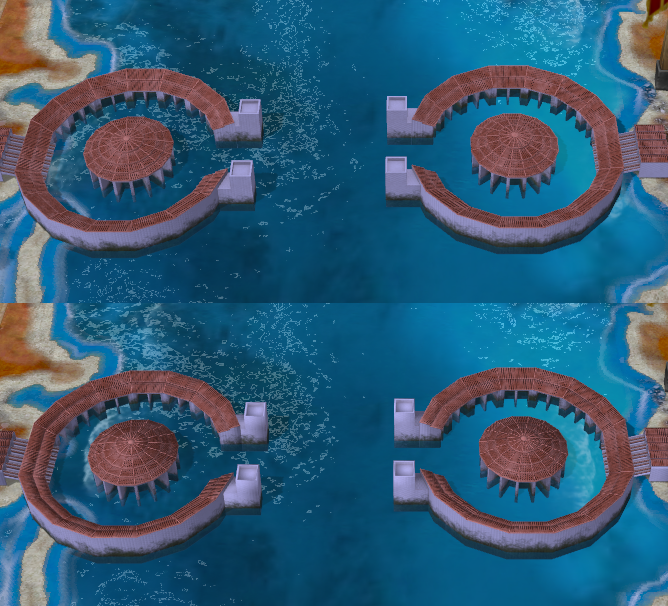
Well. I can tell from this latest screenshot that it looks better with custom split normals.
So, to me the one that looks better is this one:
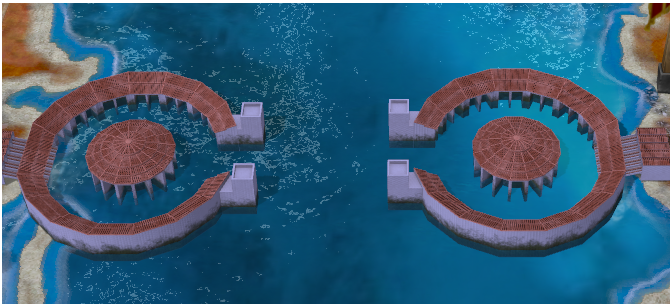
Which should correspond to the legend: "After script change with tangents"
Sure, I respect that. But shouldnt it be lit like the second screenshot? Per directional light?
No, the second screenshot is the same as if you changed the model to have all smooth faces.
Try that. Go to Blender, select the model, disable "Auto Smooth" and then set the shading to "Smooth".
You will get that result.
And all the work that the artist put into selecting which edges should be sharp is lost.
Another thing you can try is to set the shading to "Flat" and compare the results, you will understand what I'm saying.
Firstly, I apologize for such a delay in replying. Secondly, thank you for the answer and also the explanation. You are right indeed in all what you said.
My question is - is there any way to have that lit and also hard edges together? I certainly want to have that lit there but I also agree that the hard edges (for example on top of the turrets) look better.
I don't understand the question
The second screenshot has lit (those parts of the objects which are facing sun are brigther than those which are turned the other direction). You can see it nicely on that shipyard middle part. Why is this information lost during export? I do agree that those hard edges look better on the first screenshot but the lit really makes the object look more "relief"
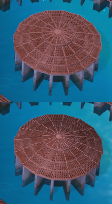
I don't think that information is lost during export.
It is difficult to tell why it seems in the screenshot that the second object has shading while the first not.
In my tests the exported object has the correct normals so it should look fine.
Really strange. When I look at this again
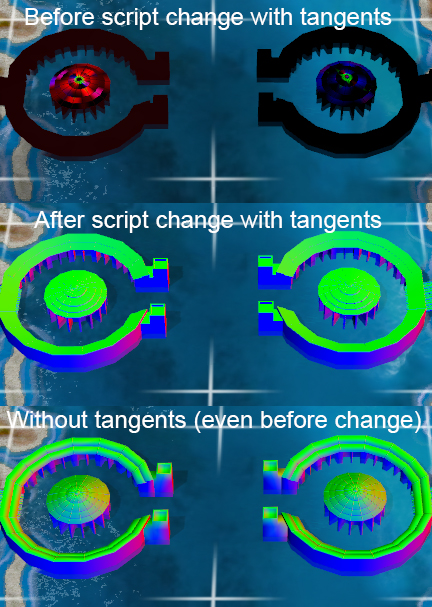
It is clear that normals are exported (for example the turrets are in blue from one side and red from another side) but the shipyard middle is pure green (except for those edges).
That is because all those edges were set as "hard" by the artist.
You are expecting a kind of shading that is not in the model.
Export the model with flat shading and you will see that it looks more like the one in the middle.
Export the model with smooth shading and it will look more like the one the bottom.
In my opinion the way it is right now is the correct look because those edges should be hard the way the artist set them.
But it seems that they look wrong to you.
I think I finally understand, thank you for the explanation. Basically, when I let Blender to create smooth normals, it does take into account the angle of that middle part and set it correctly. When I use only normals which are part of the model (and set by the 3D artist), this information was simply not generated/added. That's the whole problem, correct?
No, the normals are correctly generated (with the fix), but it seems that the smooth normals are more appealing to you aesthetically.
Because I checked the normals when exporting the model with the different options and they looked good.