

 OFA-Sys
OFA-Explainability
Thank you for your great work. I retrain your model on captioning tasks and the results are very good. To justify the results of my research I'd like to add a layer of explainability to the OFA decision. To do so, I started with this project because it already adds Explainability to the CLIP. This Colab contains their code. I need to load the OFA model and receive two callable objects, one of which should be Model, which accepts image and text and returns logits per image and logits per text. The second one should be a preprocess object that is a Torchvision transform that converts a PIL picture into a tensor that the returned model may use as input should be the other option.
Pseudocode should be like this:
# model : torch.nn.Module, The OFA model
# preprocess : Callable[[PIL.Image], torch.Tensor]


model, preprocess = OFA.load("path/to/ofa_large.pt", device=device)

img_path = "glasses.png"
img = preprocess(Image.open(img_path)).unsqueeze(0).to(device)
texts = ["a man with eyeglasses"]

text = OFA.tokenize(texts).to(device)

R_text, R_image = interpret(model=model, image=img, texts=text, device=device)
...
Interpret function:
def interpret(image, texts, model, device):
    batch_size = texts.shape[0]
    images = image.repeat(batch_size, 1, 1, 1)
    logits_per_image, logits_per_text = model(images, texts)
I went through your code but I could not find how should I create such objects. Would you please help me with this problem?

This might be different from CLIP. CLIP is a two-tower model, and thus it is easy to extract a feature vector for image and text respectively, while OFA is essentially an encoder-decoder framework for generation and we did not adapt it to feature extraction in our codes. Also, we use different codebase, so you cannot simply replace CLIP with OFA.
A simple way to reach your goal I guess can be:
1. Input an image to the OFA encoder only, and average the hidden states as the feature vector, just similar to BERT-avg;
2. Input a text to the OFA encoder also, and extract the feature vector as shown above.
You need to write some codes with our repo to do this. If you find the codes complicated, you can follow the simple implementation on our provided Colab Notebooks (e.g., caption (https://github.com/OFA-Sys/OFA/blob/main/colab.md) ). If you have any problems, you can provide your colab notebook link in this issue.

Thank you @JustinLin610 for your response, I am a newbie in transformers, and may my questions seem very stupid. I tried to encode the image as I looked in your code base.
def image_encode(task, generator, models, sample):
    encoder_out = models[0].encoder(
        sample["net_input"]["src_tokens"],
        src_lengths=sample["net_input"]["src_lengths"],
        patch_images=sample["net_input"]["patch_images"],
        patch_masks=sample["net_input"]["patch_masks"]
    )
    return encoder_out
As I looked at the output the keys of your embedding are: encoder_out , encoder_padding_mask , encoder_embedding , encoder_states , src_tokens , src_lengths and position_embeddings .
These keys are empty: encoder_embedding, encoder_states, src_lengths, and src_tokens .
I guess I need to consider encoder_out as hidden states, am I right? If I am wrong please correct me. Also, I searched over the internet and I could not find much about BERT-Avg. Could you please provide a link to me that contain more information about BERT-Avg?
Also, by average do you mean I could just use a simple average on encoder output and get it as a feature vector?
About:
2. Input a text to the OFA encoder also, and extract the feature vector as shown above.
For text encoding can I use this code that you have provided in your Colab?
def encode_text(text, length=None, append_bos=False, append_eos=False):
    s = task.tgt_dict.encode_line(
        line=task.bpe.encode(text),
        add_if_not_exist=False,
        append_eos=False
    ).long()
    if length is not None:
        s = s[:length]
    if append_bos:
        s = torch.cat([bos_item, s])
    if append_eos:
        s = torch.cat([s, eos_item])
    return s
Sorry if my question are seem so basic. Also, I am using this Colab to develop explainability for OFA. I hope I can finish it with your help.
Sorry for the late response.
-
Yes,
encoder_outis the output states of the encoder, and you can use.shapeto check its shape, and use things liketorch.mean()to get the average embedding out (make sure the dimension for averaging is correct).BERT-avg, what I mean is about methods for BERT sentence embedding (because if you just extractBERT [CLS]for sentence embedding, you will get unsatisfactory result. Check papers about sentence embedding here: Whitening sentence representations for better semantics and faster retrieval. a (He specifically used last avg, first-last avg, and whitening) and SimCSE: Simple Contrastive Learning of Sentence Embeddings ). -
The encoding text is actually tokenization. What it does is use bpe to transform words to ids (with
.long()they are transformed to integer tensors). You should also use the encoder to extract theencoder_out, but leave image inputs blank, just like
  encoder_out = models[0].encoder(
      sample["net_input"]["src_tokens"],
      src_lengths=sample["net_input"]["src_lengths"],
Never hesitate to shoot us questions :)
Dear @JustinLin610 I followed your insightful comments, to encode texts I used this code:
def text_sample(text):

    src_text = encode_text(f"{text}", append_bos=True, append_eos=True).unsqueeze(0)
    src_length = torch.LongTensor([s.ne(pad_idx).long().sum() for s in src_text])
    sample = {
        "net_input": {
            "src_tokens": src_text,
            "src_lengths": src_length,
            "patch_images": "",
            "patch_masks": ""
        }
    }
    return sample
The output of text encoding for a sample caption(e.g a horned cow laying in a field with other animals) is a Tensor with a size of [13, 1, 1024] I have used torch means on dim=0 so my feature vector size would be [1, 1024].
- My first question is whether my code for text encoding seems ok to you?
- Am I calculating the mean in the correct dimension?
Also, I calculated mean on image encoding tensor on the same dimension(dim=0), and my feature vector size for image also would be [1, 1024]. To get logit for text and image, I followed the CLIP code and define this function for logit:
def get_logit(image_features, text_features):
  # normalized features
  image_features = image_features / image_features.norm(dim=-1, keepdim=True)
  text_features = text_features / text_features.norm(dim=-1, keepdim=True)

  # cosine similarity as logits
  logit_scale = nn.Parameter(torch.ones([]) * np.log(1 / 0.07))
  logit_scale = logit_scale.exp()

  logits_per_image = logit_scale * image_features @ text_features.t()
  logits_per_text = logit_scale * text_features @ image_features.t()

  # shape = [global_batch_size, global_batch_size]
  return logits_per_image, logits_per_text
So far my code seems to work, but I need to get image attention blocks for explainability, As in CLIP Explainability described we can have attention block by some code like this:
image_attn_blocks = list(dict(model.visual.transformer.resblocks.named_children()).values())
I tried this code on your model and as I expect because of differences between your project and the CLIP I get the following error:
---------------------------------------------------------------------------
AttributeError                            Traceback (most recent call last)
[<ipython-input-45-30cff6d72f66>](https://localhost:8080/#) in <module>()
----> 1 list(dict(models[0].visual.transformer.resblocks.named_children()).values())

[/usr/local/lib/python3.7/dist-packages/torch/nn/modules/module.py](https://localhost:8080/#) in __getattr__(self, name)
   1184                 return modules[name]
   1185         raise AttributeError("'{}' object has no attribute '{}'".format(
-> 1186             type(self).__name__, name))
   1187
   1188     def __setattr__(self, name: str, value: Union[Tensor, 'Module']) -> None:

AttributeError: 'OFAModel' object has no attribute 'visual'
For the CLIP image attention block is something like this:
[ResidualAttentionBlock(
   (attn): MultiheadAttention(
     (out_proj): _LinearWithBias(in_features=768, out_features=768, bias=True)
   )
   (ln_1): LayerNorm((768,), eps=1e-05, elementwise_affine=True)
   (mlp): Sequential(
     (c_fc): Linear(in_features=768, out_features=3072, bias=True)
     (gelu): QuickGELU()
     (c_proj): Linear(in_features=3072, out_features=768, bias=True)
   )
   (ln_2): LayerNorm((768,), eps=1e-05, elementwise_affine=True)
 ), ResidualAttentionBlock(
   (attn): MultiheadAttention(
     (out_proj): _LinearWithBias(in_features=768, out_features=768, bias=True)
   )
   (ln_1): LayerNorm((768,), eps=1e-05, elementwise_affine=True)
   (mlp): Sequential(
     (c_fc): Linear(in_features=768, out_features=3072, bias=True)
     (gelu): QuickGELU()
     (c_proj): Linear(in_features=3072, out_features=768, bias=True)
   )
   (ln_2): LayerNorm((768,), eps=1e-05, elementwise_affine=True)
 ),
...
...
As there are many differences between your project and the CLIP my third question and most important one is:
How can I get attention blocks for the OFA model?
Also, you can access my OFA explainability Colab on this link.
ResidualAttentionBlock
As I go through the CLIP model code, they have two classes with this definition:
class Transformer(nn.Module):
    def __init__(self, width: int, layers: int, heads: int, attn_mask: torch.Tensor = None):
        super().__init__()
        self.width = width
        self.layers = layers
        self.resblocks = nn.Sequential(*[ResidualAttentionBlock(width, heads, attn_mask) for _ in range(layers)])

    def forward(self, x: torch.Tensor):
        return self.resblocks(x)


class VisualTransformer(nn.Module):
    def __init__(self, input_resolution: int, patch_size: int, width: int, layers: int, heads: int, output_dim: int):
        super().__init__()
        self.input_resolution = input_resolution
        self.output_dim = output_dim
        self.conv1 = nn.Conv2d(in_channels=3, out_channels=width, kernel_size=patch_size, stride=patch_size, bias=False)

        scale = width ** -0.5
        self.class_embedding = nn.Parameter(scale * torch.randn(width))
        self.positional_embedding = nn.Parameter(scale * torch.randn((input_resolution // patch_size) ** 2 + 1, width))
        self.ln_pre = LayerNorm(width)

        self.transformer = Transformer(width, layers, heads)

        self.ln_post = LayerNorm(width)
        self.proj = nn.Parameter(scale * torch.randn(width, output_dim))

    def forward(self, x: torch.Tensor):
        x = self.conv1(x)  # shape = [*, width, grid, grid]
        x = x.reshape(x.shape[0], x.shape[1], -1)  # shape = [*, width, grid ** 2]
        x = x.permute(0, 2, 1)  # shape = [*, grid ** 2, width]
        x = torch.cat([self.class_embedding.to(x.dtype) + torch.zeros(x.shape[0], 1, x.shape[-1], dtype=x.dtype, device=x.device), x], dim=1)  # shape = [*, grid ** 2 + 1, width]
        x = x + self.positional_embedding.to(x.dtype)
        x = self.ln_pre(x)

        x = x.permute(1, 0, 2)  # NLD -> LND
        x = self.transformer(x)
        x = x.permute(1, 0, 2)  # LND -> NLD

        x = self.ln_post(x[:, 0, :])

        if self.proj is not None:
            x = x @ self.proj

        return x
Do you have anything like this in the OFA? Do I need to add something to the OFA or can we use other abilities of OFA to get ResidualAttentionBlock for the OFA?
Dear @JustinLin610 I know you are very busy but if you give me some hints it would be very helpful!
Dear @JustinLin610 I know you are very busy but if you give me some hints it would be very helpful!
Sorry for missing this. I have just gone through your colab notebook. The code that you actually use is correct (with things like model[0].encoder()), and the snippet that you show in this issue is just tokenization.
Your question now is how to obtain the attention module. For starters, you cannot simply copy the code of CLIP to OFA, because they have different structures, which means that you will find a lot of errors like has no attribute. Try something like models[0].encoder.named_children() to check the modules, and see if it works. You can also read the codes of OFA model for a better understanding.
Dear @JustinLin610 I know you are very busy but if you give me some hints it would be very helpful!
Any particular information about what you would like to retrieve from the attention? Scores or weights or sth. else?
@JustinLin610 Thank you for your response I will look at named_children.
Let say we have a pair of text and images, I would like to visualize where is the OFA attention. For example, consider this image with this text: eyeglasses
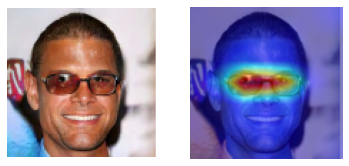 I want to get an attention score for eyeglasses and corresponding pixels. For Clip Explianblity they achieve this functionality with these code snippets,
    image_attn_blocks = list(dict(model.visual.transformer.resblocks.named_children()).values())

    num_tokens = image_attn_blocks[0].attn_probs.shape[-1]
    R = torch.eye(num_tokens, num_tokens, dtype=image_attn_blocks[0].attn_probs.dtype).to(device)
    R = R.unsqueeze(0).expand(batch_size, num_tokens, num_tokens)
    for i, blk in enumerate(image_attn_blocks):
        if i < start_layer:
          continue
        grad = torch.autograd.grad(one_hot, [blk.attn_probs], retain_graph=True)[0].detach()
        cam = blk.attn_probs.detach()
        cam = cam.reshape(-1, cam.shape[-1], cam.shape[-1])
        grad = grad.reshape(-1, grad.shape[-1], grad.shape[-1])
        cam = grad * cam
        cam = cam.reshape(batch_size, -1, cam.shape[-1], cam.shape[-1])
        cam = cam.clamp(min=0).mean(dim=1)
        R = R + torch.bmm(cam, R)
    image_relevance = R[:, 0, 1:]
I will look at your model's attribute to see if is there a way to implement this functionality meanwhile any hint would be a great help.
Thanks again.
Good. You can check the code here https://github.com/OFA-Sys/OFA/blob/main/models/ofa/unify_multihead_attention.py, and you can find the second output is the attention weight (as in line 403). I tried with your notebook, and you can try this to find out the modules:
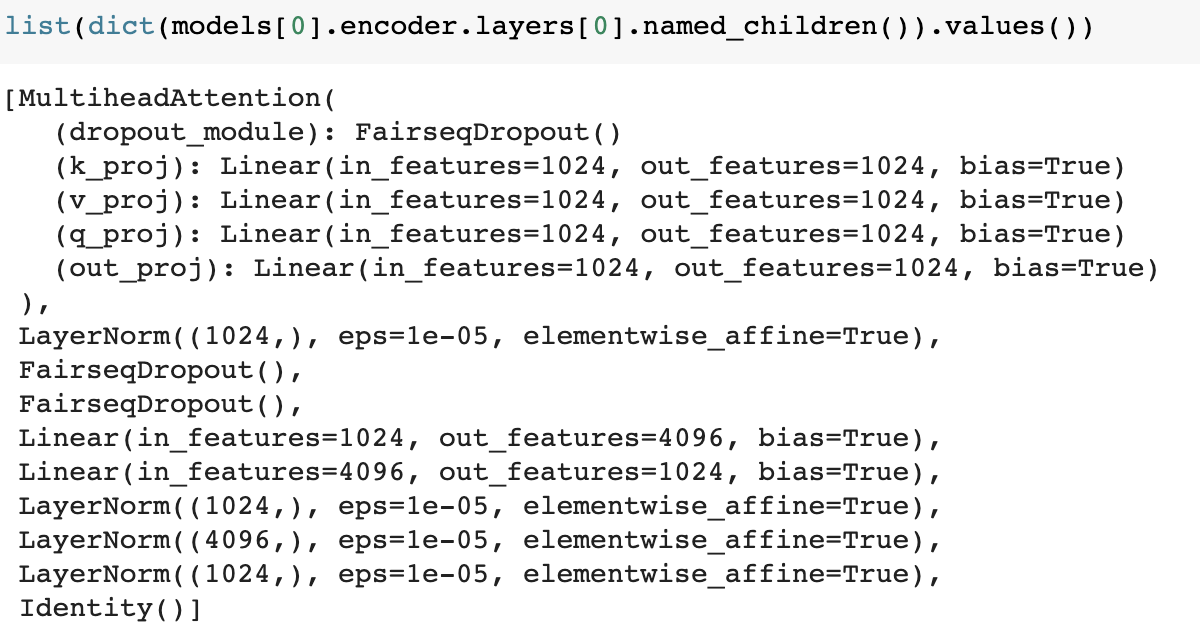 If you would like to extract the attention weights, you can choose to modify our code to get attention weights out (you see, in our code, though the attention module produces weights, yet it is actually not useful at least for us. Thus we did not retrieve the attention weights at every layer) in the forward function of the encoder (also you can check the forward function of transformer layer in
 unify_transformer_layer.py). It might be a bit tedious, but if you don't want to modify the code, you'd better follow the code of forward for TransformerEncoder, and get the outputs of each step with the corresponding modules. I don't know if I have made things clear enough.
Thank you @JustinLin610. I followed your advice and inserted those properties into your code to draw the model's attention, however it appears that I made a mistake with the associated text and images.
For instance, when I ran my code on the preceding image, the results were poor.
 You can see I could not visualize attention at all.
I'll look through your code to see how I can connect the input text and the photos. By the way, if you have any suggestions it would be a great help. I believe the logit function I created to determine the logit of picture and text embedding is the cause of the issue.
def get_logit(image_features, text_features):
  # normalized features
  image_features = image_features / image_features.norm(dim=-1, keepdim=True)
  text_features = text_features / text_features.norm(dim=-1, keepdim=True)

  # cosine similarity as logits
  logit_scale = nn.Parameter(torch.ones([]) * np.log(1 / 0.07))
  logit_scale = logit_scale.exp()

  logits_per_image = logit_scale * image_features @ text_features.t()
  logits_per_text = logit_scale * text_features @ image_features.t()

  # shape = [global_batch_size, global_batch_size]
  return logits_per_image, logits_per_text
I think I may borrow some ideas from your code in OFA-Visual_Grounding. What do you think? Once I am get freed from another project, I will clean up my codes and start work on this problem again. By the way, you can find the most recent version code here!
Sorry for missing again... Great! I'll look into your code once I have some free time and see if I can give you some help. Sure, you can learn about the code for visual grounding.
Hi @AI-EnabledSoftwareEngineering-AISE , I am also considering visualizing the attention maps of OFA models. Have you fixed the problem? It would be extremely helpful if you could grant access to your code base. Thanks!
