

 OData
OData
Why does $select cause the query to contain [Name] as fixed value column?
I have the EnableSensitiveDataLogging option enabled for my DbContext so I can inspect the query generated by OData.
public partial class MyDBContext : DbContext {
    protected override void OnConfiguring(DbContextOptionsBuilder optionsBuilder) {
        optionsBuilder.EnableSensitiveDataLogging();
    }
}
When using OData v7.5.12, I notice that if $select option is applied, the translated sql query would contain [ModelID] and [Name] as fixed value columns, where [Name] column is just the name of the selected model property.
Reproduce steps
For example, If I have the following model and controller:
// Entity Model for User Department
public partial class WebDept
{
    public string DeptID { get; set; }
    public string DeptName { get; set; }
    public string DeptStatus { get; set; }
    public string DeptManagerUser { get; set; }
}

// Controller
[HttpGet("GetWebDept")]
[EnableQuery]
public ActionResult<IQueryable> GetWebDepts() {
    var data = _sysService.GetWebDepts();
    return Ok(data);
}
When I try to query without the$select option,
GET https://localhost:5001/GetWebDept
the translated sql query would look normal:
SELECT [w].[DeptID], [w].[DeptManagerUser], [w].[DeptName], [w].[DeptStatus]
FROM [WebDept] AS [w]
However, if I try to refine my select result by using the $select option,
GET https://localhost:5001/GetWebDept?$select=DeptID,DeptName
the translated would include multiple fixed value columns, [ModelID] and [Name]:
Executed DbCommand (6ms) [Parameters=[@__TypedProperty_0='5f7b4c7d-84b2-4567-8544-36d4e2049aae' (Size = 4000)], CommandType='Text', CommandTimeout='30']
SELECT @__TypedProperty_0 AS [ModelID], N'DeptID' AS [Name], [w].[DeptID] AS [Value], N'DeptName' AS [Name], [w].[DeptName] AS [Value]
FROM [WebDept] AS [w]
My Question:
This might be just my naive speculation, but isn't the inclusion of multiple fixed value columns wasteful since it would cause more data needed to be sent from sql to backend app?
For our app, we are currently using $select to select as many as 10+ fields for some controllers, which means the translated query would contains 10+ such [Name] columns.
Is there any way to circumvent the wasteful inclusion of fixed-value columns, namely [ModelID] and [Name]? Or is this something that I really shouldn't worry about since sql has some behind-the-scene optimized method to transfer fixed column value to its clients?
Assemblies affected
Microsoft.AspNetCore.OData v7.5.12
<Project Sdk="Microsoft.NET.Sdk.Web">
  <PropertyGroup>
    <TargetFramework>net5.0</TargetFramework>
  </PropertyGroup>

  <ItemGroup>
    <PackageReference Include="Microsoft.AspNetCore.OData" Version="7.5.12" />
    <PackageReference Include="Microsoft.EntityFrameworkCore.Design" Version="5.0.1">
      <PrivateAssets>all</PrivateAssets>
      <IncludeAssets>runtime; build; native; contentfiles; analyzers; buildtransitive</IncludeAssets>
    </PackageReference>
    <PackageReference Include="Microsoft.EntityFrameworkCore.SqlServer" Version="5.0.1" />
    <PackageReference Include="Microsoft.EntityFrameworkCore.Tools" Version="5.0.1">
      <PrivateAssets>all</PrivateAssets>
      <IncludeAssets>runtime; build; native; contentfiles; analyzers; buildtransitive</IncludeAssets>
    </PackageReference>
    <PackageReference Include="TimeZoneConverter" Version="3.5.0" />
  </ItemGroup>
</Project>
Expected result
Ideally, when $select option is applied, I assume the translated query should simply select the specified columns:
// GET https://localhost:5001/GetWebDept?$select=DeptID,DeptName
SELECT [w].[DeptID], [w].[DeptName]
FROM [WebDept] AS [w]
Actual result
Instead, the translated query would select multiple fixed value columns, which seems wasteful:
// GET https://localhost:5001/GetWebDept?$select=DeptID,DeptName
Executed DbCommand (6ms) [Parameters=[@__TypedProperty_0='5f7b4c7d-84b2-4567-8544-36d4e2049aae' (Size = 4000)]]
SELECT @__TypedProperty_0 AS [ModelID], N'DeptID' AS [Name], [w].[DeptID] AS [Value], N'DeptName' AS [Name], [w].[DeptName] AS [Value]
FROM [WebDept] AS [w]

@ccyen8358
I pinged with EF Core team to understand the perf, here's the comments:
It is a parameter so it will be passed from client to server and back.

It wouldn't affect perf on the server-side for query execution.

Though depending on its size it will affect perf for the data transfer between client and server. e.g. if the parameter is a large blob then the query will take much longer rather than not sending the parameter to the server in the first place.

Other constants are in a similar boat (Name columns), though since they are constants, their size is already determined and won't be large compared to the size of the result set to ignore it

@xuzhg
Hi, thank you for the response.
Regarding the EF Core team comments
It is a parameter so it will be passed from client to server and back.
It wouldn't affect perf on the server-side for query execution.
Though depending on its size it will affect perf for the data transfer between client and server. e.g. if the parameter is a large blob then the query will take much longer rather than not sending the parameter to the server in the first place.
Other constants are in a similar boat (Name columns), though since they are constants, their size is already determined and won't be large compared to the size of the result set to ignore it
I have the following questions:
- What does it mean "the parameter is a large blob"? Does the "large blob" here refers to the "blob" column type in sql server?
- What exactly does the "parameter" here refer to? At first I thought it refers to the [Name] column but then it doesn't make sense that [Name] column could be "a large blob".
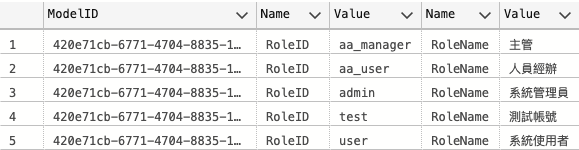
- Why is the size of the [Name] constants not considered large? Take the following example of selecting role id and role name from my UserRole table:
// GET https://localhost:5001/GetWebRoles?$select=RoleID,RoleName
Executed DbCommand (6ms) [Parameters=[@__TypedProperty_0='420e71cb-6771-4704-8835-14724d3c1907' (Size = 4000)], CommandType='Text', CommandTimeout='30']
SELECT @__TypedProperty_0 AS [ModelID], N'RoleID' AS [Name], [w].[RoleID] AS [Value], N'RoleName' AS [Name], [w].[RoleName] AS [Value]
FROM [WebRole] AS [w]
From the below screenshot you could see that the two [Name] constants along (not including [ModelID] constant) are taking up almost half of the size of the result set. Can I circumvent this situation or is this the fundemental design nature of the $select option?
@ccyen8358 It's by design. ModelID allows us to reference to the correct IEdmModel
