

 OCA
OCA
Can't use fontawesome icons in reports
I'm can't use fontawesome icons in PDF/HTML reports.
Module
base_fontawesome
Describe the bug
I installed base fontawesome module, but when I try to add e.g. <i class="fa-solid fa-phone"> to a QWeb view, I get 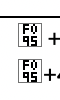
To Reproduce
Affected versions: 15.0.5.15.4
Steps to reproduce the behavior:
- Install module
- Add
<i class="fa-solid fa-phone">to e.g. the main document header/footer - Print a report and note the unknown symbol placeholder:
Expected behavior I expect to see the FA phone icon: https://fontawesome.com/icons/phone?s=solid&f=classic
Additional context

Most interestingly, it works in the PDF version, but not in HTML. For quick turnaround while editing, I set the action of the report I'm working on from PDF to HTML, so I can just refresh instead of having to use the print menu. The PDF behaves just fine, only the HTML report is broken.
There hasn't been any activity on this issue in the past 6 months, so it has been marked as stale and it will be closed automatically if no further activity occurs in the next 30 days. If you want this issue to never become stale, please ask a PSC member to apply the "no stale" label.
![github-actions[bot] avatar](https://avatars.githubusercontent.com/in/15368?v=4 "Published by a pub.dev verified publisher")
I have a similar problem, but in my case it works in the html but not in the PDF. Does anyone know how to fix this?

This is also the case for me on V17 I'm guessing the assets that need loaded onto the report is the issue.
