
ruTorrent
 ruTorrent copied to clipboard
 Novik
Novik
Err: Icons are showed wrong
Please complete the following tasks.
- [X] Web browser cache cleared
- [X] Link provided to install script if applicable
- [X] Web browser, ruTorrent, PHP and OS version provided
Tell us about your environment
Web Browser: Firefox ruTorrent: v4.0-beta.1 OR Master: fc9d1f0 PHP: PHP 7.4.3 OS: Ubuntu 20.04.3 LTS
Tell us how you installed ruTorrent
Swizzin
Describe the bug
https://i.imgur.com/nlPJ2k3.png
Steps to reproduce
Perform clean install
Expected behavior
No response
Additional context
No response

Hi @hassonipulus , I would strongly recommend upgrading to v4.0-beta.2.
Please let me know if this resolves your problem. This version is more stable and bug free.

Hi @hassonipulus , I would strongly recommend upgrading to v4.0-beta.2.
Please let me know if this resolves your problem. This version is more stable and bug free.
Unfortunately it still occurs
Hi @hassonipulus , I would strongly recommend upgrading to v4.0-beta.2. Please let me know if this resolves your problem. This version is more stable and bug free.
Unfortunately it still occurs
Did you clear your web browser cache after upgrading? And refresh the page? Have you tried an alternate theme?
Yes, only reverting to 3.10 worked
-------- Original Message -------- On 4 May 2022, 19:55, stickz wrote:
Hi @.***(https://github.com/hassonipulus) , I would strongly recommend upgrading to v4.0-beta.2. Please let me know if this resolves your problem. This version is more stable and bug free.
Unfortunately it still occurs
Did you clear your web browser cache after upgrading? And refresh the page? Have you tried an alternate theme?
— Reply to this email directly, view it on GitHub, or unsubscribe. You are receiving this because you were mentioned.Message ID: @.***>
Yes, only reverting to 3.10 worked
Okay, I believe the problem is the problem is the swizzin install script. I will spin up a cloud server right now and test it.
@hassonipulus I assume you are using v4.0-beta.2 and not v4.0-beta.1 since this looks like the theme you are using club-QuickBox is not updated for v4.0-beta.2 and thus is broken. The theme maintainer would need to update their theme. I recommend using the MaterialDesign theme.

I use the standart theme, still occured
-------- Original Message -------- On 4 May 2022, 20:40, TrimmingFool wrote:
@.***(https://github.com/hassonipulus) I assume you are using v4.0-beta.2 and not v4.0-beta.1 since this looks like the theme you are using club-QuickBox is not updated for v4.0-beta.2 and thus is broken. The theme maintainer would need to update their theme. I recommend using the MaterialDesign theme.
— Reply to this email directly, view it on GitHub, or unsubscribe. You are receiving this because you were mentioned.Message ID: @.***>
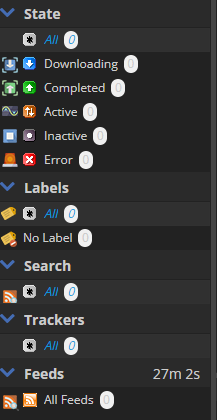
@hassonipulus This is what I got from using the swizzin on Ubuntu 20.04.4LTS. Is there anything you did differently to setup ruTorrent? As you can see my screenshot is different from yours because it's using v4.0-beta.2
bash <(curl -sL git.io/swizzin) && . ~/.bashrc
box install rtorrent (source 0.9.8)
box install nginx
box install rutorrent
https://i.imgur.com/A55lEAE.png This is the result for me
I did some more testing. This is caused by not clearing your web browser cache properly when upgrading.
I strongly recommend using Google Chrome with the following extension. All you have to do is left click on the button. https://chrome.google.com/webstore/detail/clear-cache/cppjkneekbjaeellbfkmgnhonkkjfpdn
I will try it then, same result on mobile.
-------- Original Message -------- On 5 May 2022, 19:38, stickz wrote:
https://i.imgur.com/A55lEAE.png This is the result for me
I did some more testing. This is caused by not clearing your web browser cache properly when upgrading.
I strongly recommend using Google Chrome with the following extension. All you have to do is left click on the button. https://chrome.google.com/webstore/detail/clear-cache/cppjkneekbjaeellbfkmgnhonkkjfpdn
— Reply to this email directly, view it on GitHub, or unsubscribe. You are receiving this because you were mentioned.Message ID: @.***>
This issue has been automatically marked as stale because it has not had recent activity. It will be closed if no further activity occurs. Thank you for your contributions.
![stale[bot] avatar](https://avatars.githubusercontent.com/in/1724?v=4 "Published by a pub.dev verified publisher")