

 NomicFoundation
hardhat-foundry plugin raises "Couldn't run forge"
Version of Hardhat
2.13.0
What happened?
vscode shift+click is broken when I try to work with this plugin when updating a fresh hardhat repo to a hybrid hardhat-foundry one.
Follow the steps provided below.
Then :
- vscode raises this :
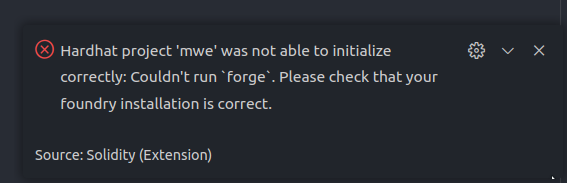
- I can't shift+click on the openzeppelin import
note that forge is installed and my .bashrc contains export PATH="$PATH:/home/fabien/.foundry/bin"
I'm not a professsional js developer but I've found a dirty fix for this : in foundry.js / ts, I've changed this
function getForgeConfig() {
    return JSON.parse(runCmdSync("forge config --json"));
}
exports.getForgeConfig = getForgeConfig;
async function getRemappings() {
    // Return remappings if they were already loaded
    if (cachedRemappings !== undefined) {
        return cachedRemappings;
    }
    // Get remappings from foundry
    const remappingsTxt = await runCmd("forge remappings");
to this : (Yeah I hardcoded the fullpath)
function getForgeConfig() {
    return JSON.parse(runCmdSync("/home/fabien/.foundry/bin/forge config --json"));
}
exports.getForgeConfig = getForgeConfig;
async function getRemappings() {
    // Return remappings if they were already loaded
    if (cachedRemappings !== undefined) {
        return cachedRemappings;
    }
    // Get remappings from foundry
    const remappingsTxt = await runCmd("/home/fabien/.foundry/bin/forge remappings");
Then everything's fine :
- no more error raised in vscode when opening lock.sol
- I can shift click the openzeppelin import in lock.sol
I'm pretty sure this can help you to solve this more elegantly.
Thanks again for your great work guys !
Minimal reproduction steps
- Create a new hardhat js project.
- npm install --save-dev hardhat-foundry
- add the require... in hardhat config
- don't forget to type git init (your forgot it in the doc ! see this
- npx hardhat init-foundry
- install the hardhat vscode extension
- create a solidity in contracts using some dependencies (and install them ofc) This step is optional it's just to show that shiftclick on import is broken. for example :
// SPDX-License-Identifier: UNLICENSED
pragma solidity ^0.8.9;
import "@openzeppelin/contracts/token/ERC20/ERC20.sol";

contract Lock is ERC20 {
    uint public unlockTime;
    address payable public owner;

    event Withdrawal(uint amount, uint when);

    constructor(uint _unlockTime) payable ERC20("Lock", "LCK") {
        (...)
Search terms
forge hardhat-foundry path runCmdSync

@Fabien-Morrow, if you open vscode from the within your bash command line at the root of your repo:
code .
Do you still get the Couldn't run forge error?

No you're right, if I run code . from the terminal in my repo everything's fine !
I'm on mint xfce, using Thunar as file manager, I open vscode by rightclicking on my repo project and clicking "open is vscode". The Thunar custom action triggered is code %f where %f works as followed
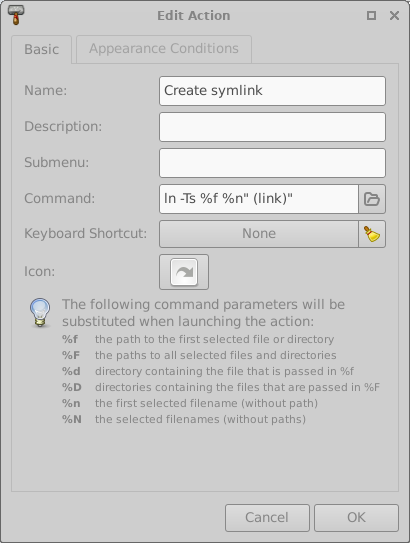
So it's a very specific platform depend problem finally... Hope this will help you to find an elegant issue to this, using my right click is quite convenient :)
Hey @Fabien-Morrow, I pushed a tentative fix in a tagged version. Could you give it a try?
Run npm i @nomicfoundation/hardhat-foundry@dev and try both ways of opening your project. It should ideally work with both.

Sorry it changes nothing :
- rightclicking open in vscode still fail
- running code . in the terminal still works :)
Hey @Fabien-Morrow, there was a problem in my code. I pushed a new version, can you give it another try? Just run npm i @nomicfoundation/hardhat-foundry@dev again to get the updated version.
I also added some temporary debugging logs so, if this doesn't work, please do this in VSCode:
- Go to View -> Output to show the output pane.
- There is a dropbox at the top right of the pane. Select "Solidity" in it.
- Copy the logs that start with
[Issue 449]and share them here.
it works !! right click on the repo works, right click inside the repo works too, code . works, well everythings fine.
"forge" works at the installation but not in vscode, where only the other path works. It seems a quite weird from my pov, I paste you both logs :)
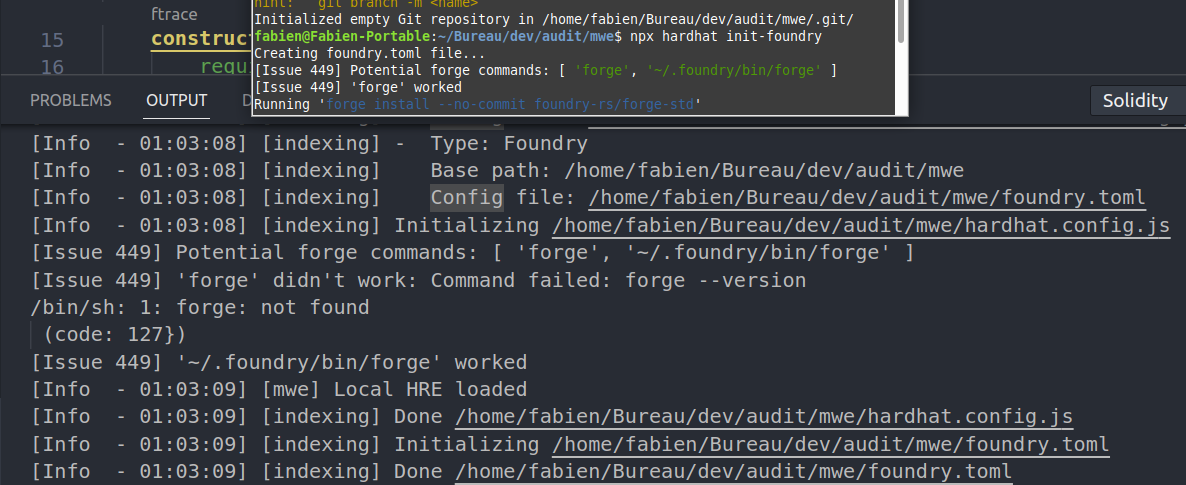
Thanks @Fabien-Morrow! I don't know why it works in one scenario but not in the other. Probably something related to how $PATH is set.
I'll work on a proper PR for this so we can include this fix in latest.