

 NickeManarin
Multi monitor recording problem
Hi, I have multiple monitors connected and always was recording on primary screen and was just fine. However, today I wanted to record on secondary monitor and recorder is writing wrong screen images, also after pushing record screen the borders getting shifted to primary screen and just disappearing. After stop using keyboard F8 the image is recorded for the wrong screen and wrong location. Setting up (aka move) on secondary screen is OK. Fun starts after request to record. best regards, Tomas

Hi, are you using the latest version? v2.30
Can you show me how your screens are positioned? (take a screenshot of the Windows Display settings)

HI,
Before retesting it I did an update to the latest version. Was same result.
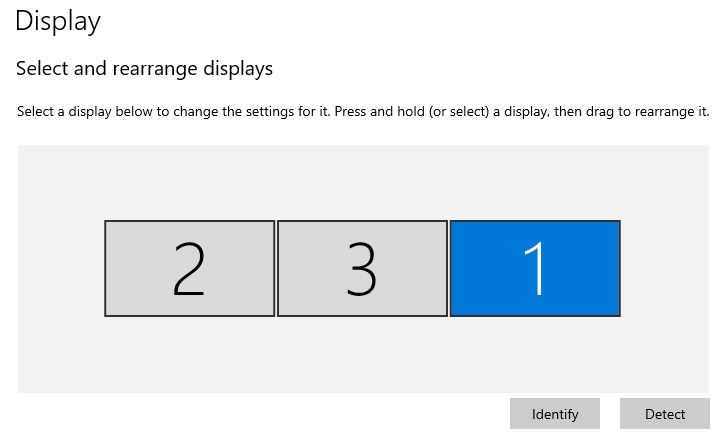
Screen No 1: is latop's screen. Tried to record and it is looking fine. Screen No 3: Is external DisplayPort connected screen, set as primary. Recorder is working fine. Screen No 2: another external DisplayPort screen, which refusing to record correctly External monitors are connected via thunderbolt connection.
I only have two monitors in here, so I can't test exactly with the same configuration.
I tested with my second monitor set as primary, while being at the left or at the right.

It recorded the correct position both times, using both the DirectX and Bitblt modes.
Is there any way I could produce the log files of position via appliation? I've created simple C# application and got this cursor positions: MessageBox.Show(Cursor.Position.ToString());
Top left corner positions for screens:
- Screen 1: X=1920, Y=0
- Screen 2: X=-1920, Y=0
- Screen 3: X=0, Y=0 (primary)
My guess is that app not dealing with negative coordinates. Try making primary screen on right hand side, this should make your secondary screen with negative coordinates. Maybe this will reproduce this problem.
You can get the source code and add logs in the RegionSelection class, to watch its position.
Also a video would be helpful too (you can configure to let multiple instances of the app run and use the full screen recorder option, it should still work).
Interesting, I've download the source code and compiled the application. I did not observed same problem as I described earlier using compiled application. All recording works fine and it does not jump. Not sure if there is any change affecting this behavior. Additionally, mentioned RegionSelection is xaml code which is never got triggered. So I did not looked deeper into place.
I have another similar problem. I got blank images when recording on the secondary screen (the size is correct).
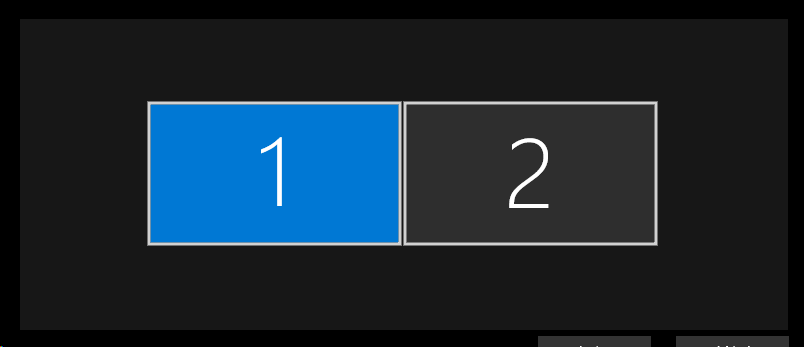

I'm using a laptop and my secondary monitor is a VGA monitor. So I connect to it via an HDMI-to-VGA adaptor. I'm not sure if it could cause this issue.

@gps7 Should be the same, compiled or not. What can happen is that you could be running in Debug mode, which usually tends to be slower.
@gps7 Should be the same, compiled or not. What can happen is that you could be running in Debug mode, which usually tends to be slower.
Strange, after reboot of the computer even standard program works fine as expected. So for me problem gone.
@NickeManarin , I was using version 2.33. Today I just remove all the config files and download the latest version 2.33.1 to make a clean installation. it works fine now. 👌