
nginx-proxy-manager
 nginx-proxy-manager copied to clipboard
 NginxProxyManager
Custom CORS
Is your feature request related to a problem? Please describe. We all know CORS is a huge pain to set up. At least if you want to do it right and don't already have a working snippet to paste in. I love this Proxy Manager, because it makes many things much more easy, but it makes CORS even worse. I have been able to create a proxy host, that can handle preflight cors requests with a custom location (like in #202), but i still think there should be a way to set CORS with the GUI. A GUI Option was mentioned in #202, but since that wasn't the original topic of the issue i created this issue dedicated to a gui solution.
Describe the solution you'd like
A GUI for CORS in the Advanced Tab, to control CORS like this:
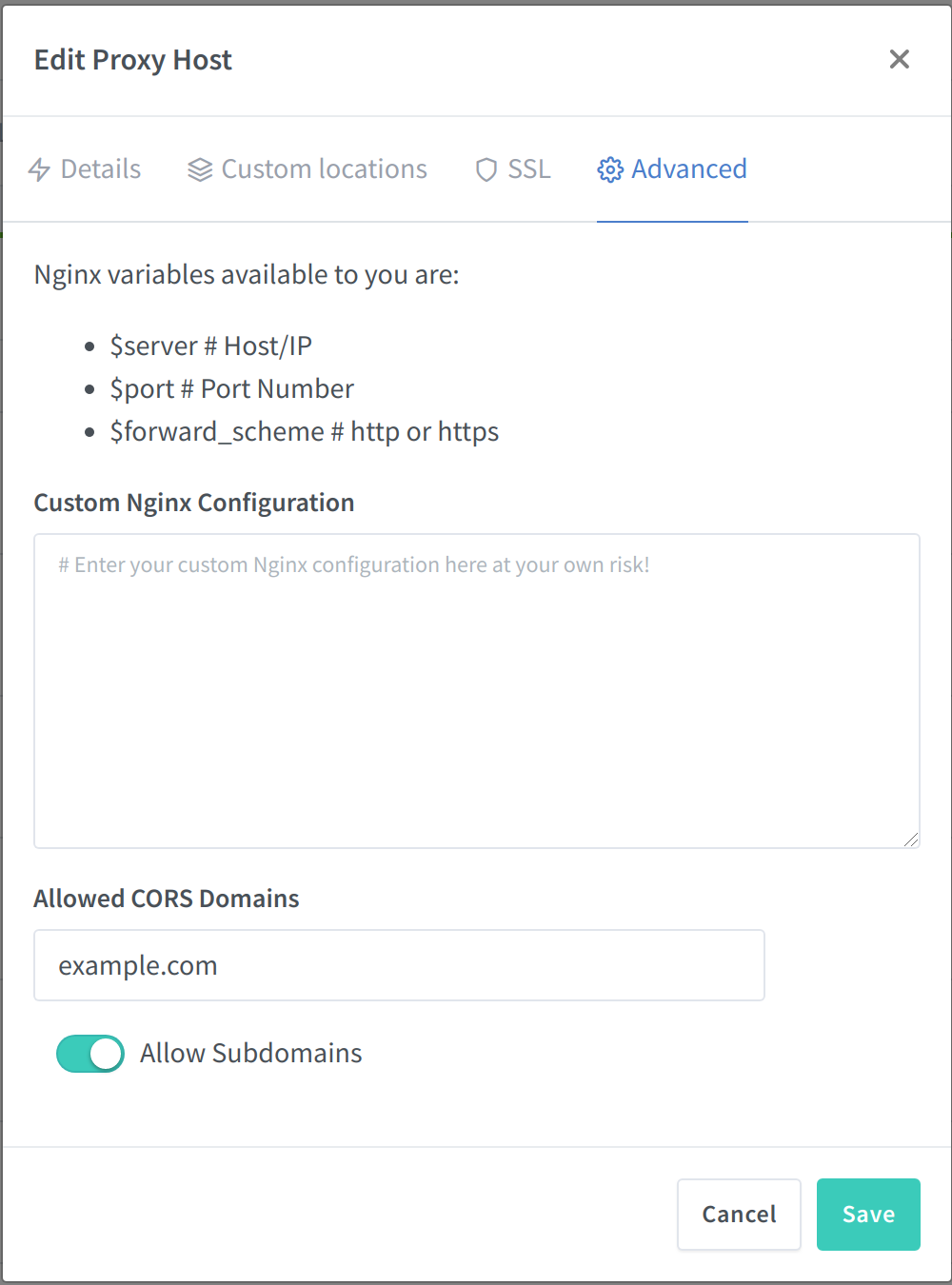


actualy how change Access-Control-Allow-Origin ?
Thats not easy in my opinion, but take a look here #202

@jc21 Any news on this? I think it could be a great small addition to the next release if you have the time.


Just want to share my working config for CORS as I spent quite a few hours to figure it out. I use the following on the advanced tab of the proxy host settings:
location ~ ^/THE-PATH-TO-PROTECT {
	more_set_headers 'Access-Control-Allow-Origin: https://YOUR-REQUEST-DOMAIN';
	more_set_headers 'Access-Control-Allow-Headers: Authorization';
	more_set_headers 'Access-Control-Allow-Credentials: true';
	more_set_headers 'Access-Control-Allow-Methods: GET,POST,OPTIONS,PUT,DELETE,PATCH';
	more_set_headers 'Access-Control-Allow-Headers: Authorization,Accept,Origin,DNT,X-CustomHeader,Keep-Alive,User-Agent,X-Requested-With,If-Modified-Since,Cache-Control,Content-Type,Content-Range,Range';


    if ($request_method = 'OPTIONS') {
      more_set_headers 'Access-Control-Allow-Origin: https://YOUR-REQUEST-DOMAIN';
      more_set_headers 'Access-Control-Allow-Credentials: true';
      more_set_headers 'Access-Control-Allow-Headers: Authorization,Accept,Origin,DNT,X-CustomHeader,Keep-Alive,User-Agent,X-Requested-With,If-Modified-Since,Cache-Control,Content-Type,Content-Range,Range';
      more_set_headers 'Access-Control-Allow-Methods: GET,POST,OPTIONS,PUT,DELETE,PATCH';
      more_set_headers 'Access-Control-Max-Age: 1728000';
      more_set_headers 'Content-Type: text/plain charset=UTF-8';
      more_set_headers 'Content-Length: 0';
      return 204;
    }

    include conf.d/include/proxy.conf;
}
Edit Nov/22: For some reason add_header stopped working a few weeks ago, more_set_headers did the trick.

@rallisf1 Can you clarify more what location ~ ^/THE-PATH-TO-PROTECT { means?
Example: If my hosted domain is www.yahoo.com and I want to ensure that 192.168.x.x is allowed via CORS, I know I would replace YOUR-REQUEST-DOMAIN with www.yahoo.com, but does the 192.168.x.x go anywhere?

@Tharic99 see the docs for location syntax. THE-PATH-TO-PROTECT is used if you want to use CORS just for a subfolder, the hosted domain is inherited from the server block.
YOUR-REQUEST-DOMAIN can be your IP address as long as that is used for the request. Check the error message in your browser console and use exactly the address that fails CORS. Also note that you can only allow 1 address (or IP) by default and cannot use wildcards. See here for a workaround.

Issue is now considered stale. If you want to keep it open, please comment :+1:
![github-actions[bot] avatar](https://avatars.githubusercontent.com/in/15368?v=4 "Published by a pub.dev verified publisher")
