

 NginxProxyManager
Question: How to configure frontend, backend, cdn
Hello
I have been dealing with mapping my previous nginx configuration to NPM
current NPM config:
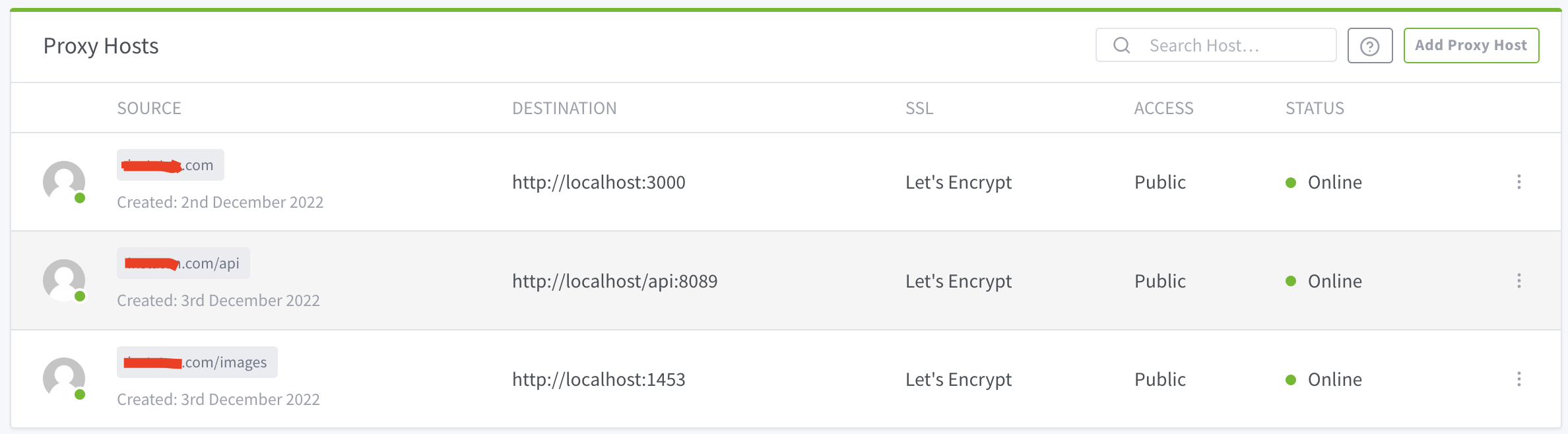
Whats wrong with my configuration?
previous nginx config:
server`
{
rewrite_log on;

server_name domain.com www.domain.com;

root /var/www/domain.com;
index index.html;

location /
{

	# try_files $uri $uri/ =404;
	try_files $uri $uri/ /index.html;
}

location /api/
{

	proxy_read_timeout 1800;
	proxy_connect_timeout 1800;
	proxy_send_timeout 1800;
	send_timeout 1800;
	proxy_pass http://127.0.0.1:8089/api/;
}

location /images/
{

	proxy_read_timeout 1800;
	proxy_connect_timeout 1800;
	proxy_send_timeout 1800;
	send_timeout 1800;
	proxy_pass http://127.0.0.1:1453/;
}

# rewrite ^/images/(.*)$ http://localhost:1453/$1 redirect;

listen 443 ssl; # managed by Certbot
ssl_certificate /etc/letsencrypt/live/domain.com/fullchain.pem; # managed by Certbot
ssl_certificate_key /etc/letsencrypt/live/domain.com/privkey.pem; # managed by Certbot
include /etc/letsencrypt/options-ssl-nginx.conf; # managed by Certbot
ssl_dhparam /etc/letsencrypt/ssl-dhparams.pem; # managed by Certbot
}`
when i open domain.com over browser, this is the result
{"status":"OK","version":{"major":2,"minor":9,"revision":19}}
domain.com:3000/ > react app domain.com:8089/api > backend app domain.com:1453/images > ftp path


I think you should not define three independent proxy hosts. You might rather take your first proxy host, go to edit, and then insert a custom location for /api and /images. You then can paste any additional configuration when you hit the gear icon on the right side.

When you check your data directory from you container (for example ./data/nginx/proxy_host), you can control the conf file NginxProxyManager creates and tune it until it matches your previoius configuration.

Issue is now considered stale. If you want to keep it open, please comment :+1:
![github-actions[bot] avatar](https://avatars.githubusercontent.com/in/15368?v=4 "Published by a pub.dev verified publisher")