

 NginxProxyManager
SSL settings are not applied
Describe the bug SSL settings are not applied when creating a new proxy. The cert is indeed generated and HTTPS is supported, however, settings such as Force SSL do not take effect. I found out when I added a new proxy and tried accessing the site. I was not redirected to HTTPS.
I verified I had not forgotten to check toggle the buttons by creating a new site and verified the same issue occurred. I also checked the id.conf file and things such as including the force SSL file were missing.
Opening the Edit dialog and toggling the options gets the desired results.
The version of NPM I use is 2.0.13
This is the conf file when I checked Force SSL, HTTP/2 Support and HSTS Enabled.
server {
  set $forward_scheme http;
  set $server         "127.0.0.1";
  set $port           81;

  listen 80;
listen 443 ssl http2;

  server_name my.test.domain.com;


  # Let's Encrypt SSL
  include conf.d/include/letsencrypt-acme-challenge.conf;
  include conf.d/include/ssl-ciphers.conf;
  ssl_certificate /etc/letsencrypt/live/npm-4/fullchain.pem;
  ssl_certificate_key /etc/letsencrypt/live/npm-4/privkey.pem;

# Asset Caching
  include conf.d/include/assets.conf;

  # Block Exploits
  include conf.d/include/block-exploits.conf;

  access_log /data/logs/proxy_host-4.log proxy;

  location / {
    # Proxy!
    include conf.d/include/proxy.conf;
  }
}
To Reproduce Steps to reproduce the behavior:
- Go to 'Proxy Hosts'
- Click on 'Add proxy host'
- Fill out the site information
- Go to 'SSL' tab
- Toggle on Force SSL, HTTP/2 Support, HSTS Enabled
Expected behavior The settings will take effect and the site config will reflect the settings.
Screenshots
When I select all those and then go edit the host, the certificate is selected but all the options I checked previously are unchecked
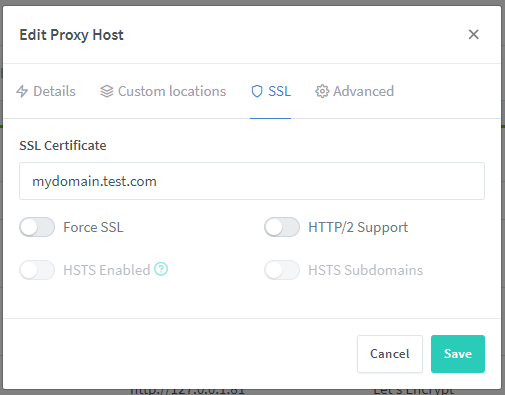


Got the same problem over here. Actually the forwarding works if I specify a path. For example http://domain/path. Without path (http://domain) it still does not work.
Im using NPM version 2.6.2

Yes that was my other problem, Firefox's web cache did not play nice with the upgrade and once I cleared it the rest of Web Interface would load.
On Wed, Nov 11, 2020 at 10:34 AM Guillaume Fournier < [email protected]> wrote:
Ok wait. After restarting the Browser everything work fine now.
— You are receiving this because you are subscribed to this thread. Reply to this email directly, view it on GitHub https://github.com/jc21/nginx-proxy-manager/issues/184#issuecomment-725589656, or unsubscribe https://github.com/notifications/unsubscribe-auth/AA2OJUCCEIBMTVV7ZGKIH5LSPLKJ5ANCNFSM4IJ7XGOA .

I am also having this issue on NPM 2.3.1
My settings:

But I can still consistently and on different browsers connect via http. It does not enforce https.

I am experiencing this on 2.7.1. Https is not enforced even with the switch enabled.

Having the same issue on v2.7.3, Force SSL doesn't actually enforce a redirect. Reset your entire browser cache/cookies/etc and try accessing via http directly, it will work even though it shouldn't. If you browser is aware of the https also working it can redirect you without asking (at least Chrome seemingly does), but it's the browser doing the redirect, not NPM. Can be confirmed by resetting the browser.


is there an update or workaround on this ?
My workaround was migrating to Caddy.


Still not fixed, but can be circumvent:
- Create a new proxy host/redirection
- Edit the proxy: enable Force SSL
- Clear browser cache/data (or just open an incognito/private session)
It should be redirected to HTTPS now.
I think this is the same issue with https://github.com/NginxProxyManager/nginx-proxy-manager/issues/516

is there any news in 2023 ?
i still have the same issue :( will have to disable Port 80


Issue is now considered stale. If you want to keep it open, please comment :+1:
![github-actions[bot] avatar](https://avatars.githubusercontent.com/in/15368?v=4 "Published by a pub.dev verified publisher")
Issue is now considered stale. If you want to keep it open, please comment :+1:
brah.

Issue is now considered stale. If you want to keep it open, please comment :+1:

