

 NginxProxyManager
Upgraded to v2.9.4 - frontend no longer usable
Checklist
- Have you pulled and found the error with
jc21/nginx-proxy-manager:latestdocker image?- Yes
- Are you sure you're not using someone else's docker image?
- Yes
- Have you searched for similar issues (both open and closed)?
- Yes
Describe the bug
I am running NPM using docker-compse. where I ran docker-compose pull and then docker-compose up -d
When the app started, I logged into the new version and instead of having the dashboard/proxy hosts I cannot see anything. I check the Chrome console tab and see a bunch of these:
Welcome to Nginx Proxy Manager
main.bundle.js?v=2.9.4:3 You are logged in as Daniel Anner
main.bundle.js?v=2.9.4:1 TypeError: Cannot read property 'extend' of undefined
    at Object.213 (7.bundle.7.js:1)
    at r (main.bundle.js?v=2.9.4:1)
    at Object.181 (7.bundle.7.js:1)
    at r (main.bundle.js?v=2.9.4:1)
    at main.bundle.js?v=2.9.4:27
r.oe @ main.bundle.js?v=2.9.4:1
Promise.catch (async)
showNginxProxy @ main.bundle.js?v=2.9.4:27
Ze @ main.bundle.js?v=2.9.4:3
(anonymous) @ main.bundle.js?v=2.9.4:3
(anonymous) @ main.bundle.js?v=2.9.4:3
execute @ main.bundle.js?v=2.9.4:27
(anonymous) @ main.bundle.js?v=2.9.4:27
(anonymous) @ main.bundle.js?v=2.9.4:27
Ct @ main.bundle.js?v=2.9.4:3
loadUrl @ main.bundle.js?v=2.9.4:27
start @ main.bundle.js?v=2.9.4:27
(anonymous) @ main.bundle.js?v=2.9.4:3
m @ main.bundle.js?v=2.9.4:27
f @ main.bundle.js?v=2.9.4:27
d @ main.bundle.js?v=2.9.4:27
o.trigger @ main.bundle.js?v=2.9.4:27
O @ main.bundle.js?v=2.9.4:27
render @ main.bundle.js?v=2.9.4:27
ae @ main.bundle.js?v=2.9.4:27
show @ main.bundle.js?v=2.9.4:27
(anonymous) @ main.bundle.js?v=2.9.4:3
Promise.then (async)
onStart @ main.bundle.js?v=2.9.4:3
O @ main.bundle.js?v=2.9.4:27
start @ main.bundle.js?v=2.9.4:27
(anonymous) @ main.bundle.js?v=2.9.4:293
d @ main.bundle.js?v=2.9.4:27
l @ main.bundle.js?v=2.9.4:27
setTimeout (async)
(anonymous) @ main.bundle.js?v=2.9.4:27
u @ main.bundle.js?v=2.9.4:27
fireWith @ main.bundle.js?v=2.9.4:27
fire @ main.bundle.js?v=2.9.4:27
u @ main.bundle.js?v=2.9.4:27
fireWith @ main.bundle.js?v=2.9.4:27
ready @ main.bundle.js?v=2.9.4:27
V @ main.bundle.js?v=2.9.4:27
7.bundle.7.js:1 Uncaught (in promise) TypeError: Cannot read property 'extend' of undefined
    at Object.213 (7.bundle.7.js:1)
    at r (main.bundle.js?v=2.9.4:1)
    at Object.181 (7.bundle.7.js:1)
    at r (main.bundle.js?v=2.9.4:1)
    at main.bundle.js?v=2.9.4:27
Nginx Proxy Manager Version 2.9.4
Screenshots

Operating System Alpine Linux 3.13.5, Docker 20.10.3, Docker-Compose 1.27.4
Additional context Logs: https://pastebin.com/swz7nvse

I also recreated the images to ensure it was built properly docker-compose up --force-recreate --build -d
That did not fix the issue
Here is my docker-compose.yml
version: '3'
services:
  app:
    image: 'jc21/nginx-proxy-manager:latest'
    ports:
      - '80:80'
      - '81:81'
      - '443:443'
    environment:
      DB_MYSQL_HOST: "db"
      DB_MYSQL_PORT: 3306
      DB_MYSQL_USER: _**REDACTED**_
      DB_MYSQL_PASSWORD: _**REDACTED**_
      DB_MYSQL_NAME: "nginx_proxy_manager"
      DISABLE_IPV6: 'true'
      X_FRAME_OPTIONS: "sameorigin"
    volumes:
      - ./data:/data
      - ./letsencrypt:/etc/letsencrypt
      - ./letsencrypt/logs:/var/log/letsencrypt/
  db:
    image: 'jc21/mariadb-aria:latest'
    environment:
      MYSQL_ROOT_PASSWORD: _**REDACTED**_
      MYSQL_DATABASE: _**REDACTED**_
      MYSQL_USER: _**REDACTED**_
      MYSQL_PASSWORD: _**REDACTED**_
      DISABLE_IPV6: 'true'
      X_FRAME_OPTIONS: "sameorigin"
    volumes:
      - ./data/mysql:/var/lib/mysql
networks:
  default:
    external:
      name: proxynet
Just to ensure that the issue is not related to me being a smacker, I decided to fully shut down the containers, remove all images on the drive (that pertained to NPM), and do a full, fresh install (using the same data of course) and still no dice
Definitely a frontend issue in my opinion but I have no idea why if it is the latest stable release?
I just upgraded from 2.9.0 to 2.9.4 and encountered this briefly, quick browser cache refresh did the trick

Thanks @Nozza-VS unfortunately that isn't the fix for me. I've tried incognito windows and other browsers without success. The same behavior is experienced
I just experienced this as well. Downgrading to 2.8.1 and refreshing browser cache returned it to functionality.

This is not specific to 2.9.4. This issue pops up from time to time with some users. Forcibly clearing your browser cache has been known to fix this and the root cause of the problem is still unknown.
Personally I've never had this happen to me, I pull and run each release on my own production servers and don't encounter a caching problem.
It might be helpful if users would report their browser and version, in case this applies to something non-mainstream.
The UI's index HTML page includes the version as a get param for assets, ie: src="/js/main.bundle.js?v=2.9.4" and this should be enough to cache bust, unless the caching mechanism is ignoring query params on urls (possible with some CDN's..). It could also be possible that the index HTML itself is cached, but then requests one of the JS files from the bundle that is not cached and causes a mismatch. But yeah this is all speculation until I can reproduce this.

I experienced this issue too.
Running Edge Version 91.0.864.70 (Official build) (64-bit)
Tried clearing site data via Developer console. No change. Tested Incognito and there was no problem.
Cleared site data again and restarted Edge, still the same issue.
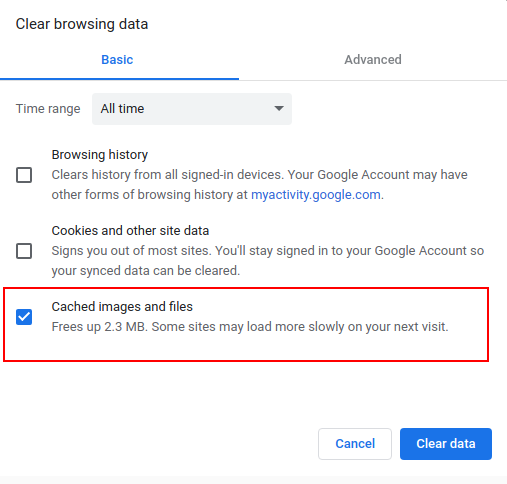
Going into Privacy, search and services > Clear browsing data > Cached images and files This fixed it.

Thanks @TrustyTristan! Going into Firefox settings "Cookies and Site Data" and selecting "Clear Data" with both "Cookies and Site Data" and "Cached Web Content" also resolved this issue for me.
I'm also having this issue. Experienced with NPM v 2.9.4 and 2.9.5 in Chrome 91.0.4472.124. Clearing cached images and files did not resolve, but downgrading to 2.8.1 did.

Clearing cached images and files did trick.
chrome://settings/clearBrowserData


Clearing cache worked for the dashboard , but when editng the host , similar problem happens
main.bundle.js?v=2.9.9:1 TypeError: Cannot read properties of undefined (reading 'extend')
    at Object.234 (11.bundle.11.js:1)
    at r (main.bundle.js?v=2.9.9:1)
    at Object.<anonymous> (11.bundle.11.js:1)
    at Object.182 (11.bundle.11.js:1)
    at r (main.bundle.js?v=2.9.9:1)
    at main.bundle.js?v=2.9.9:27
r.oe @ main.bundle.js?v=2.9.9:1
Promise.catch (async)
showNginxProxyForm @ main.bundle.js?v=2.9.9:27
click @ui.edit @ 7.bundle.7.js:1
dispatch @ main.bundle.js?v=2.9.9:27
p.handle @ main.bundle.js?v=2.9.9:27
11.bundle.11.js:1 Uncaught (in promise) TypeError: Cannot read properties of undefined (reading 'extend')
    at Object.234 (11.bundle.11.js:1)
    at r (main.bundle.js?v=2.9.9:1)
    at Object.<anonymous> (11.bundle.11.js:1)
    at Object.182 (11.bundle.11.js:1)
    at r (main.bundle.js?v=2.9.9:1)
    at main.bundle.js?v=2.9.9:27
234 @ 11.bundle.11.js:1
r @ main.bundle.js?v=2.9.9:1
(anonymous) @ 11.bundle.11.js:1
182 @ 11.bundle.11.js:1
r @ main.bundle.js?v=2.9.9:1
(anonymous) @ main.bundle.js?v=2.9.9:27
Promise.catch (async)
showNginxProxyForm @ main.bundle.js?v=2.9.9:27
click @ui.edit @ 7.bundle.7.js:1
dispatch @ main.bundle.js?v=2.9.9:27
p.handle @ main.bundle.js?v=2.9.9:27
main.bundle.js?v=2.9.9:1 TypeError: n is not a constructor
    at main.bundle.js?v=2.9.9:27
    at main.bundle.js?v=2.9.9:27
r.oe @ main.bundle.js?v=2.9.9:1
Promise.catch (async)
showNginxProxyForm @ main.bundle.js?v=2.9.9:27
click @ui.edit @ 7.bundle.7.js:1
dispatch @ main.bundle.js?v=2.9.9:27
p.handle @ main.bundle.js?v=2.9.9:27
main.bundle.js?v=2.9.9:27 Uncaught (in promise) TypeError: n is not a constructor
    at main.bundle.js?v=2.9.9:27
    at main.bundle.js?v=2.9.9:27
(anonymous) @ main.bundle.js?v=2.9.9:27
(anonymous) @ main.bundle.js?v=2.9.9:27
Promise.catch (async)
showNginxProxyForm @ main.bundle.js?v=2.9.9:27
click @ui.edit @ 7.bundle.7.js:1
dispatch @ main.bundle.js?v=2.9.9:27
p.handle @ main.bundle.js?v=2.9.9:27

Issue is now considered stale. If you want to keep it open, please comment :+1:
![github-actions[bot] avatar](https://avatars.githubusercontent.com/in/15368?v=4 "Published by a pub.dev verified publisher")
I'm still getting this when I click on Add SSL Certificate
Image: jc21/nginx-proxy-manager:latest@sha256:02c15b64d464491d09e6d04959f26689d31aec1e02236a1675c1b85d6942c103

Issue is now considered stale. If you want to keep it open, please comment :+1: