

 NetLogo
Bugfix: Fix inconsistent size of 'view' widget
Hello, here comes another pull request, this time regarding the size of the "view" widget in NetLogo Web.
The problem:
When opening the same NetLogo model, the size of the "view" widget is smaller in NetLogo Web, than it is in the desktop application. This applies only to the "view" widget, the sizes of all other widgets are consistent between both apps.
The reason for the smaller size of the "view" widget in NetLogo Web is it matches the size of the drawing area and does not account for the additional width and height, which is added by the borders in the desktop app. The size of the 'view' widget in NetLogo Web is calculated and updated in widget-controller.coffee#updateWidget, which sets the widget size based on the number of patches and the patch size. The widget size and patch size is also updated when the widget is being resized (see view.coffee#handleResize).
The different sizes of the "view" widget in the desktop and web version can be seen in the image below. The images were created by opening the same test model in both versions of the app. (The test model can be found at https://gist.github.com/daviddostal/68e7b72f5ea836cec73b84c130170806.)
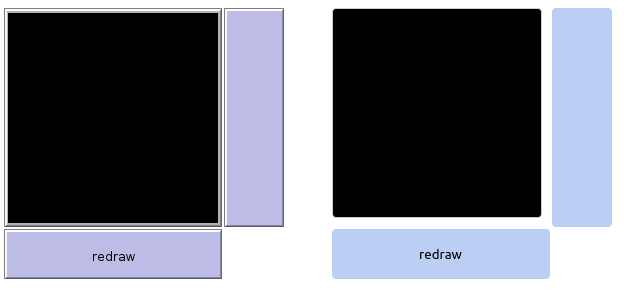
On the left are the widget sizes in the desktop app and on the right the current sizes in NetLogo Web. As you can see, the sizes of buttons are the same in both apps, but the "view" widget is smaller in the desktop app.
Why is this an issue?
The different sizes of the "view" widget can cause 2 problems:
-
When creating a model in the web version and then opening it in the desktop app, the size of the "view" widget is larger and can overlap other nearby widgets or the view area can be partially covered by them.
-
When creating a model in the desktop version where other widgets are aligned with the right or bottom edge of the "view", they will become misaligned when opening the model in NetLogo Web due to the smaller size of the "view". This isn't (IMO) that big of an issue compared to overlapping widgets, but users expect widgets of the same model to have the same dimensions regardless of the app used to open it.
What was changed?
(I assume changing the way desktop NetLogo renders the "view" widget is not an option, because it would break a ton of existing models. Changing NetLogo Web to be consistent with the desktop app seems like a much better choice.)
widget-controller.coffee:
In the updateWidget function, the widget size is now calculated not only from the size of the drawing area (canvas), but now also adds additional inner spacing to match the desktop app.
view.coffee:
A constant VIEW_INNER_SPACING was added, which contains the additional spacing between the edge of the widget and the drawing area/canvas itself.
A computed property viewDims was added, which contains CSS properties for the inner padding of the widget. These styles are then added to the partial representing the "view widget". The padding could be added in multiple ways, but I decided: 1) to do it in JS and not CSS, so the dimensions come only from a single source of truth and 2) to use a computed property for the styles to stay consistent with the way the dims property for widget dimensions is defined (see widget.coffee).
The code in handleResize counts with the inner size of the drawing area, which is why the simplest solution was to subtract the newly added spacing to get the inner canvas size. Some variables were also renamed to make it more clear, that they refer to the size of the drawing area and not the entire widget.
netlogoweb.css:
The styles for the "view" widget container (.netlogo-view-container) were changed to replace the outer border with an outline. This was done, because a border is part of the box-model and would therefore reduce the space available inside the element and move the contents (canvas) by 1px to the right and down.
What is the benefit of these changes?
The proposed changes make the size of the "view" widget consistent between the desktop and web application. This eliminates the possibility of overlapping widgets or inconsistent alignment when opening a model created in the desktop app in NetLogo Web or vice versa.
