
telegram-upload
 telegram-upload copied to clipboard
 Nekmo
Nekmo
Give More control over caption
Use file info in caption e.g.
- --caption "%(path)s"
- --caption "Name: %(short_name)s Size: %(file_size)s"
Probably closes #115 :- caption can be set to path(e.g. 1) to mimic folder structure.

The second option puts "name" in front of the actual name, there is no need for that. Also, the size is already shown in chats, so is redundant.
The first option looks more promising, but it also adds unnecessary things to the filename. For example, this is what I get when choosing the first option
D:\Backup\Power Training Course\Part 1 - The Basics\1. The ABC of Training.mp4
"D:\Backup" should not be in filename, it should look like this
Power Training Course\Part 1 - The Basics\1. The ABC of Training.mp4
So, the first part must be stripped.

The second option puts "name" in front of the actual name, there is no need for that
That was just an example what an user can send from the command line, it will passed to telegram as it is. A user may want to write the file name anywhere in between the captions. It is not implemented in code. Only %(key)s parts are handled by the code.
. Also, the size is already shown in chats, so is redundant.
Okay. Will remove it in final commit.
The first option looks more promising, but it also adds unnecessary things to the filename.
One can send just the file_name, or short_name if one wants, by %(file_name)s . You can check file_info.
        self.file_info = {
            "file_name": self.file_name,
            "path": self.path,
            "short_name": self.short_name,
            "file_size": self.file_size,
        }
For example, this is what I get when choosing the first option D:\Backup\Power Training Course\Part 1 - The Basics\1. The ABC of Training.mp4 "D:\Backup" should not be in filename, it should look like this Power Training Course\Part 1 - The Basics\1. The ABC of Training.mp4 So, the first part must be stripped.
What was your command ?
telegram-upload --caption "%(path)s" "D:\Backup\Power Training Course\Part 1 - The Basics\1. The ABC of Training.mp4" ?
The self.path is the same path you input, how will it know where to split ?
If user wants to only send Power Training Course\Part 1 - The Basics\1. The ABC of Training.mp4
- cd D:\Backup\
telegram-upload --caption "%(path)s" "Power Training Course\Part 1 - The Basics\1. The ABC of Training.mp4"
I understand now, the second option is a custom caption that includes the filename. I have seen that in some channels where filenames are captioned with the channel name. It could be useful for some users.
My command was initially
telegram-upload "D:\Backup" --directories recursive --caption "%(path)s"
but is broken in version 0.5, only works in 0.4. Now I have to use
telegram-upload --directories recursive "D:\Backup\Power Training Course" --caption "%(path)s"
Let say I have 5 Udemy courses in a folder "Backup" and I want to upload them all. I can't run the command for every single video, it will take forever.
"The self.path is the same path you input, how will it know where to split ?"
Good question! I think that the user should cd to the main folder (the folder that contains all the other folders/subfolders and files, Backup folder in our case). Then the script should only take the names of the contained folders/subfolders/files and use them as caption.
It should not use the folder itself from which is run as a caption (Backup name in our example).
Folder1/Subfolder1/Video1 Folder1/Subfolder1/Video2 .... Folder1/Subfolder2/Video1 ... Folder2/Subfolder1/Video1 .... A very useful feature will be to that in reverse, when downloading the script should automatically recreate the folder structure from captions!
Let say I have 5 Udemy courses in a folder "Backup" and I want to upload them all. I can't run the command for every single video, it will take forever. "The self.path is the same path you input, how will it know where to split ?" Good question! I think that the user should cd to the main folder (the folder that contains all the other folders/subfolders and files, Backup folder in our case). Then the script should only take the names of the contained folders/subfolders/files and use them as caption. It should not use the folder itself from which is run as a caption (Backup name in our example).
telegram-upload --directories recursive . --caption "%(path)s"
This would do exactly that, but prefix would be "./" . I can edit the code to remove that prefix if you want. Should I ?
A very useful feature will be to that in reverse, when downloading the script should automatically recreate the folder structure from captions!
It would be harder to implement, but will try when free.
Yes. I think the title should be clean, so please do the necessary changes. Thanks a lot!
“Old Style” string formatting is deprecated, it is recommended to use format instead. Template can also be used.
https://docs.python.org/3/library/stdtypes.html#str.format https://docs.python.org/3/library/string.html#template-strings
To accept the pull request there are some prerequisites:
- The code must respect the PEP8 and the style guides.
- The feature must be documented.
- Unit tests for the new feature should be included.
Thanks!

- Using format_map and {var} instead of old style string formatting.
- Automatically replaces "./" in caption start.
- Also sends to chat id with --to
- Checked with flake8, no new errors.
- Documented
Do I need to write unit test for just allowing variables path, short_name, file_name in caption text? Or is it okay? I don't know how to.
@Deshdeepak1 Thank you for your contribution. I just test it and it works great! Just a small issue, in usage.rst you write --telegram-upload . --directories recursive --caption "{path}", but in code is mentioned if path.startswith("./"):, so if a user uses just . it will remain in caption.
So maybe modify like this if path.startswith("."): or modify usage file --telegram-upload ./ --directories recursive --caption "{path}"
Great job! You think this can be done in reverse? If a user downloads files previously uploaded like this, can the folders be recreated from captions and files moved in those folders?
- Using format_map and {var} instead of old style string formatting.
- Automatically replaces "./" in caption start.
- Also sends to chat id with --to
- Checked with flake8, no new errors.
- Documented
Do I need to write unit test for just allowing variables path, short_name, file_name in caption text? Or is it okay? I don't know how to.
You need to write a test for each piece of code, to preserve coverage ( https://app.codecov.io/gh/Nekmo/telegram-upload ). In the tests directory you have the existing tests. You need to modify the files with the new tests (you can use the existing tests as an example): https://github.com/Nekmo/telegram-upload/tree/master/tests
To run the tests, the unittest module is used: https://docs.python.org/3/library/unittest.html
I recommend using an IDE like PyCharm, it has native support for tests and coverage. You may also need to use the mock module: https://docs.python.org/3/library/unittest.mock.html
Good luck with your contribution! And thank you very much for your help.
@tissole , Whether you pass . or ./ to telegram-upload , the filename starts with "./", so it will work regardless. You can test.
Great job! You think this can be done in reverse? If a user downloads files previously uploaded like this, can the folders be recreated from captions and files moved in those folders?
I have already done it, just waiting for this to be accepted first. You can check my download_dir branch . telegram-upload will generate a directory id (let 1234), if caption is set as {path} and directories recursive. Pass this to telegram-download --dirid 1234, it will download the entire structure in current directory.
I'm on Windows and when I use telegram-upload . --directories recursive --caption '{path}' I get this
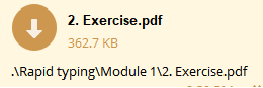
Only when I use telegram-upload ./ --directories recursive --caption '{path}' i get the clean name
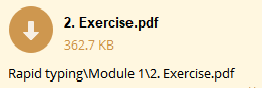
But it is not important. I'm glad that you resolved this issue and that the reverse also works. I run a test right now and has done the job flawlessly. Like magic! Very good contribution!
@tissole, Oh sorry, the separator in Windows is \ so I will also have to check that, thanks for pointing out, will fix soon. Can you help me with tests, what really to do?
Sorry, but I don't know how to run the tests, maybe @Nekmo can help you with some advices.
Added test for caption. Also fixed bug for skipping empty files in recursive mode, updated test for that. Thanks, I learned something about unittesting.
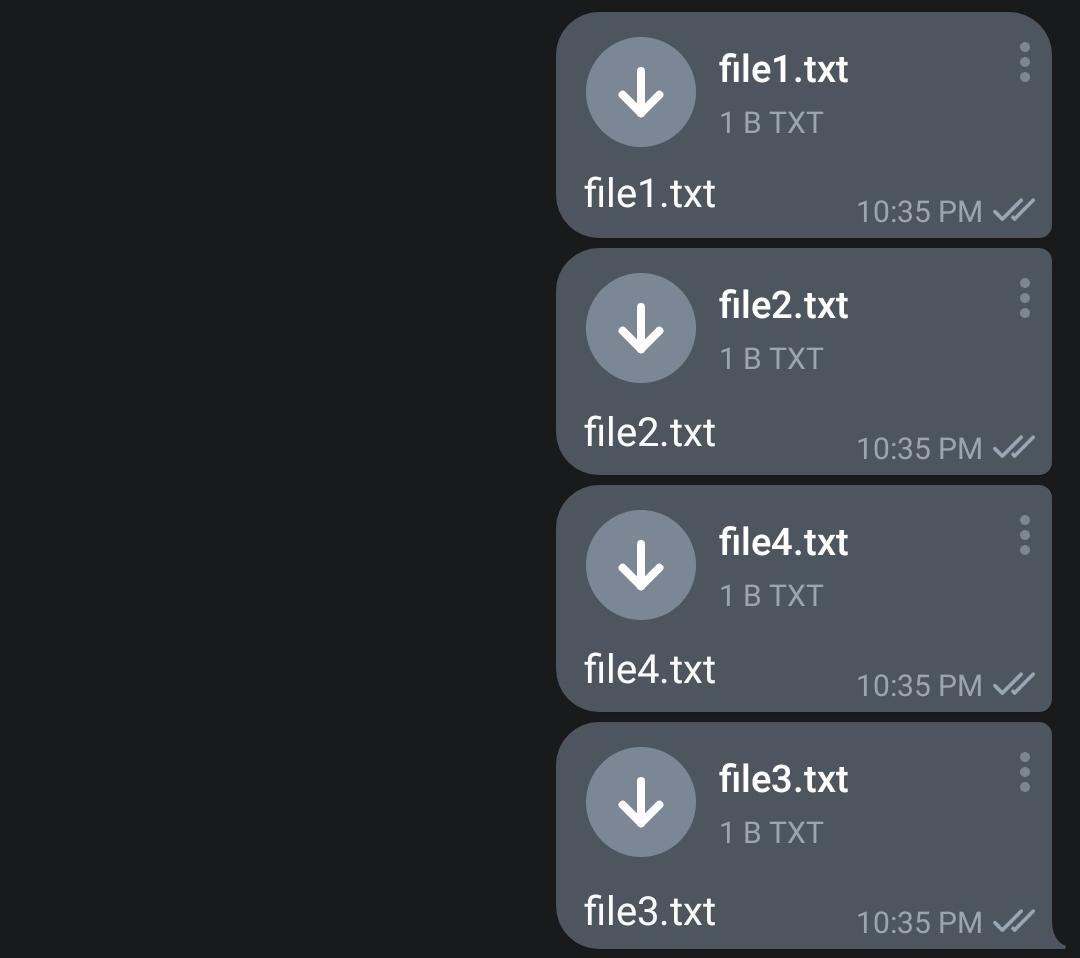
@Deshdeepak1 Great work with this PR I was just testing the recursive directory upload & was wondering if its possible to have the exact structure of files from the directory ? For some reason one of the files in a directory which should be uploaded later gets uploaded first
Command used :
telegram-upload --directories recursive --large-files split --caption '{file_name}' $HOME/Test
Directory tree :
root@ubuntu:~# tree $HOME/Test
/root/Test
├── folder1
│   ├── file1.txt
│   └── file2.txt
└── folder2
    ├── file3.txt
    └── file4.txt

2 directories, 4 files
root@ubuntu:~#
Actual files uploaded :
( Order being 1 , 2 , 4 & 3 instead of 1 , 2 , 3 & 4 )

It is necessary to make some changes in this branch before merging because there have been conflicts. Thanks for your contribution! And sorry for the wait.
The issue is now closed. The issue has been fixed using another solution. Sorry for the inconvenience and thanks for contributing.