NativeScript
BaseValueAccessor and ChangeDetectionStrategy.OnPush
Environment
- Angular CLI: 10.1.7
ns -vertsion
7.0.11
- Android Runtime: 7.0.1
- NativeScript-Angular: 10.1.7
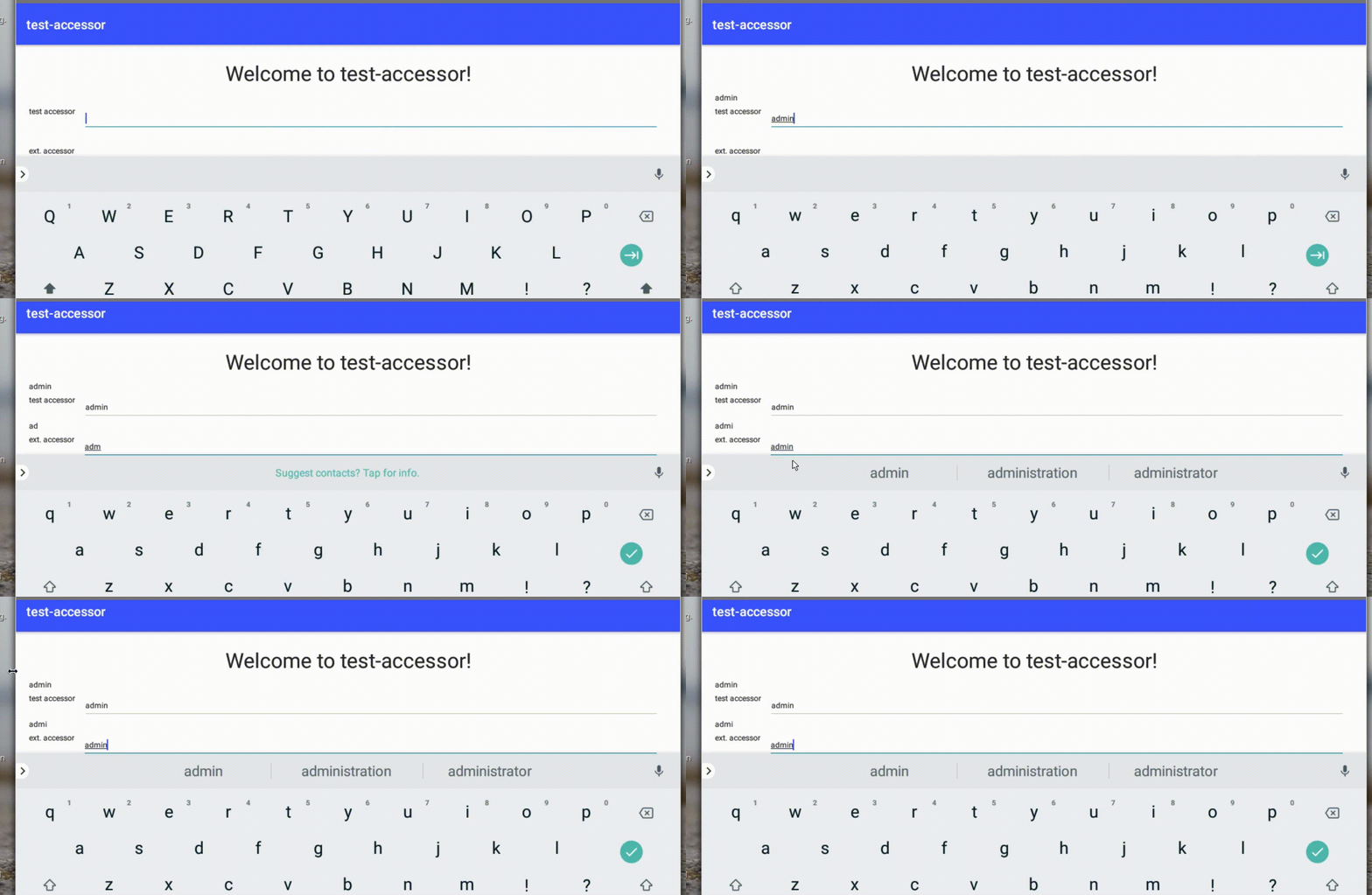
- Angular: 10.1.6 It looks like this:
Describe the bug
If you set changeDetection: ChangeDetectionStrategy.OnPush, then сhange detection does not work correctly in a component that extends the nativescript BaseValueAccessor. For example, I found an issue on the MDTextField (@nativescript-community/ui-material-textfield). It looks like this:
    <Label [text]="testAccessorControl.value"></Label>
    <app-test-accessor [formControl]="testAccessorControl"></app-test-accessor>
    <Label [text]="extendedAccessorControl.value"></Label>
    <app-extended-accessor [formControl]="extendedAccessorControl"></app-extended-accessor>
Everything is good from above, but from below the problem I am talking about. Changes are tracked with a delay. Very bad bug for the password field.
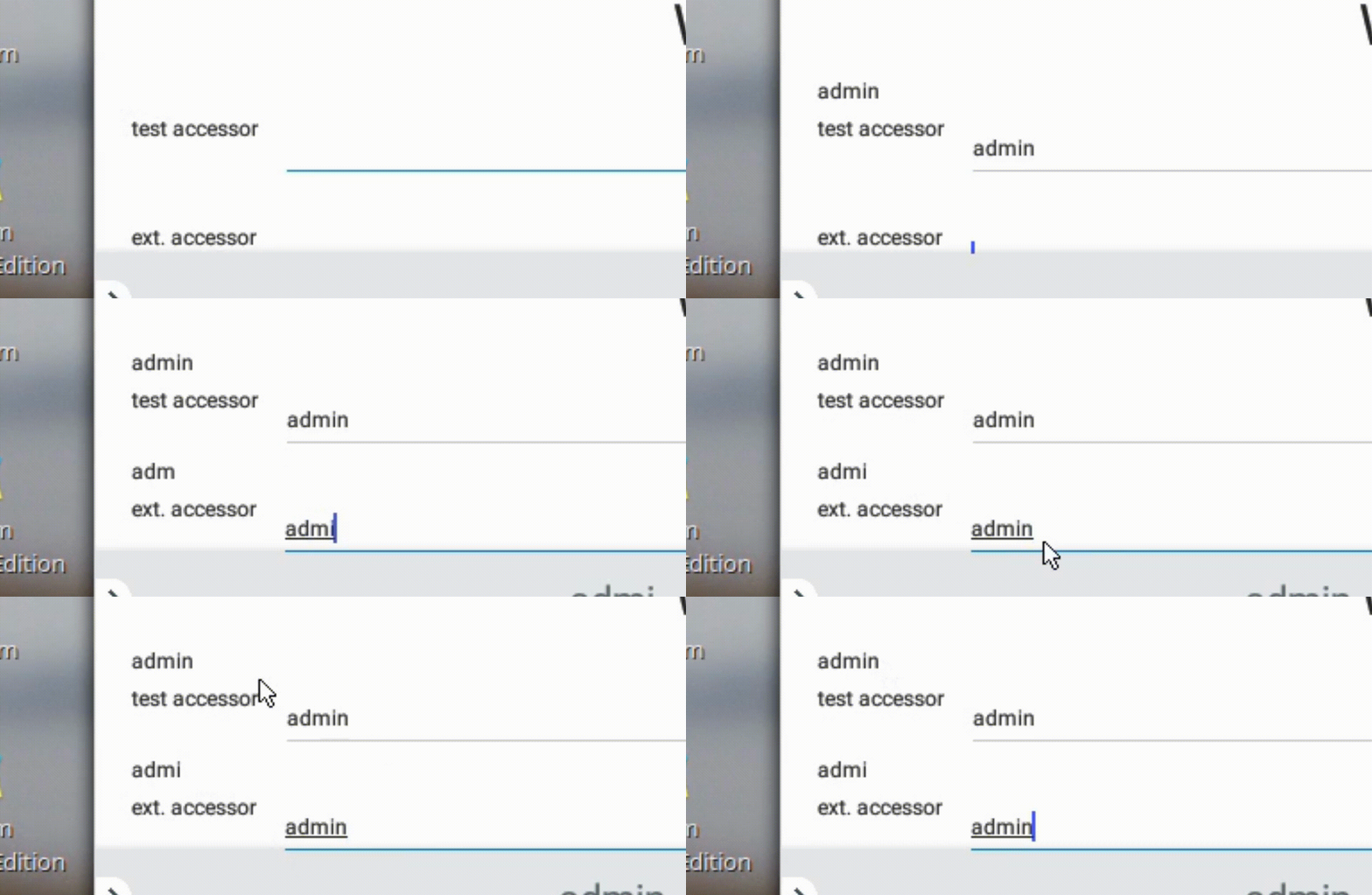 This is due to the use of setTimeout in the registerOnChange method in the file nativescript-angular/forms/value-accessors/base-
value-accessor.ts https://github.com/NativeScript/nativescript-angular/blob/2dc8e0633c8eb1f55bf0816f2230daecd57b4a7e/nativescript-angular/forms/value-accessors/base-value-accessor.ts#L18
This is due to the use of setTimeout in the registerOnChange method in the file nativescript-angular/forms/value-accessors/base-
value-accessor.ts https://github.com/NativeScript/nativescript-angular/blob/2dc8e0633c8eb1f55bf0816f2230daecd57b4a7e/nativescript-angular/forms/value-accessors/base-value-accessor.ts#L18
	registerOnChange(fn: (_: any) => void): void {
		this.onChange = (arg) => {
			if (this.pendingChangeNotification) {
				clearTimeout(this.pendingChangeNotification);
			}
			this.pendingChangeNotification = setTimeout(() => {
				this.pendingChangeNotification = 0;
				fn(arg);
			}, 20);
		};
	}
To Reproduce
- .
npm install -g @angular/cli
npm install -g @nativescript/schematics
npm install -g nativescript
-
ng new --c=@nativescript/schematics --name=test-simple --shared - Let's add a couple of lines to the file src/app/home/home.component.tns.html
<ActionBar [title]="title"></ActionBar>
<StackLayout  class="p-20">
    <Label [text]="'Welcome to ' + title + '!'" class="h1 text-center" textWrap="true"></Label>
    <Label [text]="testAccessorControl.value"></Label>
    <app-test-accessor [formControl]="testAccessorControl"></app-test-accessor>
    <Label [text]="extendedAccessorControl.value"></Label>
    <app-extended-accessor [formControl]="extendedAccessorControl"></app-extended-accessor>
</StackLayout>
And add accessors to the component src/app/home/home.component.ts
The lines are important here:
changeDetection: ChangeDetectionStrategy.OnPush,
and
    ngOnInit() {
        this.testAccessorControl = new FormControl();
        this.extendedAccessorControl = new FormControl();
    }
all file content:
import { Component, OnInit, ChangeDetectionStrategy } from '@angular/core';
import { FormControl } from '@angular/forms';

@Component({
    selector: 'app-home',
    templateUrl: './home.component.html',
    styleUrls: ['./home.component.css'],
    changeDetection: ChangeDetectionStrategy.OnPush,
})
export class HomeComponent implements OnInit {
    title = 'test-accessor';
    public testAccessorControl: FormControl;
    public extendedAccessorControl: FormControl;

    constructor() {
    }

    ngOnInit() {
        this.testAccessorControl = new FormControl();
        this.extendedAccessorControl = new FormControl();
    }
}
- create two components first - src/app/extended-accessor/extended-accessor.component.ts
src/app/extended-accessor/extended-accessor.component.ts
import { Component, Input, forwardRef, } from '@angular/core';
import { NG_VALUE_ACCESSOR } from '@angular/forms';
import { BaseValueAccessor, TextView } from '@nativescript/angular';

@Component({
    selector: 'app-extended-accessor',
    templateUrl: './extended-accessor.component.html',
    styleUrls: ['./extended-accessor.component.css'],
        providers: [
        {
            provide: NG_VALUE_ACCESSOR,
            useExisting: forwardRef(() => ExtendedAccessorComponent),
            multi: true,
        },
    ],
})
export class ExtendedAccessorComponent extends BaseValueAccessor<TextView> {
    @Input() public value = '';

    writeValue(value: any) {
        this.value = value;
    }
    onBlur() {
        this.onTouched();
    }

    onTextChange(value: string) {
        this.onChange(value);
    }
}
second - src/app/test-accessor/test-accessor.component.ts
import { Component, Input, forwardRef } from '@angular/core';
import { ControlValueAccessor, NG_VALUE_ACCESSOR } from '@angular/forms';

@Component({
    selector: 'app-test-accessor',
    templateUrl: './test-accessor.component.html',
    styleUrls: ['./test-accessor.component.css'],
    providers: [
        {
            provide: NG_VALUE_ACCESSOR,
            useExisting: forwardRef(() => TestAccessorComponent),
            multi: true,
        },
    ],
})
export class TestAccessorComponent implements ControlValueAccessor {
    @Input() public value = '';

    writeValue(value: any) {
        this.value = value;
    }

    private onTouched = () => {};

    private onChange: (value: string) => void = () => {};

    registerOnChange(onChange: (value: string) => void) {
        this.onChange = onChange;
    }

    registerOnTouched(onTouched: () => void) {
        this.onTouched = onTouched;
    }

    onBlur() {
        this.onTouched();
    }

    onTextChange(value: string) {
        this.onChange(value);
    }
}
The templates in the components will be like this
<DockLayout stretchLastChild="true">
    <Label text="ext. accessor" dock="left"></Label>
    <TextField (textChange)="onTextChange($event.value)" (blur)="onBlur()" dock="top"></TextField>
</DockLayout>
- Add new components and import dependencies in src/app/app.module.tns.ts:
.....
import { TestAccessorComponent } from '@src/app/test-accessor/test-accessor.component';
import { ExtendedAccessorComponent } from '@src/app/extended-accessor/extended-accessor.component';
import { NativeScriptCommonModule, NativeScriptFormsModule } from '@nativescript/angular';
import { ReactiveFormsModule } from '@angular/forms';
.......
@NgModule({
    declarations: [
        AppComponent,
        HomeComponent,
        TestAccessorComponent,
        ExtendedAccessorComponent,
    ],
    imports: [
        NativeScriptModule,
        AppRoutingModule,
        NativeScriptCommonModule,
        NativeScriptFormsModule,
        ReactiveFormsModule,
    ],
.......
Let's run npm run android and see