

 Narigo
Multi-line notes in verbose mode & git diff integration lose color coding
When using --verbose to diff two files and when the note field of an entry with line breaks differs, only the first line will have the - or + diff markers & color coding applied with the rest of the fields' contents showing in plain white. This makes the diff a little harder to navigate. Example:
~   Group 'Group Name'
~     Entry 'Entry Name'
-       Field 'Notes' = 'This is a field
with multiple
lines'
+       Field 'Notes' = 'This is a field
with multiple
lines'
(Note that no visible characters have changed for this example entry but this is a situation I encounter frequently. See https://github.com/keepassxreboot/keepassxc/issues/9326 for more details.)
It would be much easier to visually navigate these entries if:
- diff markers would extend over multiple lines,
- subseqeunt lines of a field were properly indented,
- (optional) invisible whitespace changes would be made visible, e.g. using an escape sequence like
\r.

This looks like a strange issue to me. Could you share a reproducer of this issue with both different types of line endings, so I can create a test case for it?
I'm thinking maybe pasting the whole output into a text editor that shows the differences there could be helpful already...

During preparation of #56 I noticed that this doesn't actually occur when invoked on the CLI, so I suppose it's related to my git diff integration described in https://github.com/Narigo/keepass-diff/issues/33#issuecomment-1277483684.
Following is a screenshot of what it looks like in a terminal:
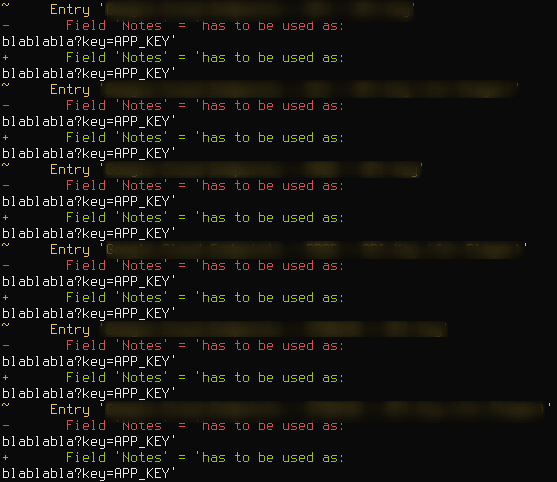
You can use the files in #56 to reproduce it by creating a git repo and transforming the files into commits on the same file, then add the git diff integration as described and use a command like git diff HEAD{~1,~0}.
I suspect that git adds an ANSI code to reset all color options at the beginning of each line or similar because this can be avoided by additionally piping through cat, i.e. git diff HEAD{~1,~0} | cat.