

 NVIDIA
G-Sync doesn't work in Wayland
G-sync is not yet implemented for Wayland, only for Xorg (using 1 monitor only) would be nice to see it supported

Hello and thank you for your interest!
The initial release is targeting datacenter GPUs and use-cases, and has several display-related features missing, including GSync. Please consult the driver readme for a more complete (but still non-comprehensive) list. We hope to address these in the future.


Hm, I haven't seen G-Sync on X11 mode.
Then maybe you also did not see HDR in linux? yum Well, it is there.
If your monitor supports G-Sync but isn't fully validated for it, you have to go to X Server Display Configuration => Advanced... and enable Allow G-SYNC on monitor not validated as G-SYNC Compatible, then Apply.
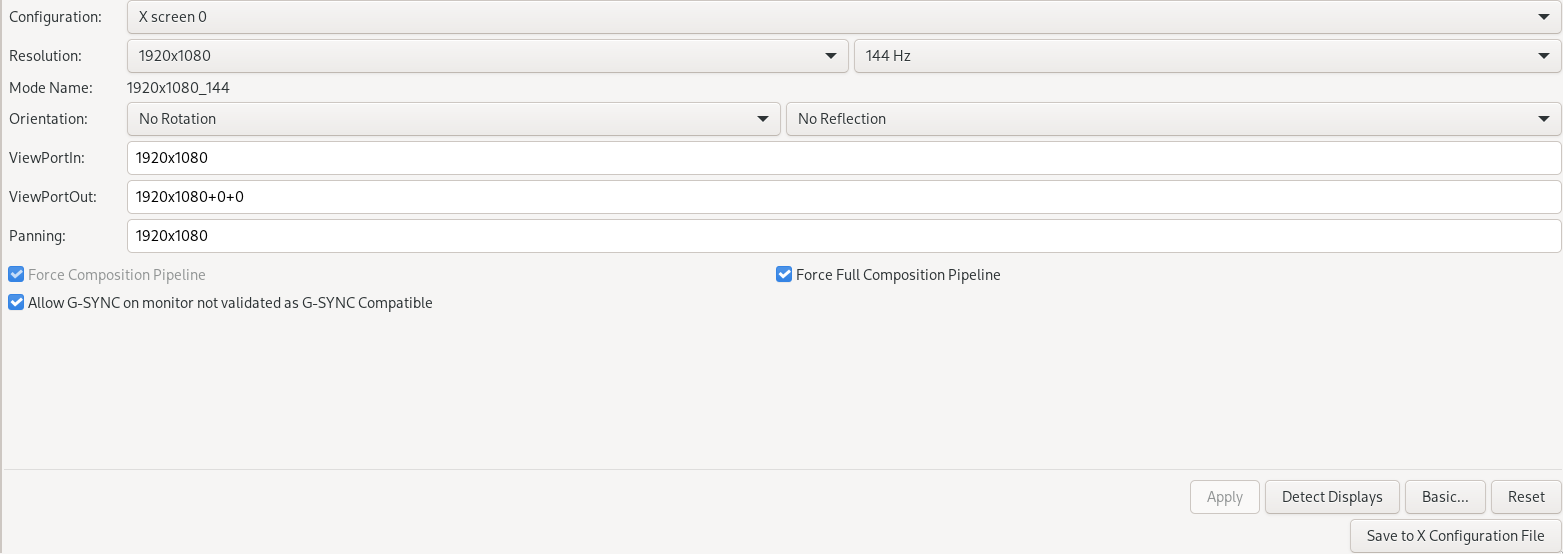

Hello,
There's no such thing in X Server Display Configuration -> Advanced.. https://i.imgur.com/up9KTOH.png
https://i.imgur.com/LPU5gqr.png -> same on OpenGL settings
And the info tab -> https://i.imgur.com/VYDDxRU.png
cat /proc/driver/nvidia/version NVRM version: NVIDIA UNIX Open Kernel Module for x86_64 515.43.04 Release Build (@) GCC version: gcc version 12.1.0 (GCC)
Regards, Rosen Aleksandrov
Hello and thank you for your interest!
The initial release is targeting datacenter GPUs and use-cases, and has several display-related features missing, including GSync. Please consult the driver readme for a more complete (but still non-comprehensive) list. We hope to address these in the future.
The proprietary kernel module seemingly doesn't support wayland at all, does this mean that the open one possibly will? Wayland is nicer because you can use g-sync with multiple screens.
@sandikata like they said the open kernel module does not support g-sync yet, the picture is probably from the proprietary module.

Hello,
There's no such thing in X Server Display Configuration -> Advanced.. i.imgur.com/up9KTOH.png
i.imgur.com/LPU5gqr.png -> same on OpenGL settings
And the info tab -> i.imgur.com/VYDDxRU.png
cat /proc/driver/nvidia/version NVRM version: NVIDIA UNIX Open Kernel Module for x86_64 515.43.04 Release Build (@) GCC version: gcc version 12.1.0 (GCC)
Regards, Rosen Aleksandrov
As the comment above states (forgot to mention it in my own post), the picture is for the DKMS/Proprietary driver.
That's why i am saying it. I know where exactly it is on Proprietary vendor and it is on by default.
G-Sync support should work with the open drivers as of 535.43.02. Can you please retest?

G-Sync support should work with the open drivers as of 535.43.02. Can you please retest?
I'm a bit confused here. Does this apply to open or proprietary 535.43.02 beta? How is it not in the changelog?

G-sync doesn't work in XWayland for sure: https://www.reddit.com/r/linux_gaming/comments/1498gtl/comment/joaxbze I can test some native Wayland game if you know any.
Using the experimental variable-refresh-rate option in the /org/gnome/mutter/experimental-features dconf option, I can enable VRR through GNOME control center for my external monitor. On Wayland, this correctly triggers VRR on an AMD GPU and an Intel GPU, but with my NVIDIA GPU (only), fullscreen applications result in a black screen being displayed. I can confirm the monitor in question supports G-Sync on NVIDIA with X11 (next to supporting FreeSync for AMD and Intel).
Just for the record, steps to reproduce:
- Ensure you are using GNOME with Wayland.
- Follow these steps to enable VRR in GNOME and your monitor.
- Start a fullscreen game or application, note how the screen remains black.
- If you press the Super key or switch desktops, you end up seeing content again (probably because mutter disables VRR temporarily then), and when going back into the fullscreen application, the screen goes black again.
This is related to this issue in the sense that G-Sync support might be a prerequisite here, but supporting GNOME (and KDE's?) VRR settings might require additional steps, not sure.
