

 NVIDIA
Error: "curl: (6) Could not resolve host: nvidia.github.io"
When I set up the package repository and the GPG key by the flow step:
distribution=$(. /etc/os-release;echo $ID$VERSION_ID)
&& curl -fsSL https://nvidia.github.io/libnvidia-container/gpgkey | sudo gpg --dearmor -o /usr/share/keyrings/nvidia-container-toolkit-keyring.gpg
&& curl -s -L https://nvidia.github.io/libnvidia-container/$distribution/libnvidia-container.list |
sed 's#deb https://#deb [signed-by=/usr/share/keyrings/nvidia-container-toolkit-keyring.gpg] https://#g' |
sudo tee /etc/apt/sources.list.d/nvidia-container-toolkit.list
It shows that:
curl: (6) Could not resolve host: nvidia.github.io
Does anyone have faced that error?
My GPU info is: +-----------------------------------------------------------------------------+ | NVIDIA-SMI 510.47.03 Driver Version: 510.47.03 CUDA Version: 11.6 | |-------------------------------+----------------------+----------------------+ | GPU Name Persistence-M| Bus-Id Disp.A | Volatile Uncorr. ECC | | Fan Temp Perf Pwr:Usage/Cap| Memory-Usage | GPU-Util Compute M. | | | | MIG M. | |===============================+======================+======================| | 0 NVIDIA GeForce ... Off | 00000000:65:00.0 On | N/A | | 0% 47C P8 28W / 235W | 122MiB / 8192MiB | 1% Default | | | | N/A | +-------------------------------+----------------------+----------------------+
+-----------------------------------------------------------------------------+ | Processes: | | GPU GI CI PID Type Process name GPU Memory | | ID ID Usage | |=============================================================================| | 0 N/A N/A 1430 G /usr/lib/xorg/Xorg 91MiB | | 0 N/A N/A 1685 G /usr/bin/gnome-shell 28MiB | +-----------------------------------------------------------------------------+

@zhy1503 are you behind a firewall or do you need a proxy to access the internet? Note that there may be some redirects that are occurring behind the scenes.

Thanks for your kindly reply. @elezar When I copy the URL "https://nvidia.github.io/libnvidia-container/gpgkey" in the browser, it could download the file named "gpgkey". But when I input the command line in Terminal, it shows the same error "curl 6...".

Could you run the curl command with the -v flag?
curl -v -fsSL https://nvidia.github.io/libnvidia-container/gpgkey
Also, does the second curl command fail with the same error:
curl -v -s -L https://nvidia.github.io/libnvidia-container/ubuntu18.04/libnvidia-container.list
Could you also answer the question:
are you behind a firewall or do you need a proxy to access the internet? Note that there may be some redirects that are occurring behind the scenes.
It may be that your browser has settings applied that are not propagated to the terminal.
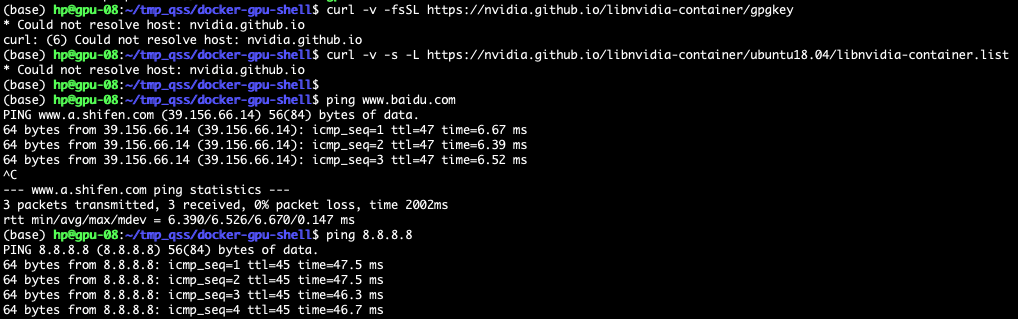
That shows that nvidia.github.io cannot be resolved. What does:
ping nvidia.github.io`
or
dig nvidia.github.io
show?
@elezar It's right! "It may be that your browser has settings applied that are not propagated to the terminal."
When I add my proxy ports into the bashrc, the error did not recur. @WeiXiao-Hyy
But when I do this step " sudo apt-get update", it shows a new error:
W: Failed to fetch https://nvidia.github.io/libnvidia-container/stable/ubuntu18.04/amd64/InRelease Could not resolve 'nvidia.github.io'
Does this mean my network configuration is still wrong?
root@NavLabServer:/home/yaoo# ping nvidia.github.io ping: nvidia.github.io: Name or service not known
root@NavLabServer:/home/yaoo# dig nvidia.github.io
; <<>> DiG 9.16.1-Ubuntu <<>> nvidia.github.io ;; global options: +cmd ;; Got answer: ;; ->>HEADER<<- opcode: QUERY, status: NXDOMAIN, id: 14675 ;; flags: qr rd ra; QUERY: 1, ANSWER: 0, AUTHORITY: 0, ADDITIONAL: 1
;; OPT PSEUDOSECTION: ; EDNS: version: 0, flags:; udp: 65494 ;; QUESTION SECTION: ;nvidia.github.io. IN A
;; Query time: 3 msec ;; SERVER: 127.0.0.53#53(127.0.0.53) ;; WHEN: 五 8月 12 00:22:23 CST 2022 ;; MSG SIZE rcvd: 45
You would have to double-check how APT should be configured to access a proxy. Maybe a page such as https://askubuntu.com/questions/257290/configure-proxy-for-apt will be useful?
It's useful, and so grateful for your help. I have completed the installation of the Nvidia Docker engine.
Thanks. From your final comment, I assume that this issue can be closed. Please reopen if the issue continues.