

 NVIDIA
Tensorrt:22.04-py3 has cuda11.6 instead of 11.4
Hi.
I run docker, [nvcr.io/nvidia/tensorrt:22.04-py3]. In 1566c4797d Layers, I can see ENV TENSORRT_VERSION=8.2.4.2+cuda11.4.2.006 . So I expect cuda 11.4 but it has cuda 11.6.
 'Using driver version 470.57.02 which has support for CUDA 11.4. This container
was built with CUDA 11.6 and will be run in Minor Version Compatibility mode.'
'Using driver version 470.57.02 which has support for CUDA 11.4. This container
was built with CUDA 11.6 and will be run in Minor Version Compatibility mode.'
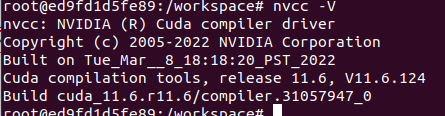 And nvcc -V says cuda 11.6 is installed.
 But I can see there are 11.4 and 11.6 both. Now cuda and cuda-11 files are linked with cuda-11.6 So I try linking cuda and cuda-11 to cuda-11.4 but it doesn't work.
And so I try removing /usr/local/cuda* and reinstalling CUDA 11.4 by below instructions. https://developer.nvidia.com/cuda-11-4-0-download-archive?target_os=Linux&target_arch=x86_64&Distribution=Ubuntu&target_version=20.04&target_type=deb_local
But when I do this command, apt-get -y install cuda-11-4 confront below errors.
E: Sub-process /usr/bin/dpkg returned an error code (1)
https://drive.google.com/file/d/1e0LV8JcXbuaw6PpUce1JEZkLo9gUiwZc/view?usp=sharing
I can't fix with any solutions (like rm [PACKAGE NAME].perm, dpkg — configure -a. etc)
How can I use CUDA 11.4 in [nvcr.io/nvidia/tensorrt:22.04-py3] docker image? Please help me ;( Thank you so much.
