

 NVIDIA
Crop multiple images from one image
Hello!
I'm trying to prepare preprocessing pipeline for MMPose network - specifically for hrnet48.
Logic of preprocessing without DALI: For mmpose operation, an additional object detector is used. Object detections are then cropped from the main image. Then a batch is formed from these cropped out detections and fed into the hrnet48 network.
The point is that the batch depends on the number of people in the frame - it is always different, dynamic. That is why I read it from fn.external_source along with an image.
I try to crop a one big image with some count of persons on it using fn.crop operation with parameters crop_pos_x and crop_pos_y. It works fine for one person (when I use crop_pos_x=persons_list[0][0]/1920, crop_pos_y=persons_list[0][3]/1080 instead of crop_pos_x=persons_list[0]/1920, crop_pos_y=persons_list[3]/1080, for example), but how to pass list of coordinates to crop to cut multiple bboxes from image?
According DALI documentation it is possible, for example, crop_pos_x (float or TensorList of float, optional, default = 0.5). But list does not work for me.
So the question is - how to use fn.crop function to crop many images from original image? How to pass a list of coordinates into fn.crop?
Source code:
class ExternalInputIterator(object):
    def __init__(self, image, persons):
        self.image = image
        self.persons = persons

    def __iter__(self):
        return self

    def __next__(self):
        return self.image, self.persons

    def update(self, image, persons):
        self.image = image
        self.persons = persons
Code from loop over video:
global eii

# make batch image of (1, 1920, 1080, 3) shape
dali_image = np.expand_dims(image, axis=0).astype(np.uint8)

# make batch persons of (1, N, 5) shape, where N - count of persons detected on frame. 5 - x1,y1,x2,y2,confidence.
dali_persons = np.expand_dims(np.stack(persons_result, axis=0), axis=0).astype(np.float32)
eii.update(image=dali_image, persons=dali_persons)

batch_dali = dali_pipeline.run()
out_images = batch_dali[0].as_array()
cv2.imwrite(f"dali_images/img_{i}.jpg", out_images[0])
out_persons = batch_dali[1].as_array()
Error, when I try to pass list of coordinates into fn.crop:
dummy_img = np.random.randint(2, size=(1, 1920, 1080))
dummy_img = dummy_img.astype(np.uint8)
eii = ExternalInputIterator(image=dummy_img, persons=np.expand_dims(np.array([1, 2], dtype=np.float32), axis=0))

@pipeline_def(batch_size=1, num_threads=4, device_id=0)
def mmpose_preprocess_pipeline():
    """
    Prepares pipeline of operations.
    :param batch_size: size of maximum batch for new DALI model.
    :param num_threads: number of CPU threads to be used.
    :param device_id: ID of GPU.
    :return: preprocessed images.
    """
    crop = (256, 192)
    image, persons_list = fn.external_source(source=eii, num_outputs=2, dtype=[types.UINT8, types.FLOAT])
    cropped = fn.crop(image, crop_pos_x=persons_list[0]/1920, crop_pos_y=persons_list[3]/1080, crop=crop, out_of_bounds_policy="pad", device="cpu")
    return cropped, persons_list

def create_pipeline(batch_size: int = 256, num_threads: int = 4, device_id: int = 0):
    """
    Builds and serialize pipeline of operations to DALI model.
    :param model_func_obj: function object pf model pipeline.
    :param path_to_save: path to save DALI model.
    :param batch_size: size of maximum batch for new DALI model.
    :param num_threads: number of CPU threads to be used.
    :param device_id: ID of GPU.
    :return: NoReturn.
    """
    print('Building pipeline...')
    pipeline = mmpose_preprocess_pipeline(batch_size=batch_size, num_threads=num_threads, device_id=device_id)
    pipeline.build()
    print('Done!')

    return pipeline
Building pipeline...
Done!
/usr/local/lib/python3.8/dist-packages/torch/nn/functional.py:718: UserWarning: Named tensors and all their associated APIs are an experimental feature and subject to change. Please do not use them for anything important until they are released as stable. (Triggered internally at  /pytorch/c10/core/TensorImpl.h:1156.)
  return torch.max_pool2d(input, kernel_size, stride, padding, dilation, ceil_mode)
Traceback (most recent call last):
  File "/home/user/mmpose/pe_solutions/mmpose/dali_demo.py", line 189, in <module>
    img_det, fps, person_count = process_img(pose_model, det_model, img, dali_pipeline=pipe, i=i)
  File "/home/user/mmpose/pe_solutions/mmpose/dali_demo.py", line 94, in process_img
    batch_dali = dali_pipeline.run()
  File "/usr/local/lib/python3.8/dist-packages/nvidia/dali/pipeline.py", line 922, in run
    return self.outputs()
  File "/usr/local/lib/python3.8/dist-packages/nvidia/dali/pipeline.py", line 821, in outputs
    return self._outputs()
  File "/usr/local/lib/python3.8/dist-packages/nvidia/dali/pipeline.py", line 905, in _outputs
    return self._pipe.Outputs()
RuntimeError: Critical error in pipeline:
Error when executing CPU operator TensorSubscript, instance name: "__TensorSubscript_4", encountered:
[/opt/dali/dali/operators/generic/slice/subscript.h:214] Index 3 is out of range for axis 0 of length 3
Detected while processing sample #0 of shape (3 x 5)
Stacktrace (11 entries):
[frame 0]: /usr/local/lib/python3.8/dist-packages/nvidia/dali/libdali_operators.so(+0x594bc2) [0x7fc06292cbc2]
[frame 1]: /usr/local/lib/python3.8/dist-packages/nvidia/dali/libdali_operators.so(+0xfa60bb) [0x7fc06333e0bb]
[frame 2]: /usr/local/lib/python3.8/dist-packages/nvidia/dali/libdali_operators.so(+0xfa6b57) [0x7fc06333eb57]
[frame 3]: /usr/local/lib/python3.8/dist-packages/nvidia/dali/libdali.so(void dali::Executor<dali::AOT_WS_Policy<dali::UniformQueuePolicy>, dali::UniformQueuePolicy>::RunHelper<dali::HostWorkspace>(dali::OpNode&, dali::HostWorkspace&)+0x7bd) [0x7fc08256d2cd]
[frame 4]: /usr/local/lib/python3.8/dist-packages/nvidia/dali/libdali.so(dali::Executor<dali::AOT_WS_Policy<dali::UniformQueuePolicy>, dali::UniformQueuePolicy>::RunCPUImpl()+0x218) [0x7fc0825720e8]
[frame 5]: /usr/local/lib/python3.8/dist-packages/nvidia/dali/libdali.so(dali::Executor<dali::AOT_WS_Policy<dali::UniformQueuePolicy>, dali::UniformQueuePolicy>::RunCPU()+0xe) [0x7fc082572bae]
[frame 6]: /usr/local/lib/python3.8/dist-packages/nvidia/dali/libdali.so(+0xb778d) [0x7fc08252978d]
[frame 7]: /usr/local/lib/python3.8/dist-packages/nvidia/dali/libdali.so(+0x12f8bc) [0x7fc0825a18bc]
[frame 8]: /usr/local/lib/python3.8/dist-packages/nvidia/dali/libdali.so(+0x712b6f) [0x7fc082b84b6f]
[frame 9]: /usr/lib/x86_64-linux-gnu/libpthread.so.0(+0x8609) [0x7fc1f2198609]
[frame 10]: /usr/lib/x86_64-linux-gnu/libc.so.6(clone+0x43) [0x7fc1f22d2133]

Current pipeline object is no longer valid.

Process finished with exit code 1

Hi @Tpoc311,
Thank you for reaching out. Currently, it is not possible to achieve it directly in DALI. The assumption is that one sample at the input can produce only one slice at the output. However thanks to the recently introduced conditional execution it is possible to provide something working similarly:
@experimental.pipeline_def(enable_conditionals=True)
def test_pipe():
    img = fn.external_source(name="image")
    pers = fn.external_source(name="person")
    anch = pers[:, 0:2]
    shape = pers[:, 2:4] - pers[:, 0:2]
    if fn.shapes(pers)[0] == 0:
        out = fn.reshape(img, src_dims=[-1, 0, 1, 2])
    elif fn.shapes(pers)[0] == 1:
        out = fn.slice(img, anch[0], shape[0])
        out = fn.reshape(out, src_dims=[-1, 0, 1, 2])
    elif fn.shapes(pers)[0] == 2:
        out1 = fn.slice(img, anch[0], shape[0])
        out2 = fn.slice(img, anch[1], shape[1])
        out = fn.stack(out1, out2)
    else: # 3 people
        out1 = fn.slice(img, anch[0], shape[0])
        out2 = fn.slice(img, anch[1], shape[1])
        out3 = fn.slice(img, anch[2], shape[2])
        out = fn.stack(out1, out2, out3)
    return out, anch, shape
So depending on numer of cropping windows you can call slice multiple times and then stack the results.

Hi, @JanuszL!
Thank you for paying attention to the issue.
This method would be applicable for batch size 5 or 10. But potentially I will get up to 40 batch size. So the batch ranges from 1 to 40.
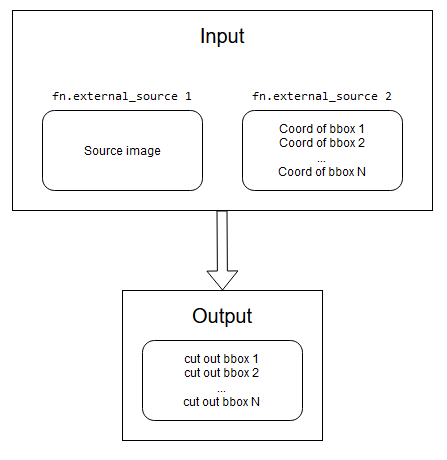
The ideal scheme for the operation of this pipeline:
Put one original image and a list of coordinates for people's bboxes as input.
And at the output, get cut out images of these people according to their bboxes.
For now I gonna use the next approach:
I will put batch of pairs [source_image, coord_of_bbox] and get the same output - cut out images of these people according to their bboxes.
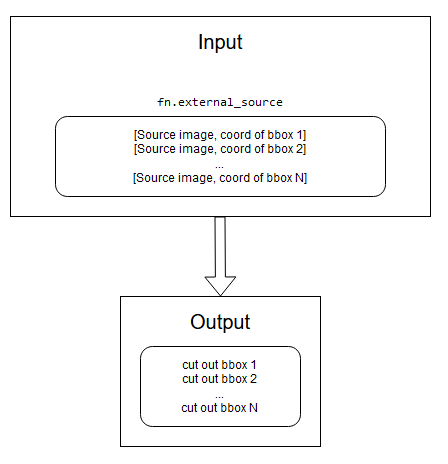
The obvious disadvantage of this approach is that I have to put N-1 extra source images into pipeline. If there is any other way to solve this issue, I would be very grateful.
Hi @Tpoc311,
The obvious disadvantage of this approach is that I have to put N-1 extra source images into pipeline. If there is any other way to solve this issue, I would be very grateful.
For now, I'm afraid there is no other way to handle this. I will add a multi-crop/slice operator to our ToDo list.
Hi, @JanuszL,
That would be great! May I ask you for one more favor?
Could you also add an fn.warp_affine operator to the task list? It can also be used to cut images.
And transforms which prepare tranformation matrix, such as:
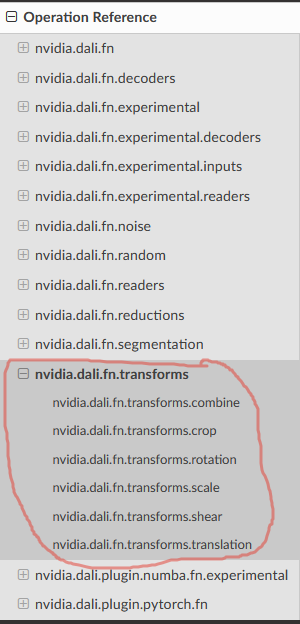
Thank you in advance!
Hi @Tpoc311,
Thank you for the suggestion. The goal of this section is to describe how to prepare a transformation matrix for the fn.warp_affine operator. Putting it here will mix two different kinds of operations.
@JanuszL, thank you for explaining all this stuff! I have no more questions at the moment
I'm running into the same issue and would most likely be able to solve it with a new operator multi_crop_mirror_normalize (or if that's not possible, multi_crop or multi_slice).

@bveldhoen, Hi! Keep in touch pls, it would be interesting to know the result