

 NVIDIA
Video reader artifacts
Pipe definition:
@pipeline_def
def video_pipe(filenames):
    side_size = 224
    crop_size = 224
    sequence_length = 32
    sampling_rate = 4
    random_shuffle = False
    device = 'gpu'

    video, labels = fn.readers.video_resize(
        device="gpu", filenames=filenames, labels=[], sequence_length=sequence_length, random_shuffle=random_shuffle,
        skip_vfr_check=True, size=(side_size, side_size), mode='not_smaller', name='Reader',
        dtype=types.FLOAT, normalized=True, stride=sampling_rate,
        pad_sequences=True
    )
    video = fn.crop(video, crop=(crop_size, crop_size),
                    crop_pos_x=0.5, crop_pos_y=0.5, device=device)

    return video, labels
I have a dataset of 5 tiktok videos. Whenever I iterate over this dataset I can notice different collisions and artifacts on frames. Moreover, sometimes frames one video appear in sequence of another video, for example frames from video with label 1 (house) appear in sequence with returned label 2 (video with a woman and clothes).
I have noticed, that this collisions happen only around video with label 2 (kjbelll_6987115080580107525.mp4). However if I pass to the pipe only this video everything works as expected.
I attach example of collisions and a dataset.
I pass the videos to the pipe in this exact order:
[
    'thepetcollective_6850180418818346246.mp4',
    'bigvarn_6925039213402426629.mp4',
    'kjbelll_6987115080580107525.mp4',
    'josemiguelsal_6840197131358194950.mp4',
    'tobyporterart_6838650165688028421.mp4'
]
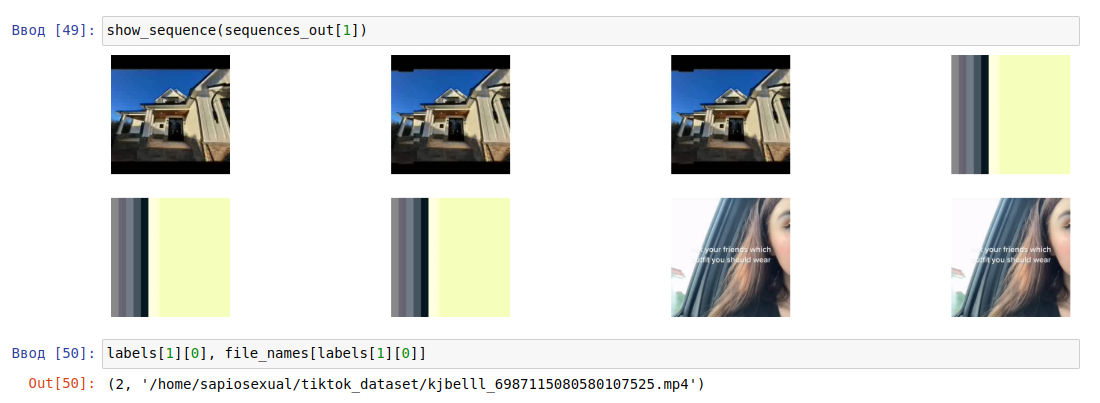

What causes this behavior? Can you do something about it? Is there a way to filter out videos that break everything?

Hi @sapiosexual,
This is not expected. Can you provide a full repro script? Does it happen with the latest GPU driver? Can you provide the GPU model and driver version you have?

Dali repro.zip Reproduction ipynb. Note: feel free to rerun cells from section "Rerun it" as many times as needed to see artifacts, it takes couple times.
I have faced this issue with RTX A5000
Driver and cuda versions:
NVIDIA-SMI 510.60.02 Driver Version: 510.60.02 CUDA Version: 11.6
Hi @sapiosexual,
I can reproduce the issue. I guess it may be unrelated to DALI but the video decoder itself or how DALI uses it. Please let us give some time to debug it.
I dug myself a little and it seems related to fps.
Every video except kjbelll_6987115080580107525.mp4 has fps 30, kjbelll_6987115080580107525.mp4 has 29.something fps.
I have found that if every video passed to the pipeline has the same fps everything works fine. In the other case, every video with fps different from the very first video passed to the pipeline is a mess.
I hope it will help.
@sapiosexual,
That is a good starting point. I have missed that. From the decoder API point of view, FPS rate is rather irrelevant, but maybe it matters internally. Let me check with the relevant team.
Hi @sapiosexual,
We are still for the NVDEC team to respond. I will update as soon as I get any info.
Hello!
What news? Can I help something?
UPD: I am also noticed, that this artifacts happen if video height and width differ from the first passed video
Hello!
Thanks for checking in. Unfortunately, we do not have any update for you yet. We'll let you know, when we have something we can share.
Thanks for your patience.

Hey guys. Anything new? Is it under investigation right now or NVDEC team just have another priorities right now? I just want to know, did we move somewhere in this two months?
Hey guys. Anything new? Is it under investigation right now or NVDEC team just have another priorities right now? I just want to know, did we move somewhere in this two months?
I'm sorry, but there is no news. The NVDEC team seems to be swapped with other things for now.
Hi @sapiosexual,
I'm sorry, but I don't have any update from the Video team.
Hi. I figured out that videos with this configuration (fps and hxw could be any)
  Metadata:
    major_brand     : isom
    minor_version   : 512
    compatible_brands: isomiso2avc1mp41
    encoder         : Lavf58.29.100
  Duration: 00:01:00.08, start: 0.000000, bitrate: 575 kb/s
    Stream #0:0(und): Video: h264 (High) (avc1 / 0x31637661), yuv420p, 454x256, 436 kb/s, 59.94 fps, 59.94 tbr, 11988 tbn, 119.88 tbc (default)
    Metadata:
      handler_name    : VideoHandler
doesn't have this problems at all. Originally videos were encoded with
  Metadata:
    major_brand     : isom
    minor_version   : 512
    compatible_brands: isomiso2mp41
    encoder         : Lavf58.29.100
  Duration: 00:01:00.03, start: 0.000000, bitrate: 342 kb/s
    Stream #0:0(und): Video: mpeg4 (Simple Profile) (mp4v / 0x7634706D), yuv420p, 455x256 [SAR 1:1 DAR 455:256], 208 kb/s, 30 fps, 30 tbr, 15360 tbn, 30 tbc (default)
    Metadata:
      handler_name    : VideoHandler
I figured that out when I tried to use experimental video reader and my original video codec threw error (i will open separate issue for this).
This makes me think that this behavior is not really connected to NVDEC, but to how DALI works with ffmpeg API and vfr check heuristics, but these assumptions are based on nothing since I don't have good knowledge about how DALI works under the hood.
Hi @bpleshakov,
That is an interesting finding. What is worth noting is that transcoding the video can change many of its internal properties. On top of that the decoding time could be affected making some synchronization problems visible/not visible. Regarding the mentioned https://github.com/NVIDIA/DALI/issues/4818 it is one of the known limitations of the experimental operator.