

 MultiMC
MultiMC cant find any Java installation
Operating System
Windows
Description of bug
I try installing many different versions of Java, but none of is detected by the launcher. Moreover I select the javaw.exe but Multimc doen't accept it.

The java path is correctly set on the PATH as on CMD java -version correctly shows me the version.

I try restarting, install from Oracle and azul different versions java 17, java 18, java 8 as suggested on https://github.com/MultiMC/Launcher/wiki/Using-the-right-Java#setting-up-java-in-multimc but nothing change.
Now I dont know what to try. I'm open to suggestions
Steps to reproduce
Seems only on my computer, when launching Multimc and after chousen the language.
Suspected cause
No response
This issue is unique
- [X] I have searched the issue tracker and did not find an issue describing my bug.

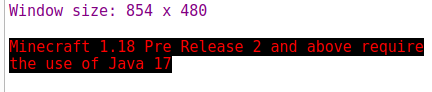
I can confirm a similar issue on Linux. My Java installations all appear on auto-detect, and the 'test' function shows them working perfectly. But the error message still appears.
I have tried:
- Switching between all installations on auto-detect
- Manually selecting the install through the 'browse' button
- Restarting both MultiMC and my computer.


.

I can confirm a similar issue on Linux. My Java installations all appear on auto-detect, and the 'test' function shows them working perfectly. But the error message still appears.
I have tried:
- Switching between all installations on auto-detect
- Manually selecting the install through the 'browse' button
- Restarting both MultiMC and my computer.
.
I had the same issue it, to fix it I had to use java 17/1.7 java 18/1.8 would not work I manually downloaded java 1.7 and set multimc to use the java 1.7 binaries

@Nemoy2001 @radcom completely different issue, read the error message or https://github.com/MultiMC/Launcher/wiki/Using-the-right-Java and make your own issue next time @radcom Java 1.8.X is Java 8 and Java 7 is 1.7.X, Java 18 is 18.X and Java 17.X is 17, you are mixing up versions completely here..
@ClemtM can you post your MultiMC log file, its in the launcher main folder, are you using any third party anti-virus? if you skip this and go to the main java settings and test the java.exe you put in manually what does the test output tells you
@ClemtM can you post your MultiMC log file, its in the launcher main folder, are you using any third party anti-virus? if you skip this and go to the main java settings and test the java.exe you put in manually what does the test output tells you
I alrady try to stop my anti-virus but it changes nothing.
Here are the logs : https://paste.ee/p/uqw43 The error "Error: An unexpected error occurred while trying to open file D:/Téléchargements/Jeux/mmc-stable-win32/MultiMC/jars/JavaCheck.jar" appears. An issue with accented letters in the path ?
I try to run manualy JavaCheck and it works :

Ok To test if "accented letters in the path" can be the issue, I moved MultiMC to the root and now it works

If that's the problem, maybe it can be a good idea to add a line if no java version is detected, as "MultiMc has trubles if there are accented letters in the installation path"

what happens if you run it manually with the full path? so
java -jar "D:/Téléchargements/Jeux/mmc-stable-win32/MultiMC/jars/JavaCheck.jar"
what happens if you run it manually with the full path? so
java -jar "D:/Téléchargements/Jeux/mmc-stable-win32/MultiMC/jars/JavaCheck.jar"

I have this error
apparently this is a Java bug https://bugs.openjdk.java.net/browse/JDK-4488646