
GitHub-userscripts
 GitHub-userscripts copied to clipboard
 Mottie
(GitHub table of contents) Resizable window
Greetings @Mottie
It's a feature request I wanted to make for a long time now: it's about your awesome script, "GitHub table of contents".
Would it be possible to make its window resizable? i.e. to be able to drag its right corner(or its edges) and expand/reduce as I want?
The reason is that very often, many entries in the TOC don't fit in the window and are truncated, and I have to mouseover each line to see it fully.
Example page: https://github.com/microsoft/vscode-docs/blob/vnext/release-notes/v1_52.md
Screenshot

Thank you
P.S. I know you are super busy in your life, just wanted to express my wish 🙂


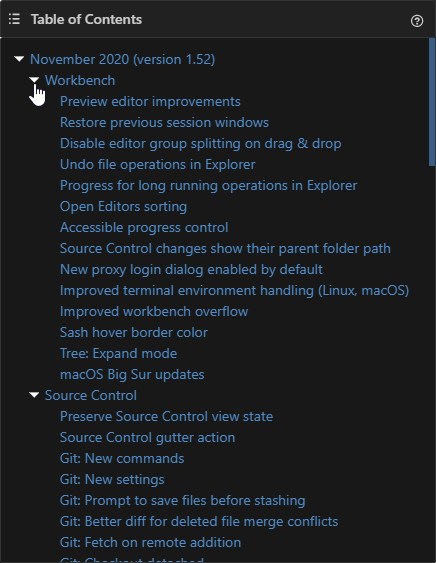
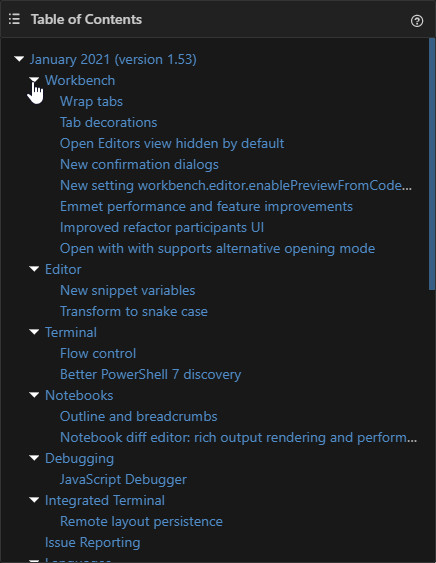
If it's not too much to ask, could you please make the sections collapsible when clicking the arrows ?
e.g. in the following screenshot examples, the Workbench section to collapse when clicking the arrow before it?
I am asking this, because when the TOC is very long, it would be very convenient to be able to expand/collapse some sections.
Screenshot 1
Screenshot 2
Clicking on the arrows works for me in Chrome. What browser are you having an issue in?
I hid my last comment: there are some issues after your last commit: the collapse arrows now work only on some pages, that's why I mistakenly thought that the feature is missing, sorry. So, this comment is an issue report:
Below are example pages: (tested in my Chrome 88 everyday profile, with latest TM beta 4.12.6126)
Where the collapse arrows don't work, having login to GitHub: (it's rather in all pages I tried) (I believe this started happening right after I resized the TOC window) https://github.com/microsoft/vscode-docs/blob/vnext/release-notes/v1_52.md https://github.com/microsoft/vscode-docs/blob/vnext/release-notes/v1_53.md https://github.com/sinatra/sinatra (the example URL) https://github.com/sindresorhus/refined-github https://github.com/Mottie/tablesorter
No generated TOC when not logged in to GitHub: https://github.com/sinatra/sinatra (the example URL) https://github.com/Mottie/GitHub-userscripts https://github.com/Mottie/tablesorter
There's the following error in Console in the last case group:
Uncaught (in promise) TypeError: Cannot read property 'parentElement' of null at init
Also, when I test on a fresh Chrome profile with only latest Tampermonkey beta/Violentmonkey and the script (after login to GitHub): there are no collapse arrows: (no error in Console)
Screenshot

Update: regarding my everyday Chrome profile, I found that the collapse arrows not working is a conflict with the Refined GitHub extension: when I disable it, then they work ok every time. If I enable it, then they don't work most of/all the times.
I found that the collapse arrows event listener was being bound on every page refresh. I've updated the script just now. Please try it now.
Thanks a lot! So, indeed the 1st issue is fixed!
What now still remains is the other two: (I retested them just now with a different fresh Chrome profile with only TM beta/VM beta)
No generated TOC when not logged in to GitHub: Example pages: https://github.com/sinatra/sinatra (the example URL) https://github.com/Mottie/GitHub-userscripts https://github.com/Mottie/tablesorter
There's the following error in Console:
Uncaught (in promise) TypeError: Cannot read property 'parentElement' of null at init
No collapse arrows after login to GitHub: (no error in Console) Example page: https://github.com/microsoft/vscode-docs/blob/vnext/release-notes/v1_53.md
Screenshot
Ok, I've just updated the userscript to work on the logged out header... I can't reproduce the last issue with no arrows. I did change how the arrows are rendered, so maybe it's incompatible with other browsers? No idea.
Thanks for the fix when logged out.
The last issue occurs for me consistently.
If I may assist in reproducing it, here is my STR in full details:
In in a fresh Chrome profile of 88.0.4324.104 / Firefox 85 (win10 x64 20h2), with only Tampermonkey beta 4.12.6126/Violentmonkey beta 2.12.9.4 and the script:
I open https://github.com/microsoft/vscode-docs/blob/vnext/release-notes/v1_52.md : there are no collapse arrows in both browsers neither when logged in nor when logged out.
Screenshots:
logged out:
in Chrome

in Firefox

logged in:
in Chrome

in Firefox

In both browsers also I tried changing the GitHub theme Dark/Light (https://github.com/settings/appearance) but it made no difference.
Update:
in the fresh profiles, the collapse arrows are displayed again only if I install (Stylus extension and the) Github Dark userstyle.
Without that userstyle, the arrows don't appear in neither the Dark nor Light default GitHub theme.
