
ColorHighlighter
 ColorHighlighter copied to clipboard
 Monnoroch
New version of Color Highlighter.
I've had some spare time and rewrote the plugin from scratch using all the good coding practices to reduce the number of potential bugs. It's not full-featured just yet, but the core functionality is already there. The code can be found in the branch v8.0.
The code should be put in Packages/color_highlighter, not Packages/ColorHighlighter.
The following features are not supported yet:
- ~~Color picker.~~
- ~~Color conversion.~~
- CSS/preprocessor variables.
- Named CSS colors.
What's new:
- Most complicated code is covered with tests, so less bugs.
- About 2x speedup (and I haven't optimized anything yet).
- Highlighting with phantoms.
- User friendly main menu.
Any volunteers to help me test it?

About color variables. Currently the plugin parses them all using regexes. This is very hard to do correctly and because of that there are various bugs with coloring only parts of names and whatnot. The correct way to do it would be using CSS/Less/Sass/Styl parsers. I have tried to find these and failed so far. Perhaps someone knows about any python libraries to parse these stylesheet formats?
This lib may help https://bitbucket.org/cthedot/cssutils
But it lacks less/sass/styl support =(

@realzoberg I have already considered it. However it doesn't support CSS variables. It does partially support some old draft of the old variables standard, but that's not what we need for obvious reasons.
I just installed v8.0 and it's already working much better than the previous version, great job!
The only thing I noticed so far is that the default settings file does not open correctly from Preferences > Package Settings > Color Highlighter > Settings - Default. I was able to change all the visual settings I wanted from the Tools > Color Highlighter > Color highlighters menu though, very nice!

Thanks! Good to hear. The new version with the color picker and color conversion is on the way, perhaps the settings issue will get fixed.
The new alpha is released in the same branch:
- Even more speedup.
- Color picker.
- Color conversion.
- Good old hotkeys for the above.
- Optimized ST loading time with the plugin.
- New highlighting mode: highlight colors under the cursor (no need to click on them any more!).
- I specifically tested opening settings (both user and default) and it worked.
Still to go:
- Named CSS colors.
- CSS/preprocessor variables.
Thank you very much for this rewrite, my only problem with this plugin was how slow it was and this seems to have addressed that very well! 😄
Only thing it's missing for me personally is Preprocessor Vars, which as you've said is soon to come.

Known bugs:
- ~~Color picker blocks the UI.~~
- Bugs in color format regexes (#FFFs is highlighted).
Missing features:
- Color variables.
- Color functions.
- Named colors.
- ~~Rehighlighting changed selected lines.~~
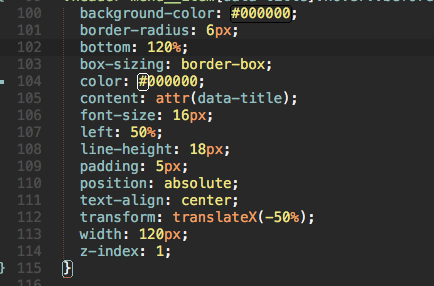
I have Tools > Color Highlighter > Color Highlighters > Highlight colors in all text > Inline highlighting style set to Outlined and it does not update the outline when the color is changed.
The highlighted region also does not update and disappears from the parts of it are changed completely.
@willrowe thanks, I was already working on these problems. Should be fixed now (I've uploaded the code just now).
I'm still seeing the same issue.
-
I start with a
colorvalue of white and it correctly looks like this: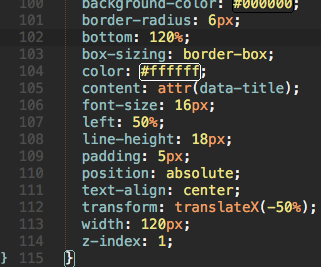
-
Then I change it to black and it does not update unless I restart Sublime Text or change one of the visual settings:
@willrowe are you using ST2 or ST3? What are your CH settings? What platform are you running it on? What does the log file say?
OS: Mac OS X v10.11.6 Sublime Text: v3 Build 3144 Color Highlighter Settings:
{
	"search_colors_in":
	{
		"all_content":
		{
			"color_highlighters":
			{
				"color_scheme":
				{
					"enabled": true,
					"highlight_style": "outlined"
				},
				"gutter_icons":
				{
					"enabled": false,
					"icon_style": "circle"
				},
				"phantoms":
				{
					"enabled": false
				}
			},
			"enabled": true
		},
		"hover":
		{
			"color_highlighters":
			{
				"color_scheme":
				{
					"enabled": false,
					"highlight_style": "filled"
				},
				"gutter_icons":
				{
					"enabled": false,
					"icon_style": "circle"
				},
				"phantoms":
				{
					"enabled": false
				}
			},
			"enabled": false
		},
		"selection":
		{
			"color_highlighters":
			{
				"color_scheme":
				{
					"enabled": true,
					"highlight_style": "filled"
				},
				"gutter_icons":
				{
					"enabled": false,
					"icon_style": "circle"
				},
				"phantoms":
				{
					"enabled": false
				}
			},
			"enabled": true
		}
	}
}
I did just notice that It is updating now when the file is saved.
@willrowe I think I solved your issue now. If you have more, please provide the log file as well, this one would be easily identifiable by looking at the logs.
Thanks, it is working as expected now. For future reference, where is the log file located?
For parsing, maybe PostCSS might help? For instance, postcss might help to figure out how to deal with parsing of Sass.

@ArmorDarks that is a nodejs module that can't be used from python apart from running the node, which is just way too slow.
Yeap, right. Not sure there is something like this for Python, unfortunately :(
New version that doesn't mess with user preferences and can be smoothly upgraded from a current master version of the plugin in uploaded to the same branch!
The new version was released and can now be installed from Package Controls! Weee!
Have a bug after installed last version 8.0 (Sublime 3143, Windows 7-64). File of settings doesn't exist - look at video https://yadi.sk/i/GhEiYAQX3NN2dH

@Eugene-nsk thanks for the report, but it's ment to be like that. The new settings file is very different and complitely incompatible, so I had to delete the old one for everything to work smoothly. It only deletes the old settings version, so it won't delete them again if you change the new settings.
@Eugene-nsk I've added a FAQ section to the README to explain this to everyone.
I updated to the official branch 8.0 and it seems there's an issue with the Mac color picker. If I use the eye-dropper, it should pick the color and stay open for further adjustment. Instead the picker closes (crashes?). Here's a screen recording: https://youtu.be/yL_IAMFYBkM

@alexkadis thanks for the report! Unfortunately, I don't have a mac or an apple dev account, the osx color picker was imlemented by another contributor. If you have time and energy to help me fix the problem, it would be great!
Also, could you please create a separate bug for it, as I think it deserves it's own discussion.
@Monnoroch will do! Which contributer created it? I'll tag them. Now opened as #375
@alexkadis don't remember, it was a few years ago :) Would have to search it in PRs.
