

 Monnoroch
SASS variables not highlighted

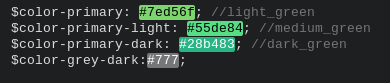
As to be seen in this picture, I have problems with the highlighting of SASS variables. It only seems to highlight them when there is a semicolon in the end (But of course that's invalid in SASS).

Any idea why that is the case?


Sorry for that, I don't use Saas myself, dunno what the exact syntax. I'll check it out.

Lol I was about to post that.
Sass syntax is pretty much the same as in css / scss but without curly braces nor semi-colons
So this in Scss
$main-color : orange;

.block {
  color: $main-color;
}
Is this in Sass syntax
$main-color: orange

.block
  color: $main-color
It's basically the same but indentation matters



It's fixed for me have you tried updating your plugin?
Also sometimes it might not work but if you open your variables tab and then close it they get the colors back :)
for me its fixed too, I just reinstalled, cleaned cache, reinstalled my theme and done

 In Vs-code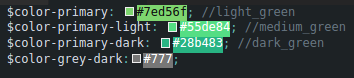

 if possible please update this.