

 MonitorControl
Automatic dimming when there is no user activity
Before opening the issue, have you...?
- [X] Searched for existing issues
Is your feature request related to a problem? Please describe
I would like to automatically dim the display when a certain amount of time is elapsed.
Describe the solution you'd like
Add another tab on the preferences pane, maybe called Events or Automations, where the user can select multiple triggers.
Like this:
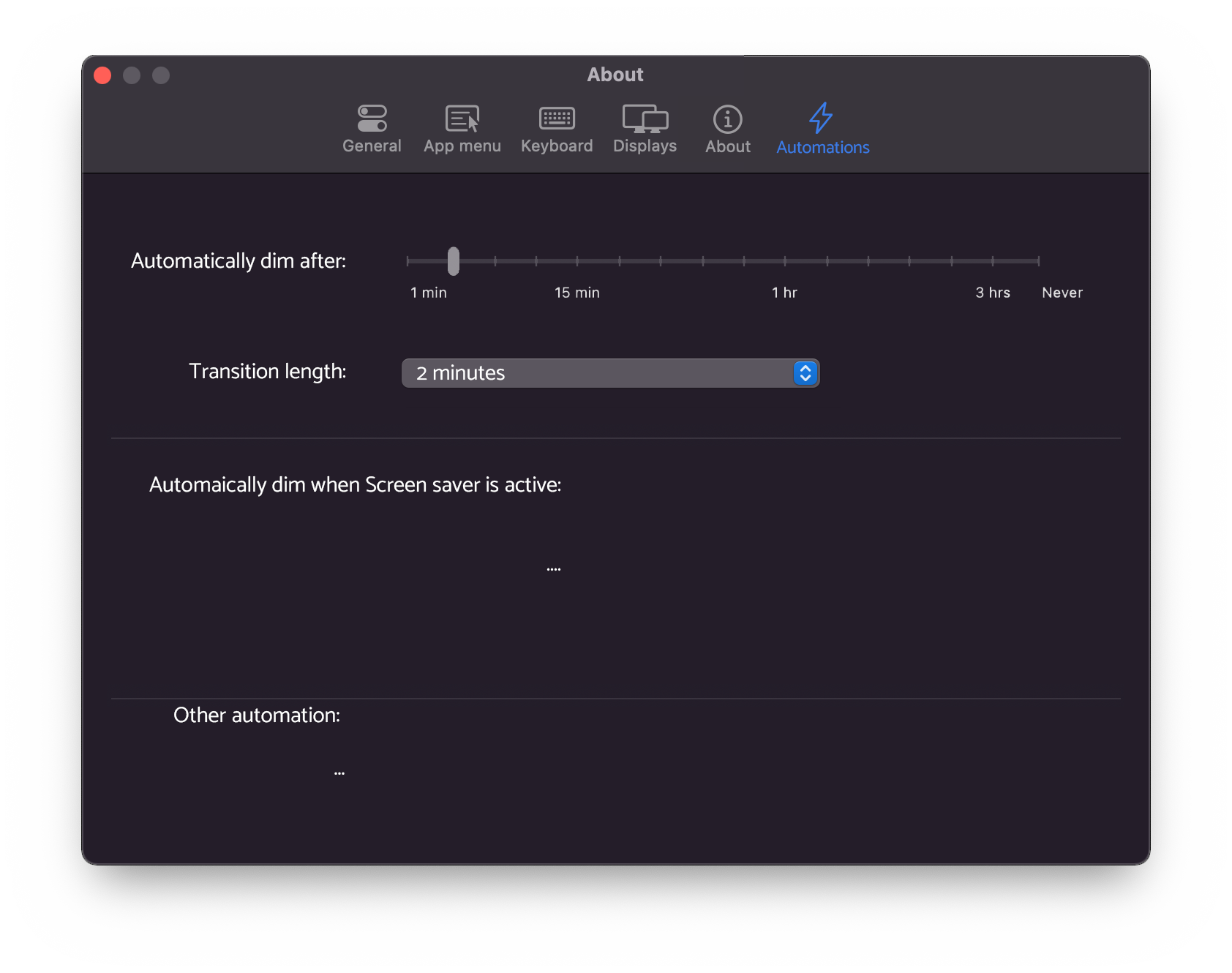
When the user doesn't interact with the computer it should automatically start a transition to decrease the brightness on all screens.
Describe alternatives you've considered
I've been using a script in combination with ddcctl cli, but since I've switched to M1 I cannot do it anymore on my HDMI display, and I would like to use your software dimming feature. Alternatively, I would like to have an API interface to interact with MonitorControl from an external script
Anything else?
Related issues: #728, #674 Possible implementation: https://stackoverflow.com/questions/53559121/how-to-detect-user-inactivity-in-os-x-writing-in-swift-cocoa it should not require additional accessibility permissions

IMO if we start supporting any form of automations, a better approach would probably be building actions for shortcuts for mac and exporting those. Gives more flexibility vs hard coding automations or building an editor ourselves I'd think. #776

@waydabber @JoniVR Can we maybe close this issue and open a new "Support Shortcut for macOS" ?

I think the auto-dimming after a period of inactivity can be a standalone feature (just like dimming on screensaver) as that might be a generally useful function (if I remember correctly, macOS does or did something like this when running on battery). Scripting, automation, CLI, shortcuts etc. should be a separate issue and could be extended to any number of features currently in the app.
We could keep this issue open but focus solely on auto-dimming and then create an other for the Scripting/automation/CLI/shortcuts (I think there was one already but probably we converted it into a discussion)?

Yes, it helps understand when the screensaver/sleep mode is about to kick in. Now that I think about it, an alternative could be to put only a checkbox that once enabled will replicate the default macOS behavior so that it will be consistent system-wide. This way MonitorControl will need to read the screensaver and sleep options from the system settings
There are system notifications when the screensaver kicks in, the dimming can be built upon that. For a "dim after a period of inactivity" the thing is a bit more difficult, but the last event caused by a HID device (eg. mouse, keyboard) can be measured and something can be built upon that.
CGEventSource.secondsSinceLastEventType(CGEventSourceStateID.hidSystemState, eventType: CGEventType(rawValue: ~0)!)
There are system notifications when the screensaver kicks in, the dimming can be built upon that. For a "dim after a period of inactivity" the thing is a bit more difficult, but the last event caused by a HID device (eg. mouse, keyboard) can be measured and something can be built upon that.
CGEventSource.secondsSinceLastEventType(CGEventSourceStateID.hidSystemState, eventType: CGEventType(rawValue: ~0)!)
=> Why "~0"?

Hi @mandarkh - if you are asking what the ~ is, it's a bitwise not operator so it simply inverts bits. The result depends on the type - so if rawValue is an UInt32, then ~0 sets all bits of this UInt32 to 1 (since for a 0 all bits are 0) which will result in the largest possible number the UInt32 can hold.
Hey there, it looks like there has been no activity on this issue recently. Has the issue been fixed, or does it still require attention? This issue may be closed if no further activity occurs. Thank you for your contributions.
![stale[bot] avatar](https://avatars.githubusercontent.com/in/1724?v=4 "Published by a pub.dev verified publisher")