ModernFlyouts-Community
Unable to start App
ModernFlyouts Version
0.9.3.0
Windows version
Windows 11 Pro 21H2
OS build
22000.739
Platform
x64
Area(s) with issue?
General
Steps to reproduce
- Install ModernFlyouts
winget install ModernFlyouts.ModernFlyouts - Start ModernFlyouts from Start Menu
✔️ Expected Behavior
No response
❌ Actual Behavior
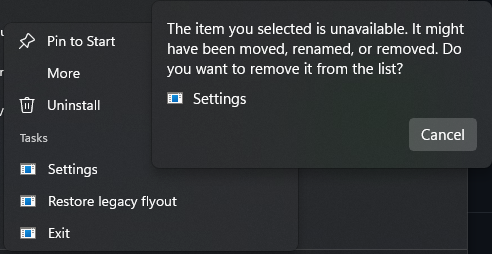
Nothing happens, volume slider has default design, app is not listed in Task Manager.
Other Software
No response
Additional Context
I recently installed Win10 and then upgraded to Win11. After that I installed ModernFlyouts via chocolatey, worked perfectly. At some point I switched to winget and installed it there instead (I don't remember the reason, probably more recent version).
At this point the app did not work anymore, as described above. I installing it from chocolatey again, I got an error message for missing permissions. It seemed ModernFlyouts was uninstalled incorrectly, because there were multiple folders in C:\Program Files\WindowsApps that only contained a AppxManifest.xml file. But installation from the Windows store worked, the program still had the same issue though.
Before posting a bug report I tried to find out more about the problem. sfc /scannow and then dism /online /cleanup-image /restorehealth fixed the permission error in winget and chocolatey. Get-AppxLog doesn't seem to show anything pointing to the error.
I know this is a very vague issue, but as I don't have much experience with Appx packages, I don't know how to find the relevant logs or error messages.

Have you tried installing the app through the Microsoft Store or msix on github instead of winget?

Yes, I have tried every method I could think of:
- MS Store
-
.msixInstaller from the releases (I also tried older releases) - winget
- chocolatey
Nothing worked


here too but I have a second computer and it works fine there, but this laptop that I recently got but it doesn't show in the hidden icons