

 MixinNetwork
[desktop_multi_window] Sometimes a sub window does not display content
like this:

main.dart
void main(List<String> args) async {
  WidgetsFlutterBinding.ensureInitialized();

  if (args.firstOrNull == 'multi_window') {
    runApp(const MySubWindow());
  } else {
    // WidgetsFlutterBinding.ensureInitialized();

    await windowManager.ensureInitialized();

    windowManager.waitUntilReadyToShow().then((_) async {
      await windowManager.setTitle('我的第一个桌面应用');
      await windowManager.setSize(const Size(800, 600));
      await windowManager.setMinimumSize(const Size(800, 600));
      await windowManager.center();
      await windowManager.show();
      // await windowManager.setSkipTaskbar(false);
    });

    runApp(const MyApp());
  }
}
page code
import 'dart:convert';

import 'package:desktop_multi_window/desktop_multi_window.dart';
import 'package:flutter/material.dart';

class MultiWindowPage extends StatefulWidget {
  const MultiWindowPage({Key? key}) : super(key: key);

  @override
  State<MultiWindowPage> createState() => _MultiWindowPageState();
}

class _MultiWindowPageState extends State<MultiWindowPage> {
  void _addWindow() async {
    final window = await DesktopMultiWindow.createWindow(jsonEncode({}));
    window
      ..setFrame(const Offset(0, 0) & const Size(600, 450))
      ..center()
      ..setTitle('标题在这里')
      ..show();
  }

  @override
  Widget build(BuildContext context) {
    return Center(
      child: Column(
        mainAxisAlignment: MainAxisAlignment.center,
        children: [
          ElevatedButton(
            onPressed: _addWindow,
            child: const Text('创建新窗口'),
          ),
        ],
      ),
    );
  }
}
sub window
import 'package:flutter/material.dart';

class MySubWindow extends StatelessWidget {
  const MySubWindow({Key? key}) : super(key: key);

  @override
  Widget build(BuildContext context) {
    return MaterialApp(
      debugShowCheckedModeBanner: false,
      theme: ThemeData(
        primarySwatch: Colors.blue,
        fontFamily: 'Microsoft YaHei',
      ),
      home: const Scaffold(
        body: Center(
          child: Text(
            '0101, 这里是07😎',
            style: TextStyle(fontSize: 24),
          ),
        ),
      ),
    );
  }
}

I test flow code with Flutter 2.13.0-0.0.pre.110 (master channel) on Windows 11, But it seems to work fine.
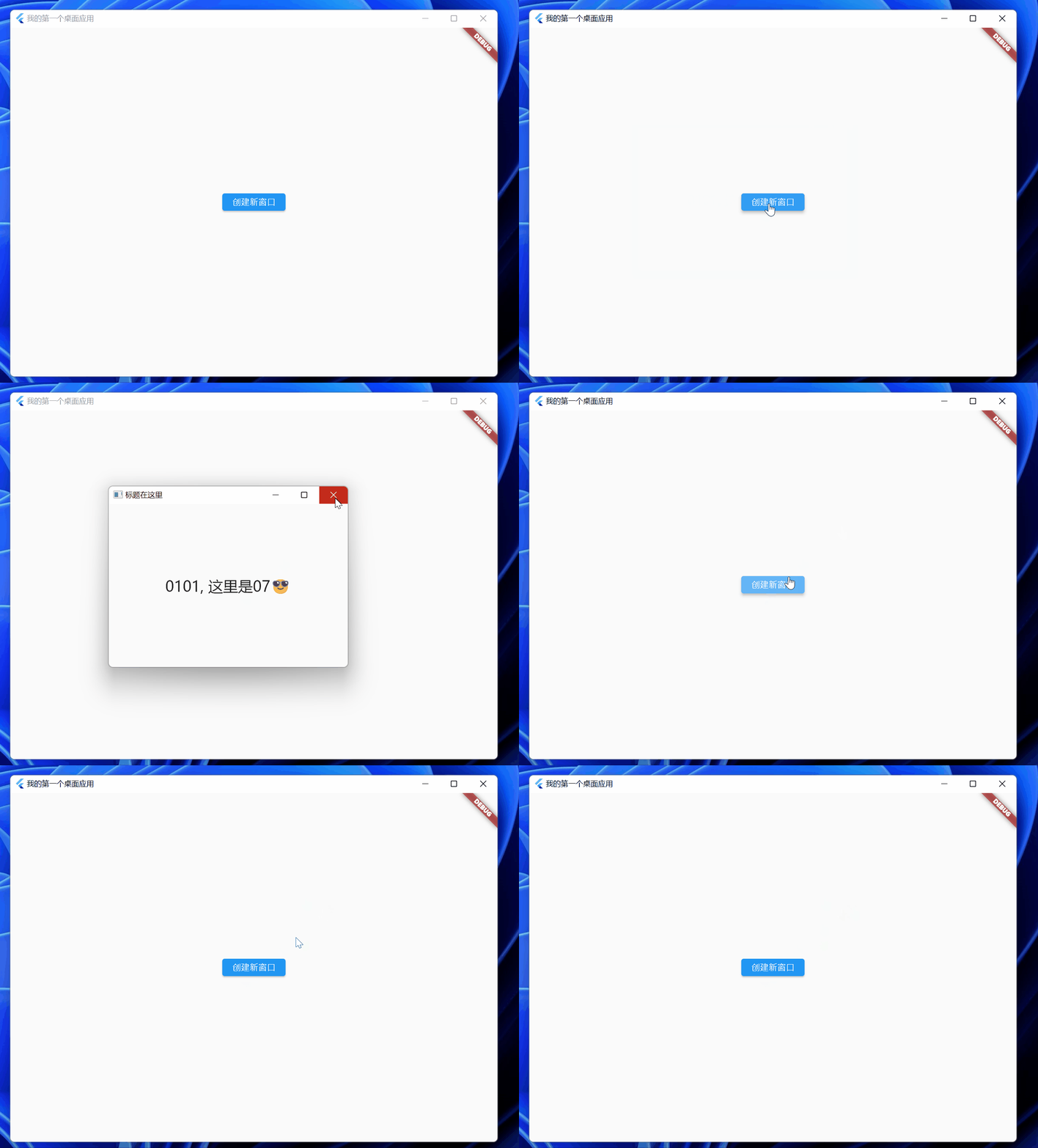
Which flutter are you using ?
After the child window is blank, will the screen appear automatically after a while?
example code
import 'dart:convert';

import 'package:collection/collection.dart';
import 'package:desktop_multi_window/desktop_multi_window.dart';
import 'package:flutter/material.dart';
import 'package:window_manager/window_manager.dart';

void main(List<String> args) async {
  WidgetsFlutterBinding.ensureInitialized();

  if (args.firstOrNull == 'multi_window') {
    runApp(const MySubWindow());
  } else {
    // WidgetsFlutterBinding.ensureInitialized();

    await windowManager.ensureInitialized();

    windowManager.waitUntilReadyToShow().then((_) async {
      await windowManager.setTitle('我的第一个桌面应用');
      await windowManager.setSize(const Size(800, 600));
      await windowManager.setMinimumSize(const Size(800, 600));
      await windowManager.center();
      await windowManager.show();
      // await windowManager.setSkipTaskbar(false);
    });

    runApp(const MaterialApp(home: MultiWindowPage()));
  }
}

class MultiWindowPage extends StatefulWidget {
  const MultiWindowPage({Key? key}) : super(key: key);

  @override
  State<MultiWindowPage> createState() => _MultiWindowPageState();
}

class _MultiWindowPageState extends State<MultiWindowPage> {
  void _addWindow() async {
    final window = await DesktopMultiWindow.createWindow(jsonEncode({}));
    window
      ..setFrame(const Offset(0, 0) & const Size(600, 450))
      ..center()
      ..setTitle('标题在这里')
      ..show();
  }

  @override
  Widget build(BuildContext context) {
    return Scaffold(
      body: Center(
        child: Column(
          mainAxisAlignment: MainAxisAlignment.center,
          children: [
            ElevatedButton(
              onPressed: _addWindow,
              child: const Text('创建新窗口'),
            ),
          ],
        ),
      ),
    );
  }
}

class MySubWindow extends StatelessWidget {
  const MySubWindow({Key? key}) : super(key: key);

  @override
  Widget build(BuildContext context) {
    return MaterialApp(
      debugShowCheckedModeBanner: false,
      theme: ThemeData(
        primarySwatch: Colors.blue,
        fontFamily: 'Microsoft YaHei',
      ),
      home: const Scaffold(
        body: Center(
          child: Text(
            '0101, 这里是07😎',
            style: TextStyle(fontSize: 24),
          ),
        ),
      ),
    );
  }
}

I test flow code with Flutter 2.13.0-0.0.pre.110 (master channel) on Windows 11, But it seems to work fine.
Which flutter are you using ?
After the child window is blank, will the screen appear automatically after a while?
example code
import 'dart:convert';

import 'package:collection/collection.dart';
import 'package:desktop_multi_window/desktop_multi_window.dart';
import 'package:flutter/material.dart';
import 'package:window_manager/window_manager.dart';

void main(List<String> args) async {
  WidgetsFlutterBinding.ensureInitialized();

  if (args.firstOrNull == 'multi_window') {
    runApp(const MySubWindow());
  } else {
    // WidgetsFlutterBinding.ensureInitialized();

    await windowManager.ensureInitialized();

    windowManager.waitUntilReadyToShow().then((_) async {
      await windowManager.setTitle('我的第一个桌面应用');
      await windowManager.setSize(const Size(800, 600));
      await windowManager.setMinimumSize(const Size(800, 600));
      await windowManager.center();
      await windowManager.show();
      // await windowManager.setSkipTaskbar(false);
    });

    runApp(const MaterialApp(home: MultiWindowPage()));
  }
}

class MultiWindowPage extends StatefulWidget {
  const MultiWindowPage({Key? key}) : super(key: key);

  @override
  State<MultiWindowPage> createState() => _MultiWindowPageState();
}

class _MultiWindowPageState extends State<MultiWindowPage> {
  void _addWindow() async {
    final window = await DesktopMultiWindow.createWindow(jsonEncode({}));
    window
      ..setFrame(const Offset(0, 0) & const Size(600, 450))
      ..center()
      ..setTitle('标题在这里')
      ..show();
  }

  @override
  Widget build(BuildContext context) {
    return Scaffold(
      body: Center(
        child: Column(
          mainAxisAlignment: MainAxisAlignment.center,
          children: [
            ElevatedButton(
              onPressed: _addWindow,
              child: const Text('创建新窗口'),
            ),
          ],
        ),
      ),
    );
  }
}

class MySubWindow extends StatelessWidget {
  const MySubWindow({Key? key}) : super(key: key);

  @override
  Widget build(BuildContext context) {
    return MaterialApp(
      debugShowCheckedModeBanner: false,
      theme: ThemeData(
        primarySwatch: Colors.blue,
        fontFamily: 'Microsoft YaHei',
      ),
      home: const Scaffold(
        body: Center(
          child: Text(
            '0101, 这里是07😎',
            style: TextStyle(fontSize: 24),
          ),
        ),
      ),
    );
  }
}
Flutter 2.10.3 • channel stable • https://github.com/flutter/flutter.git Framework • revision 7e9793dee1 (3 weeks ago) • 2022-03-02 11:23:12 -0600 Engine • revision bd539267b4 Tools • Dart 2.16.1 • DevTools 2.9.2
Windows10 Professional 21H2
I tried to reproduce it, and the debug mode almost never happened, but the profile/release would have a white screen or no response.
Thanks for your feedback.

@Lililili-m Sorry, I don't know
It's a shame, I'm in a similar situation, when I create a sub window, occasionally the window goes white.
Hello, I'm having a similar issue, is there any solution or do you know the cause of this bug? @boyan01
is there any solution or do you know the cause of this bug?
Sorry, I don' known what happened in this case too.
It would be nice if someone could give some extra attention.
is there any solution or do you know the cause of this bug?
Sorry, I don' known what happened in this case too.
It would be nice if someone could give some extra attention.
Well, I tried using 'Future.delayed' before show sub window and it seems to work at first, but I found sometimes the window may have been white always and won't appear to normal even after a while. I don't know if it's the same cause, hope my description helps.