

 MirrorNetworking
Unity 2021 compiles wrong in Linux Standalones/Server
Describe the bug In Unity 2021 when you build for linux in standalone or server target, you cannot connect to that server despite the server is on server mode or in host mode (client + server)
[IMPORTANT] How can we reproduce the issue, step by step:
- Select all the scene for the additive example in the build settings
- Change the build target to linux, can be standole or server target
- Open the linux subsystem or use a virtual machine with linux or linux server
- Execute the linux build and check server only or host server and client
- In the unity editor or in windows build try to connect to localhost on that server
- You wont connect and no error is displayed
- only happens in unity 2021
Any bug that can be reproduced, can be fixed. If we can't reproduce it, we can't fix.
Expected behavior
You cannot connect to that server and no error shows in the console
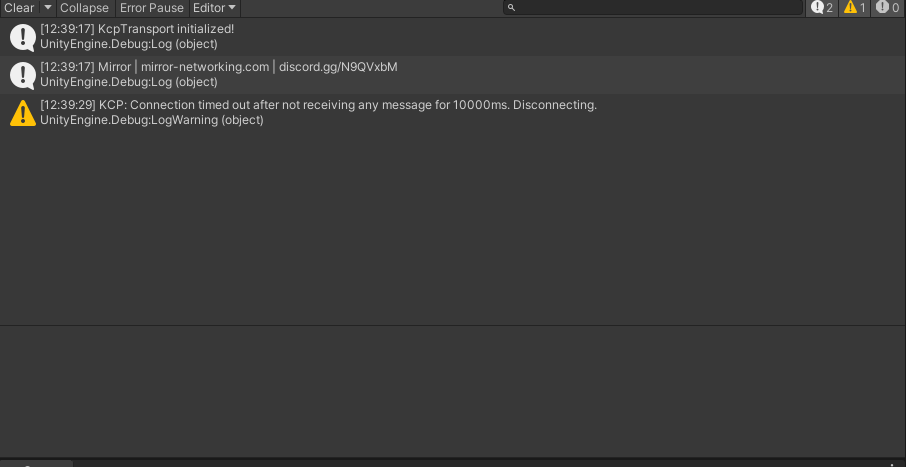
Desktop (please complete the following information):
- OS: Windows 11 with Linux subsystem to execute the linux build or using Linux server
- Build target: Linux standalone or Linux Server
- Unity version: 2021.3.6f1
- Mirror branch: v66
Additional context Only happens in unity 2021


Also i tried compiling with Net Framework and with Net Standard 2.1 with same results
Tried with telepathy transport and works now!!!! Thanks !!!!
interesting. any chance you could attach your debugger and see where it may fail on linux with kcp?
Assigning @vis2k to see if this is still an issue with recent kcp updates.

a lot of projects are using kcp transport on linux. this seems to work fine.
if anyone encounters issues like this one again: try binding the kcp server to "0.0.0.0" instead of "127.0.0.1". I've had a similar issue in Rust earlier, where "127.0.0.1" would not work on linux.