

 MirrorNetworking
Rotation or Translation not synced when one is much slower than the other
Description If rotation is much slower than translation, it doesn't get synced at all.
How to reproduce -Create a new Unity 2021.3.4f1 project -Add Mirror (tested with 66.0.9 and 67.1.0) -In Sample scene: Add an object with a NetworkManager + NetworkManagerHUD -Create player prefab (just an empty object with a NetworkIdentity) and add it to the NetworkManager -Create a Cube -Add a NetworkTransform to cube -Add TestingMovements.cs to project and add it to the cube -Build in Development build to directly see the logs -Execute the project twice, once for the Host, once for the Client.
What happens is, if on the host you rotate using the arrows, it will sync properly, however, if you translate while rotating (WASD to translate, arrows to rotate), the rotation won't be synced at all. The opposite happens when the translation is much slower than the rotation.
TestingMovements.cs
using UnityEngine;

public class TestingMovements : MonoBehaviour
{
    public float speed=1;
    public float rotSpeed=1;

    void Update()
    {
        float rotMovement = rotSpeed * Time.deltaTime;
        if (Input.GetKey(KeyCode.UpArrow)) transform.Rotate(Vector3.forward, rotMovement);
        if (Input.GetKey(KeyCode.DownArrow)) transform.Rotate(Vector3.forward, -rotMovement);
        if (Input.GetKey(KeyCode.LeftArrow))transform.Rotate(Vector3.up, -rotMovement);
        if (Input.GetKey(KeyCode.RightArrow))transform.Rotate(Vector3.up, rotMovement);

        float posMovement = speed * Time.deltaTime;
        if (Input.GetKey(KeyCode.W)) transform.Translate(Vector3.forward * posMovement);
        if (Input.GetKey(KeyCode.S)) transform.Translate(Vector3.back * posMovement);
        if (Input.GetKey(KeyCode.A)) transform.Translate(Vector3.left * posMovement);
        if (Input.GetKey(KeyCode.D)) transform.Translate(Vector3.right * posMovement);

        Debug.LogError($"{gameObject.name} : Position: {transform.position.ToString("N3")} Rotation: {transform.rotation.eulerAngles.ToString("N3")}");
    }
}
Expected behavior The rotation should be synced regardless of whether we are translating or not.
Screenshots
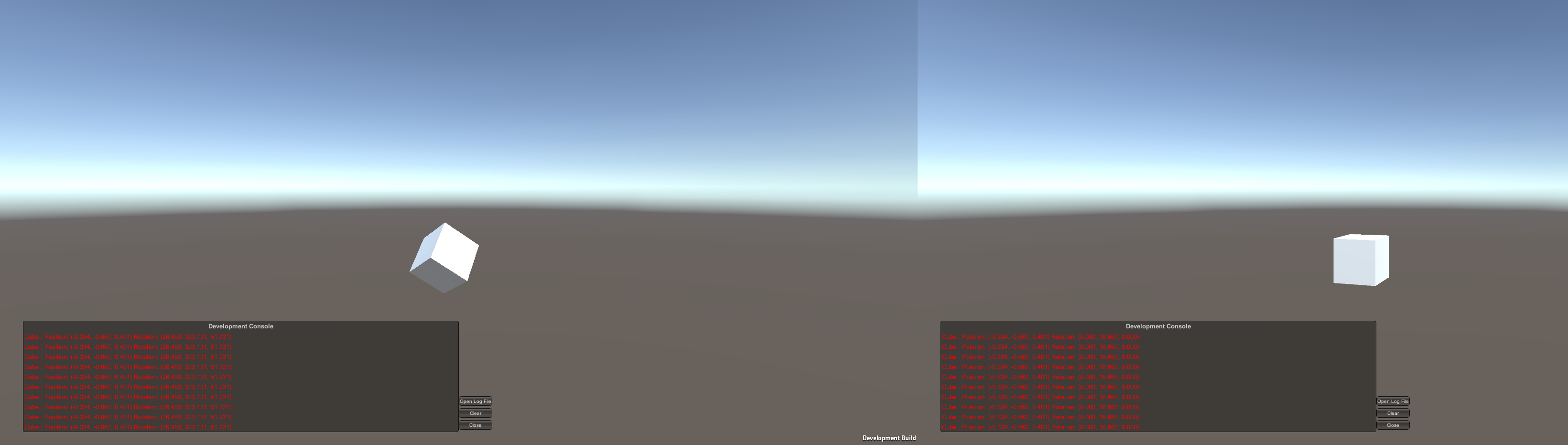
Desktop OS: [Windows]
- Build target: [Windows]
- Unity version: [2021.3.4f1]
- Mirror branch: [Release 67.1.0]

@TessTiner Erm, Your Update() code, and thus button detection is running on all scripts on all players object, so im running the script on your player. Change MonoBehaviour to NetworkBehaviour at top, and add this: void Update() { if( isLocalPlayer == false) return;

The cube is not a player object, there is only one cube in the scene and it is moved by the server in this example. I wanted to keep the code minimal but to be a little cleaner you can indeed change the TestingMovements.cs code to this to make it explicit that it is only controlled by the server:
using UnityEngine;
using Mirror;

public class TestingMovements : NetworkBehaviour
{
    public float speed=1;
    public float rotSpeed=1;

    void Update()
    {
        if(isServer)
        {
            float rotMovement = rotSpeed * Time.deltaTime;
            if (Input.GetKey(KeyCode.UpArrow)) transform.Rotate(Vector3.forward, rotMovement);
            if (Input.GetKey(KeyCode.DownArrow)) transform.Rotate(Vector3.forward, -rotMovement);
            if (Input.GetKey(KeyCode.LeftArrow)) transform.Rotate(Vector3.up, -rotMovement);
            if (Input.GetKey(KeyCode.RightArrow)) transform.Rotate(Vector3.up, rotMovement);

            float posMovement = speed * Time.deltaTime;
            if (Input.GetKey(KeyCode.W)) transform.Translate(Vector3.forward * posMovement);
            if (Input.GetKey(KeyCode.S)) transform.Translate(Vector3.back * posMovement);
            if (Input.GetKey(KeyCode.A)) transform.Translate(Vector3.left * posMovement);
            if (Input.GetKey(KeyCode.D)) transform.Translate(Vector3.right * posMovement);
        }

        Debug.LogError($"{gameObject.name} : Position: {transform.position.ToString("N3")} Rotation: {transform.rotation.eulerAngles.ToString("N3")}");
    }
}
I tested just to be sure but the bug still happens with this slightly modified script.
Here is the scene hierarchy when it is playing:
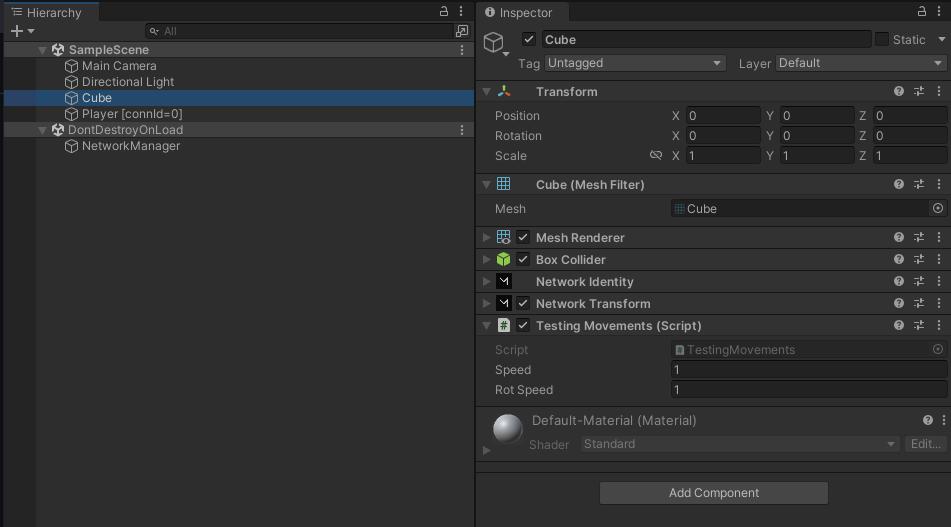
For curiosity I also made a version where the I made a player prefab out of the cube (and deleted the one in the scene) and modified the script to this:
using UnityEngine;
using Mirror;

public class TestingMovements : NetworkBehaviour
{
    public float speed = 1;
    public float rotSpeed = 1;

    void Update()
    {
        if (isLocalPlayer)
        {
            float rotMovement = rotSpeed * Time.deltaTime;
            if (Input.GetKey(KeyCode.UpArrow)) transform.Rotate(Vector3.forward, rotMovement);
            if (Input.GetKey(KeyCode.DownArrow)) transform.Rotate(Vector3.forward, -rotMovement);
            if (Input.GetKey(KeyCode.LeftArrow)) transform.Rotate(Vector3.up, -rotMovement);
            if (Input.GetKey(KeyCode.RightArrow)) transform.Rotate(Vector3.up, rotMovement);

            float posMovement = speed * Time.deltaTime;
            if (Input.GetKey(KeyCode.W)) transform.Translate(Vector3.forward * posMovement);
            if (Input.GetKey(KeyCode.S)) transform.Translate(Vector3.back * posMovement);
            if (Input.GetKey(KeyCode.A)) transform.Translate(Vector3.left * posMovement);
            if (Input.GetKey(KeyCode.D)) transform.Translate(Vector3.right * posMovement);
        }

        Debug.LogError($"{gameObject.name} : Position: {transform.position.ToString("N3")} Rotation: {transform.rotation.eulerAngles.ToString("N3")}");
    }
}
And the client player rotation is not synced properly on the host and vice-versa.
Is the movement threshold set correctly? IIRC there's a threshold in the Network Transform that dictates when it'll synchronize.

That is one of the first things I tweaked but it did not solve the issue. I don't think it is relevant anyway since after a while, the difference is way higher than any threshold (you can see it in the image in my first message) and I suspect the difference can actually get arbitrarily high, as long as there is not a big enough change happening in a single frame compared to the change of the other movement (rotation/translation).
Is this still true in master branch, with the new NetworkTransform components?
