

 MirrorNetworking
NetworkAnimator.cs (bool CheckAnimStateChanged) Error on enabling gameObject with Animator
Describe the bug [Not critical bug] The IndexOutOfRangeException error is thrown on enabling other prefab with another NetworkAnimator.cs.
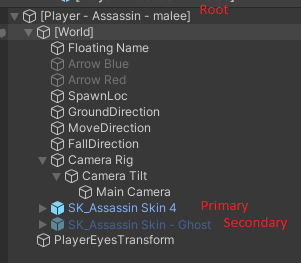
[IMPORTANT] How can we reproduce the issue, step by step: A player prefab has two models. On special effect player enables another object to show different model/animations and disables the primary one.
The script which was used to change prefabs (spawned object on server):
    IEnumerator SecondaryPlayerEffect()
    {
        SyncEffect(true);

        while (!playerBase.IsAttacking && timePassed < 10)
        {
            if (!playerBase.IsStealthed) playerBase.IsStealthed = true;

            timePassed += Time.deltaTime;
            yield return null;
        }
        playerBase.IsStealthed = false;
        SyncEffect(false);
    }

    private void SyncEffect(bool value)
    {
        Loop(value);
    }

    private void Loop(bool value)
    {
        foreach (var player in netManager.players)
        {
            TargetSyncEffect(player.Value, player.Key, value);
        }
    }

    [TargetRpc]
    private void TargetSyncEffect(NetworkConnection conn,string playerName, bool value)
    {
        if(mainPrefab == null)
            mainPrefab = MyHelper.FindComponentInChildWithTag(Owner, "PlayerObject", true);
        if (secondaryPrefab == null)
            secondaryPrefab = MyHelper.FindComponentInChildWithTag(Owner, "StealthObject", true);
        if (floatingText == null)
            floatingText = MyHelper.FindComponentInChildWithTag(Owner, "FloatingText", true);

        if (playerName == Owner.name)
        {
            secondaryPrefab.SetActive(value);
            mainPrefab.SetActive(!value);
        }
        else
        {
            floatingText.SetActive(!value);
            mainPrefab.SetActive(!value);
        }
    }
Scripts on players prefab (root), second NetworkAnimator points to Animator on child object (secondary model)

The fix I did: NetworkAnimator.cs, method bool CheckAnimStateChanged, added check to skip if layerWeight.Length is zero. Because every animators has at least 1 layer. The issue might happen, because script checks if state changed every fixed frame, without checking if layers are not 0. Next frame, the error disappears.
Desktop (please complete the following information):
- OS: Windows 10 Pro
- Build target: Standalone
- Unity version: 2020.3.13f1
- Mirror branch: asset store version 40.0.9
