

 MirrorNetworking
ObjectDestroyMessage for DontDestroyOnLoad objects lost during Scene switch
Describe the bug
When changing scenes, all clients are set to not ready. The method used for this is SetClientNotReady. This method removes all observers for the client connections. When calling NetworkServer.Destroy(someGameobject); (where someGameobject is part of DontDestroyOnLoad) immediately on the host/server after a scene change, the clients won't be ready yet, and they won't be part of the observers of the someGameobject, thus the ObjectDestroyMessage will be lost on clients that are still loading.
(I guess that most probably all types of messages will be lost during this phase, but it's most severe for ObjectDestroyMessage, since they will then just continue to be zombie objects on the clients forever/until the game is closed.)
How to reproduce the issue, step by step
The problem can easily be reproduced by inserting one line of code, and then be replicated by using the "Room" example provided by Mirror. (So obviously if you are going to build the project add the three scenes of "Room" to the build settings, however, I would recommend using two Unity editor instances, since it allows you to see any transforms in the scene.) In the NetworkRoomManager.cs, in line 192 insert the following line of code: NetworkServer.Destroy(roomPlayer);
Then the method SceneLoadedForPlayer should look like this
        void SceneLoadedForPlayer(NetworkConnection conn, GameObject roomPlayer)
        {
            // Debug.LogFormat(LogType.Log, "NetworkRoom SceneLoadedForPlayer scene: {0} {1}", SceneManager.GetActiveScene().path, conn);

            if (IsSceneActive(RoomScene))
            {
                // cant be ready in room, add to ready list
                PendingPlayer pending;
                pending.conn = conn;
                pending.roomPlayer = roomPlayer;
                pendingPlayers.Add(pending);
                return;
            }

            GameObject gamePlayer = OnRoomServerCreateGamePlayer(conn, roomPlayer);
            if (gamePlayer == null)
            {
                // get start position from base class
                Transform startPos = GetStartPosition();
                gamePlayer = startPos != null
                    ? Instantiate(playerPrefab, startPos.position, startPos.rotation)
                    : Instantiate(playerPrefab, Vector3.zero, Quaternion.identity);
            }

            if (!OnRoomServerSceneLoadedForPlayer(conn, roomPlayer, gamePlayer))
                return;

            NetworkServer.Destroy(roomPlayer); //THIS LINE IS THE ONLY CHANGE COMPARED TO ORIGINAL MIRROR

            // replace room player with game player
            NetworkServer.ReplacePlayerForConnection(conn, gamePlayer, true);
        }
Now, the next steps are quite simple:
- Host with the first instance. This instance will be referred to as "host".
- Join as a client to localhost on the seond instance (this instance should be run in the Unity editor, since it allows you to see the GameObjects in the scene). This instance will be referred to as "client"
- Click ready on the client.
- Click ready on the host.
- Click start on the host.
- Now on the client, in the
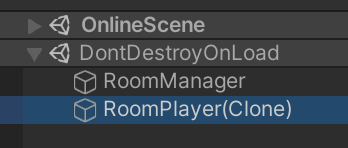
DontDestroyOnLoadscene object, there will a child called "RoomPlayer(Clone)". If you take a closer look, it will have the index 0 in the NetworkRoomPlayerExt script, meaning this is the RoomPlayer object of the host, that has been destroyed while the client was still loading (or at least while the host has not yet processed the ready message). This RoomPlayer object will live on until the game is closed in a zombie-like state, because the host thinks it has already been destroyed, and thus won't send any new Messages for it. - On the host all RoomPlayer objects will have been deleted.
You can also try running 3 or more instances. Using n instances, one instance will have n-1 zombie RoomPlayers, another instance will have n-2 zombie RoomPlayers, the next one n-3 zombie RoomPlayers and so on. Only on the host all RoomPlayers have been destroyed.
Expected behavior
Calling NetworkServer.Destroy(something); should destroy something on all clients, even when called during a Scene change.
Screenshots
The client will still see a RoomPlayer, even though it should have been destroyed:
Desktop:
- OS: Windows 10
- Build target: Windows x86, standalone
- Unity version: 2019.4.22f1
- Mirror branch: master (v35.0.1)
Additional context I am going to submit a pull request for a fix I made myself soon. This issue should help highlight the reasons for the changes.

Do you realize that destroying the RoomPlayer breaks the Room system's ability to return to the Room scene correctly? By design the room player does nothing outside of the Room scene, but lives in DDOL so it can function properly when going back to the Room scene from Game play scene.

Hi, thanks for your answer! To be honest, I wrote my own inherited class of the NetworkManager that works similar to the RoomManager (and has extended functionality because I have multiple different player prefabs, some special requirements, and so on). I simply chose the Room example because it allows you to replicate the issue by only writing one single line of code.
Nevertheless: The issue stays the same, messages regarding DDOL gameobjects get lost during scene changes for clients that have not yet loaded the new scene.
So I'm running into the same issue. Objects aren't destroyed on clients if the clients are unready as the time the destroy message is supposed to be sent.
I'm convinced this is unintended behavior since SendToObservers, which is used to send the Destroy message, explicitly states "// this is like SendToReadyObservers - but it doesn't check the ready flag on the connection.", implying that a player's ready status should not factor into whether it receives this message, but since the observer is not in the list it misses the message anyways.
I came here to post a bug report but stumbled upon this one. Has any progress been made on fixing this?
