MirrorNetworking
NetworkDiscovery freeze
Describe the bug NetworkDiscovery causes the game to freeze when StopDiscovery gets called from OnServerFound callback.
Repro project https://1drv.ms/u/s!ArafnbgKcsvygu90RXmOsjXhNzI7MA?e=BiqOVD
To Reproduce Steps to reproduce the behavior:
- Open the attached project 'NetworkDiscoveryBugReport'
- Open Scene 'NetworkDiscoveryBugReport'
- Run the server from 'Server' Folder
- Press 'Play' in Unity Editor
Expected behavior
- Log server response endpoint in console.
- Stop network discovery
- Not freeze
Desktop (please complete the following information):
- OS: [Windows]
- Build target: [Standalone]
- Unity version: [e.g. 2019.3.13f1]
- Mirror branch: [Version 13.0.1 from Asset Store]
Additional context I suppose, the problem is caused by the discovery loop running in an async Task and the callback gets Invoked from there. The StopDiscovery is then executed in the async thread and Unity gets all confused. I managed to solve it by setting a flag in the script and when the flag is set running StopDiscovery on the main thread, which works correctly. The code is in 'NetworkDiscoveryBugReport' script.

@alesmasiar any chance that you could send us a pull request with your fix, or just post the fix here?

@alesmasiar any chance that you could send us a pull request with your fix, or just post the fix here?
I didn't actually manage to fix the bug, I just found a workaround.
The code for this is included in the repro project I posted. In the 'NetworkDiscoveryBugReport' script, there's the line _networkDiscovery.StopDiscovery();, which causes the game to freeze. If you switch this line with _stopDiscovery = true;, it then runs in the update loop on the main thread and doesn't crash.
I'm not quite sure what's really causing the freeze, but I think it might have something to do with the ReceiveGameBroadcastAsync running as async task, then when ProcessResponse is called in the NetworkDiscovery class, it invokes OnServerFound.Invoke(response); on the async thread as well and that might be causing the issue.
Have the same problem. Managed to work around it by starting a coroutine & waiting one frame before calling StopDiscovery:
        private void OnServerFound(ServerResponse response) {
            Debug.Log("Found server @" + response.uri);

            StartCoroutine(ConnectToServer(response));
        }

        IEnumerator ConnectToServer(ServerResponse response) {
            //Skip one frame, otherwise discovery.StopDiscovery freezes everything.
            yield return null;

            if (!NetworkClient.isConnected) {
                discovery.StopDiscovery();
                NetworkManager.singleton.StartClient(response.uri);
            }
        }

I had the same issue, only on Android. Delaying the Discovery by one frame as explained above fixes the problem.
I actually got an EndOfStreamException because the ReceiveGameBroadcastAsync method is still being executed while the udpClient that it receives as argument is no longer valid.
EndOfStreamException: ReadByte out of range:NetworkReader pos=0 len=0 buffer=
  at Mirror.NetworkReader.ReadByte () [0x00000] in <00000000000000000000000000000000>:0
  at Mirror.NetworkReaderExtensions.ReadUInt64 (Mirror.NetworkReader reader) [0x00000] in <00000000000000000000000000000000>:0
  at Mirror.NetworkReaderExtensions.ReadInt64 (Mirror.NetworkReader reader) [0x00000] in <00000000000000000000000000000000>:0
  at Mirror.Discovery.NetworkDiscoveryBase`2+<ReceiveGameBroadcastAsync>d__22[Request,Response].MoveNext () [0x00000] in <00000000000000000000000000000000>:0
  at System.Runtime.CompilerServices.AsyncMethodBuilderCore+MoveNextRunner.InvokeMoveNext (System.Object stateMachine) [0x00000] in <00000000000000000000000000000000>:0
  at System.Threading.ExecutionContext.RunInternal (System.Threading.ExecutionContext executionContext, System.Threading.ContextCallback callback, System.Object state, System.Boolean preserveSyncCtx) [0x00000] in <00000000000000000000000000000000>:0
  at System.Threading
This then snowballs into a non stop spam of this error:
NullReferenceException: Object reference not set to an instance of an object.
  at Mirror.Discovery.NetworkDiscoveryBase`2+<ReceiveGameBroadcastAsync>d__22[Request,Response].MoveNext () [0x00000] in <00000000000000000000000000000000>:0
  at System.Runtime.CompilerServices.AsyncTaskMethodBuilder.Start[TStateMachine] (TStateMachine& stateMachine) [0x00000] in <00000000000000000000000000000000>:0
  at Mirror.Discovery.NetworkDiscoveryBase`2[Request,Response].ReceiveGameBroadcastAsync (System.Net.Sockets.UdpClient udpClient) [0x00000] in <00000000000000000000000000000000>:0
  at Mirror.Discovery.NetworkDiscoveryBase`2+<ClientListenAsync>d__19[Request,Response].MoveNext () [0x00000] in <00000000000000000000000000000000>:0
  at System.Runtime.CompilerServices.AsyncMethodBuilderCore+MoveNextRunner.InvokeMoveNext (System.Object stateMachine) [0x00000] in <00000000000000000000000000000000>:0
  at System.Threading.ExecutionContext.RunInternal (System.Threading.ExecutionContext executionContext, System.Threading.C

This may have been fixed over a year ago in #2908 - will try to reproduce.

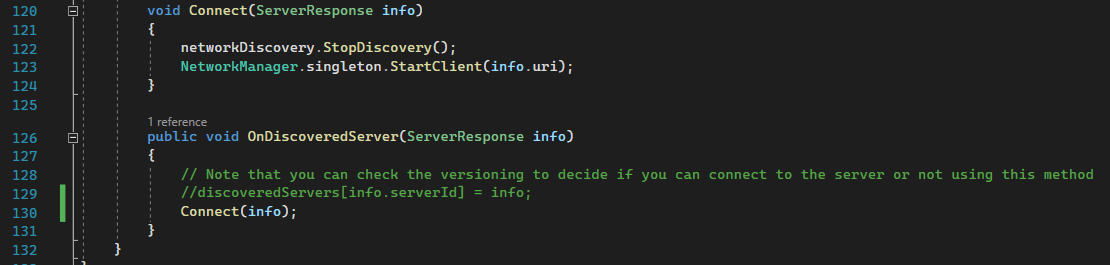
Starting with the Discovery example included in Mirror, I modified the DiscoveryHUD script to immediately call Connect when a ServerResponse is received, built a headless server, ran client in editor, and clicked Find Servers and it connected as expected with no errors. I also clicked Stop Client and Find Servers again (repeatedly, quickly) and it always worked without issue.
Closing this as "Fixed". If someone can reproduce some other way, please create a new ticket