

 MinecraftForge
Mod loading warning screen does not appear for located invalid mod files
Minecraft Version: 1.19.3 / 1.19.2 / 1.18.2
Forge Version: 44.0.37 / 43.2.1 / 40.1.92
Logs: n/a
Steps to Reproduce:
- Create a blank JAR file in the
modsfolder. (This can be done by renaming a blank ZIP file to the.jarextension.) - Load the game.
- Observe that nothing happens.
- Install Forge 1.16.5-36.2.39 and run it from the same directory.
-
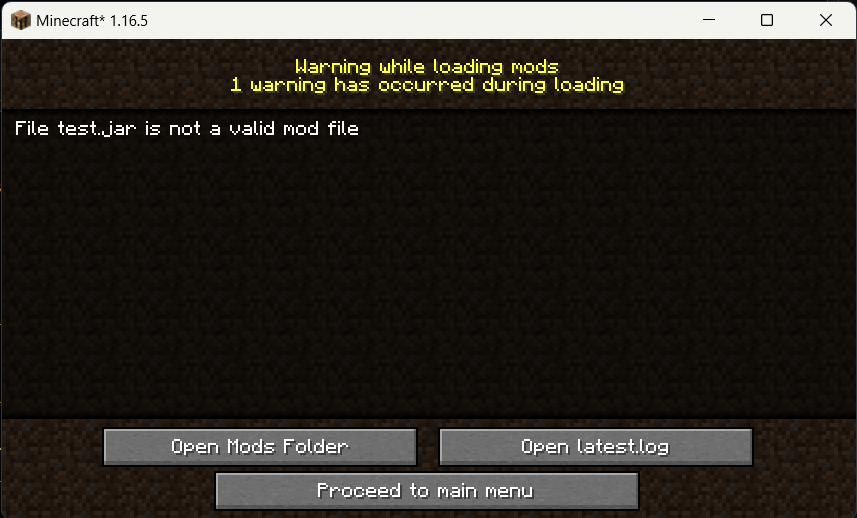
Observe that a warning screen comes up after loading, warning the user about an invalid mod file -- the same blank JAR file in step 1 -- in the
modsfolder.Screenshot of the mod loading warning screen
-
Description of issue:
FML has a mod loading error/warning screen, which is presented to the user when errors or warnings are issued by the mod loading system. One example of warnings which may be issued are warnings of files found by mod locators, such as the mods folder locator, that are not valid mod files. See the screenshot above for an example of such a warning presented to the user.
However, since Forge's update to 1.17, the mod warning screen is no longer shown when invalid mod files are found by mod locators. It seems that the FML PEEL of 1.17 changed how invalid mod files are propagated through to the mod loader.
I've investigated 1.19.2/3 code with regards to the issue, and it seems to be because AbstractModLocator#createMod creates a ModFileLoadingException when it encounters an invalid mod file, but ModDiscoverer#discoverMods requires the specific exception subclass InvalidModFileException[^1] to add it to the list of broken mod files.
Credits to @EnnuiL for reporting this issue to me, which I then confirmed.
[^1]: AbstractModProvider does not use this exception because it requires a IModFileInfo to create, which it does not have because it only creates an instance of that (ModFile) when it detects it as a valid mod file with a mods.toml or a valid value for the manifest attribute FMLModType.
