
sd-webui-controlnet
 sd-webui-controlnet copied to clipboard
 Mikubill
[Bug]: models/ControlNet folder ......... no, cannot read from this folder
Is there an existing issue for this?
- [X] I have searched the existing issues and checked the recent builds/commits of both this extension and the webui
What happened?
Usage Put the ControlNet models (.pt, .pth, .ckpt or .safetensors) inside the models/ControlNet folder.
[Bug]: models/ControlNet folder ......... no, cannot read from this folder
Steps to reproduce the problem
omg
What should have happened?
omg
Commit where the problem happens
omg
What browsers do you use to access the UI ?
No response
Command Line Arguments
omg
Console logs
omg
Additional information
No response


You can also go to settings and add the folder, or use command line argument --controlnet-dir <path-to-cn-models-folder>.

guys no,
i mean the folder in the root,
lets say, for example, c:\a1111 webui\MODELS\controlnet
there is this folde name controlnet after you installed it...
and you cannot put models in it and have it read by the controlnet extension...... get it?
also there is bunch of big files need to put inside "annotator" folder which is really misleading for starters...
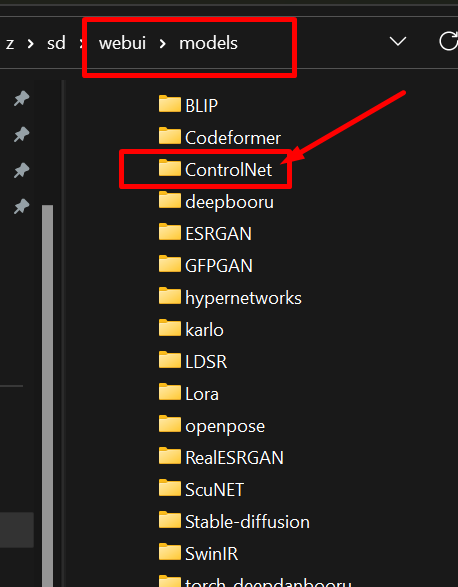
You can also go to settings and add the folder, or use command line argument
--controlnet-dir <path-to-cn-models-folder>. how do you do it? i tried and doesnt work. i put the dir add but seems like it cannot read...

i knew this, but i am referring to the folder in the root
Are you on the latest version? A month ago the part of the code responsible for this was moved to a different location:
https://github.com/Mikubill/sd-webui-controlnet/blob/241c05f8c9d3c5abe637187e3c4bb46f17447029/scripts/global_state.py#L99
You should be able to use this directory exactly in the same way as any other location listed in this list. Can you verify that your models location points where you expect? For example, if you specify the --data-dir cli arg you will need to put your controlnet models under <data-dir>/models/ControlNet instead.
It could alternatively have to do with the model you are using also. If your model is corrupted or not a controlnet model, or if there is a bug in the model loading code, then you may not see a model even though you put it at the correct location.
I would appreciate you filling the sections of the bug report instead of putting "omg" because these actually help speed up issue resolution.
i am pretty sure i stay up to date on all my ext and webui...
but
this thread is 2 weeks old, and i probably haven't check it since then...
i will post update soon