
sd-webui-controlnet
 sd-webui-controlnet copied to clipboard
 Mikubill
Currently almost all faces generated with ControlNet are bad (even with face restore). I propose a solution (enhancement?)
Not sure about others but every test I did where the face isn't super close (taking up the entire image), they come out pretty terrible. No matter what model I use. There is a potential fix (not sure how easy or hard to implement).
Using the "Highres .fix" option, which fixes the faces perfectly. But isn't that a default feature of A111 already? Yes, but highres .fix is applied to the entire image. Which will sadly often ruin the very correct pose that we were able to get using ControlNet (even at very low denoising levels).
If instead we can choose to manually "mask" an area on the image we gave to controlnet (the head/face for example only), and have a checkmark option to apply the highres fix ONLY to the area masked and not the rest of the generation, then highres fix will always fix ControlNet faces for you, without having to manually send every image to img2img each time and without ruining the rest of the pose!
Only reason I can't use ControlNet still is the faces issue and this is a nice way to solve it I think. This would also enable other possibilities for artistic choices. Such as, instead of masking only the face to apply hi.res to face only, you wanna also mask the boobs so that high res fix applies to them as well (if your source image model had MASSIVE ones and you wanted to make them smaller for example).
I know that all of what I'm saying is also doable by just sending your normal controlnet generation to img2img and then doing the masks, but I think the quality of life improvement of not having to constantly go back and forth and generating things twice is worth it. Especially since you are only able to send 1 image at a time to img2img, whereas with this method you would be doing it in 1 place for as many images as you want.

do we have a mode to do something like 50% iteration control? lets say we have 50 sampling steps, perhaps we can just control the first 25 steps.

do we have a mode to do something like 50% iteration control? lets say we have 50 sampling steps, perhaps we can just control the first 25 steps.
There's prompt editing which lets you change prompt on certain steps

do we have a mode to do something like 50% iteration control
guidance strength is designed for this. Also see https://github.com/Mikubill/sd-webui-controlnet/discussions/175

do we have a mode to do something like 50% iteration control
guidance strength is designed for this. Also see #175
brilliant! Then if the face is still bad, the problem is caused by the base model, not controlnet. Perhaps some base model is overfitted and not robust enough?
do we have a mode to do something like 50% iteration control
guidance strength is designed for this. Also see #175
brilliant! Then if the face is still bad, the problem is caused by the base model, not controlnet. Perhaps some base model is overfitted and not robust enough?
@lllyasviel The problem is most certainly not the model. I've experimented on various of my best models, and face issues appear only when enabling controlnet. I've tried all possible combinations of Weight and Guidance strength settings (using the prompt matrix). The bad faces issue remains. The only fix I found so far is high. res as I described above.
Even if the guidance strength adjustment solved the issue (which it does not and I've ran tests with various different settings/models), it doesn't stop the fact that reducing guidance strength will introduce changes to the overall pose, which is unwanted.
The main issue here is the need to mask specific areas of the reference image and apply hi.res fix only to those, to enable some fine tuning while also avoiding destroying the rest of the benefits that you get from ControlNet. Yes you can send the image to inpainting and do it from there, but as I said the issue with that is that a) You can't do it for multiple images, you gotta generate 1 by one and send one by one and regenerate one by one. b) It's just a lot more effort to be constantly going back and forth between tabs and adjusting all settings twice each time.
Hmm..maybe inpaint could do some work in this area, but there's still some issues hooking with WebUI at the moment.
Hmm..maybe inpaint could do some work in this area, but there's still some issues hooking with WebUI at the moment.
In the case where in inpainting mode, we use the exact same image used in controlnet, I think that instead of the Highres .fix we need some kind of option to just copy the exact mask from an inpainted area to the controlnet image and use the "Only masked" option to fix faces or details of the image, maybe by also adjusting the Weight and Guidance strength?
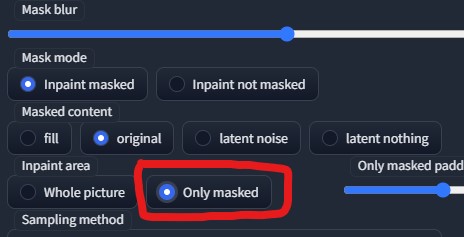

Hmm..maybe inpaint could do some work in this area, but there's still some issues hooking with WebUI at the moment.
In the case where in inpainting mode, we use the exact same image used in controlnet, I think that instead of the Highres .fix we need some kind of option to just copy the exact mask from an inpainted area to the controlnet image and use the "Only masked" option to fix faces or details of the image, maybe by also adjusting the Weight and Guidance strength?
I think going through the "highres fix." route is better, because from my tests I noticed that upscaling the image helps the face a lot too - a lot more than doing the highres fix at x1 resize. If we do it through the img2img tab inpainting mode, you will still have to throw a high res/upscale on top of it to fix the face to an ideal result. The ultimate goal here is to reduce the number of clicks/different workflows needed. And I think the smoothest way of achieving that is like I described in the original comment
Using "only masked" option in inpaint tab wouldn't be as resource heavy as doing hires fix. It essentially crops masked area to whatever resolution is set and works only on that part of image and then pastes it back rather than rendering whole image at higher resolution
Using "only masked" option in inpaint tab wouldn't be as resource heavy as doing hires fix. It essentially crops masked area to whatever resolution is set and works only on that part of image and then pastes it back rather than rendering whole image at higher resolution
I see, so you could specify a large resolution for just the masked area, to get the benefit you'd get from upscaling, and then it's just resized down to fit into the original image. Yeah, sounds like it could work that way to solve the face issue and not need a hi res fix for it at all.
Using "only masked" option in inpaint tab wouldn't be as resource heavy as doing hires fix. It essentially crops masked area to whatever resolution is set and works only on that part of image and then pastes it back rather than rendering whole image at higher resolution
I see, so you could specify a large resolution for just the masked area, to get the benefit you'd get from upscaling, and then it's just resized down to fit into the original image. Yeah, sounds like it could work that way to solve the face issue and not need a hi res fix for it at all.
Yeah. Don't even need to go higher than default. Whole face area will be rendered at 512x512 (which SD1.5 was trained on) and then pasted back to original pic
Hope to see a GIGACHAD coder add this soon, it would pretty much perfect ControlNet in my opinion😃
I fixed the face issue for canny by deleting (filling with white paint) the whole face (including the jaw) of the pre-processed image and then re-apply pre-process on it when generating new images. Work extremely well.
Maybe include an "exclude" brush for canny so it doesn't try to draw any edges inside the masked area.

I guess the ideal way of providing good quality with highres fix is to have different flexible settings for the basic generation pass and upscaling pass, defaulting to zero. I that case we would have ControlNet off for the highres pass by default, we would also have a checkbox saying "enable on the highres pass" and if the checkbox is enabled, it drops down weight and guidance for that step of generation. Kinda like highresfix itself handles sampling steps.
