

 MikeCarlo
PBI.tips issue: "Themes executable not found. Contact the tool author for support." I installed chrome supported add on and I have Chrome browser.

I would recommend removing the External Tool icon from the ribbon, then re-adding it.
We made some internal changes to the Business Ops tool that moved around some assets, the movement of those internal assets might have caused something to break.
If that doesn't work, Try un-installing Business Ops then re-installing the latest version.
The only other thing I can think of is that the chrome install location is different on your machine that it was on mine. or Google moved the EXE file to run Chrome.

I think the PBITools.json file is broken as the google chrome install location now seems to be in Program Files vs. Program Files (x86) as called out in the json file.
new
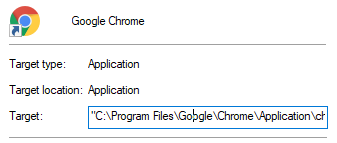
old

I will add this to our backlog to fix...
Did everything but the problem and error message still remains the same. I reinstalled the software and removed and readded the business ops tool along with other for quite a few times. But unable to use them.
On Tue, Apr 27, 2021 at 7:29 PM Mike Carlo @.***> wrote:
I think the PBITools.json file is broken as the google chrome install location now seems to be in Program Files vs. Program Files (x86) as called out in the json file.
new [image: image] https://user-images.githubusercontent.com/25160592/116254135-b57ef100-a736-11eb-8b1a-ffe2bf905007.png
old [image: image] https://user-images.githubusercontent.com/25160592/116254191-c2034980-a736-11eb-9163-d67dc79249c3.png
I will add this to our backlog to fix...
— You are receiving this because you authored the thread. Reply to this email directly, view it on GitHub https://github.com/MikeCarlo/BusinessOps/issues/7#issuecomment-827628660, or unsubscribe https://github.com/notifications/unsubscribe-auth/AT3KQVCHDDB6NRV5NJWLA6TTK27KXANCNFSM43UYGPEQ .
To fix this problem, you need to edit the json file in the following folder.
"C:\Program Files (x86)\Common Files\Microsoft Shared\Power BI Desktop\External Tools"
This is the correct information for my computer for chrome. "C:/Program Files/Google/Chrome/Application/chrome.exe" Make sure you notice that the Slashes are different.
you need to do this for each one that uses Chrome.
I would submit a change request, but the code is private.
