
EpicRPGFarmBot
 EpicRPGFarmBot copied to clipboard
Published
1 year ago
•
 Mid0aria
Mid0aria
Discord Epic RPG farm bot with CAPTCHA(BAN) protection 🗿
dWdnY2Y6Ly9iY3JhLmZjYmd2c2wucGJ6L2dlbnB4LzVwc2tIZ1B4Y3hQVkVlWGxxVVhGb1kgcm90MTM=
6 28 15 26 15
{/__/}( • . •)/ > 🤍
EpicRPG Farm Bot V0.0.5.4(BETA)


Tutorials
Text
- 🎈・Installation
- Windows / Linux - Official
- Android / iOS (Termux) - Official
To get auth key, join the Discord server here, go to #🤖・bot-commands, and send s!key. The official bot will directly message you with the key.
Contents
⭐・Star History
❗・Important
👑・Features
⚙・Config.json example
💎・Get Token
📚・Discord RPC
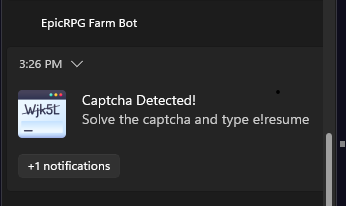
⚠️・Captcha Alert
🔗・Required Links
🎈・Installation
⭐・Star History
Goal:  / 512
/ 512
⭐⭐⭐ You can also give this repository a star so that others know we're trusted!❗・Important (Anyone using the bot is deemed to have read and accepted these)
- Use of this farm bot may lead to actions being taken against your EpicRPG profile and/or your Discord account. We are not responsible for them.
- Discord may restart as a result of discord RPC overload.
- DO NOT USE ONE CHANNEL FOR TWO ACCOUNTS, USE IT FOR 1 ACCOUNT ONLY.
👑・Features
-
Auto Commands:
- Rewards:
- Daily
- Weekly
- Vote (automatically opens the voting site in the browser if you have a vote (not working in termux))
- Experience:
- Hunt
- Adventure
- Training
- Progress:
- Farm
- Seed
- Potato seed
- Carrot seed
- Bread seed
- Working:
- Chop
- Fish
- Pickup
- Mine
- Axe
- Net
- Ladder
- Farm
- Rewards:
-
Event:
- Auto Join Events
- Auto Special Trade
- Auto Accept Arena
-
Inventory:
- Auto Check Inventory
- Auto Use Life Potion (Heal)
- Auto Use Selected LootBoxes
- Auto Sell Selected Items
-
Discord RPC
-
Auto Phrases Send
-
Captcha(Ban) Protection v0.0.1 (beta)
-
NEW FEATURES WILL COME WITH UPDATES
⚙・config.json example
{
    "midoservices_authkey": "mido_services.xxx", / Enter Your midoservices authkey

    "prefix": "e!", / Enter Prefix
    "token": "", / Enter Account Token
    "channelid": "", / Enter channel id where the bot will work
    "userid": "", / Enter your discord account user id
    "commands": {
        "rewards": {
            "daily": true, / true or false
            "weekly": true / true or false
            "vote": {
                "enable": true,
            }
        },
        "experience": {
            "hunt": true, / true or false
            "adventure": true, / true or false
            "training": true / true or false
        },
        "progress": { / !!!! Enable only one of the progress commands, if more than one progress command is enabled, only the farm command is enabled by default
            "farm": {
                "enable": false, / true or false
                "types": {
                    "seed": true, / true or false
                    "potato seed": true, / true or false
                    "carrot seed": true, / true or false
                    "bread seed": true / true or false
                }
            },
            "working": { / !!!! Enable only one of the run commands, if you enable more than one, by default only the chop command will be enabled.
                "chop": false, / true or false
                "fish": true, / true or false
                "pickup": false, / true or false
                "mine": false, / true or false
                "axe": false, / true or false
                "net": false, / true or false
                "ladder": false / true or false
            }
        }
    },
    "settings": {
        "discordrpc": true, / true or false
        "autophrases": true, / true or false
        "event": {
            "autojoin": true, / true or false
            "autospecialtrade": true, / true or false
            "autoarena": true / true or false
        },

        "inventory": {
            "check": true, / true or false
            "lifepotion": {
                "autouse": true, / true or false
                "hplimit": 170 / will automatically use a life potion when your health drops below this value
            },
            "lootbox": {
                "autouse": true, / true or false
                "types": {
                    "common lootbox": true, / true or false
                    "uncommon lootbox": true, / true or false
                    "rare lootbox": true, / true or false
                    "EPIC lootbox": true, / true or false
                    "EDGY lootbox": true, / true or false
                    "OMEGA lootbox": true / true or false
                }
            },
            "sell": {
                "enable": false, / true or false
                "types": {
                    "normie fish": true, / true or false
                    "golden fish": true, / true or false
                    "EPIC fish": true, / true or false
                    "SUPER fish": true, / true or false
                    "wooden log": true, / true or false
                    "EPIC log": true, / true or false
                    "SUPER log": true, / true or false
                    "MEGA log": true, / true or false
                    "HYPER log": true, / true or false
                    "ULTRA log": true, / true or false
                    "ULTIMATE log": true, / true or false
                    "apple": true, / true or false
                    "banana": true, / true or false
                    "bread": true, / true or false
                    "carrot": true, / true or false
                    "flask": true, / true or false
                    "wolf skin": true, / true or false
                    "zombie eye": true / true or false
                }
            }
        }
    }
}
💎・Get Token
PC
- Open your preferred browser (with developer tools) and login to https://discord.com/app
- Press CTRL + Shift + I and open the Console tab.
- Paste the following code.
- The text returned (excluding the quotes
') will be your Discord account token.
(webpackChunkdiscord_app.push([
    [""],
    {},
    (e) => {
        for (let t in ((m = []), e.c)) m.push(e.c[t]);
    },
]),
m)
    .find((e) => e?.exports?.default?.getToken !== void 0)
    .exports.default.getToken();
Mobile/Android
- Open Chrome
- Create a bookmark (by clicking on star button in 3 dots menu)
- Edit it and set name to Token Finder and url to the following code:
javascript: (webpackChunkdiscord_app.push([[""],{},(e)=>{m=[];for (let c in e.c) m.push(e.c[c]);},]),m).find((m) => m?.exports?.default?.getToken%20!==%20void%200)%20%20%20%20.exports.default.getToken(); - Open https://discord.com/app and log in.
- Tap on search bar and type Token Finder (don't search it just type)
- Click on the bookmark named Token Finder.
- A new page will open, the text in the page will be your Discord account token.
📚・Discord RPC

⚠️・Captcha Alert
[!NOTE] If you want the captcha alert to work properly, turn off do not disturb
🔗・Required Links
NodeJS
Terminal
Farm Bot ZIP File
🎈・Installation
🖥️・Windows / Linux
# Check Node.js version:
node -v

# Clone the files with git:
git clone https://github.com/Mid0aria/epicrpgfarmbot
# Optionally you can also download from github at https://github.com/Mid0aria/epicrpgfarmbot/archive/refs/heads/main.zip

# Enter into the cloned directory:
cd epicrpgfarmbot

# Configure the bot:
notepad config.json # On windows
nano config.json # On linux, can also use any other preferred file writing software

# Run the bot:
start ./start.bat
or
node bot.js

# Start Bot:
In config.json, type [prefix]start (example: e!start) with the prefix you set in config.json to the channel whose ID you entered in channelid

# Stop Bot:
In config.json, type [prefix]stop (example: e!stop) with the prefix you set in config.json to the channel whose ID you entered in channelid

# Resume Bot:
In config.json, type [prefix]resume (example: e!resume) with the prefix you set in config.json to the channel whose ID you entered in channelid
📱・Android / iOS (Termux)
# Install:

apt update -y && apt upgrade -y && pkg install wget
wget https://raw.githubusercontent.com/mid0aria/epicrpgfarmbot/main/termux-setup.sh
sh termux-setup.sh

# Configure the bot:

cd epicrpgfarmbot
nano config.json

# Run the bot:
sh start.sh
or
node bot.js

# Start Bot:
In config.json, type [prefix]start (example: e!start) with the prefix you set in config.json to the channel whose ID you entered in channelid

# Stop Bot:
In config.json, type [prefix]stop (example: e!stop) with the prefix you set in config.json to the channel whose ID you entered in channelid

# Resume Bot:
In config.json, type [prefix]resume (example: e!resume) with the prefix you set in config.json to the channel whose ID you entered in channelid
 Mid0aria