

 MicrosoftEdge
Unable to use Clipboard API to write to clipboard in WinUI 3 app with WebView2
This problem is fully explained in this post on Microsoft forums:
https://docs.microsoft.com/en-us/answers/questions/877299/unable-to-use-clipboard-api-to-write-to-clipboard.html
I am unable to create an app I want to make as a result of this issue.
Please let me know if it can be fixed programmatically.
Thank You

In the link I see you write the following:
Hello,

I am writing a WinUI 3 app with WebView2 in Visual Studio Community 2022 (64-bit) which will load a web page and then the user will click a button on the WinUI 3 window that sends JavaScript to the WebView2 via an "await" with the ExecuteScriptAsync function.

It is my understanding that I must use WinUI 3 with Windows App SDK in order for my final app to be eligible to potentially be published to the Microsoft Store.

The JavaScript is supposed to gather information from the web page and then copy it to the clipboard as an HTML blob using the Clipboard API "clipboard.write()" function, but I currently can't even get it to work with plain text. It gives me a "DOMException: Document is not focused." error from the returned promise from the write() function. I have tried correcting this by putting "MyWebView2.Focus(FocusState.Programmatic);" or "MyWebView2.Focus(FocusState.Pointer);" in the click function of the WinUI 3 button before the JavaScript is called, and then also in the JavaScript I put "window.focus();", but none of it has helped.

It appears that the WebView2 class I am required to use with WinUI 3 is the one located at "Microsoft.UI.Xaml.Controls.WebView2".
It works from that namespace in my app even though the WebView2 Nuget package is not added to the project.
If I add the Nuget package I get an error about CoreWebView2 existing in two namespaces.
I found no way to check the version or update the version for the WebView2 under "Microsoft.UI.Xaml.Controls".
I have updated my Windows App SDK and Visual Studio, but it didn't help.
I searched Google and found nothing helpful.
Hopefully someone can tell me how to fix this.
Otherwise, I suspect it is a bug with the WinUI 3 WebView2 control that will prevent me from writing my app until fixed.
My JavaScript is below.
To see the DOMException error, after I click the button to run the JavaScript, I verify the contents of the clipboard have not changed, and then I right-click the web page in the WebView2 and click Inspect and go to the Console and type MyExportStr to view its value.
The WebView2 is on a TabViewItem on the WinUI 3 window. I don't think that's important, but I could be wrong. The TabViewItem is also selected when this runs.
The error DOMException: Document is not focused. I would expect means the WebView2 doesn't have focus, not that the web content's focus is wrong. If you move the WebView2 out of the TabView and into a Grid or something plain like the WinUI3 WebView2 sample app does, do you still experience the same problem?
Also, what version of WinUI3 and WebView2 are you using? Is this a UWP app or a Win32 app?

Hi David,
Thank you for your reply.
I've tried every "focus" method I could find including:
MyWebView2.Focus(FocusState.Programmatic);
I've tried using other options from the FocusState enumeration above as well.
I've made sure the TabView tab is selected.
It's a WinUI 3 app. My understanding is that WinUI 3 is replacing UWP.
WinUI 3 and its associated version of WebView2 appear to be a part of WindowsAppSDK.
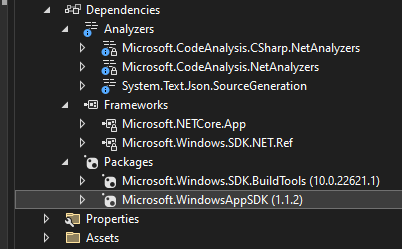
The version of WindowsAppSDK in my project is 1.1.2. It appears to be the latest. No update was found.
There is no separate WebView2 package in my project, which leads me to believe the WebView2 is in the WindowsAppSDK package.
I found no other way to check a version for WinUI 3 or WebView2 even after Googling it.
I also tried adding the WebView2 package to my project and it gives me a namespace conflict for CoreWebView2 when compiling.
I believe the only WebView2 I can use with a WinUI 3 app has to be from the Microsoft.UI.Xaml.Controls namespace.
Even if this could be made to work outside of a TabView, that doesn't really help me.
I need it to work inside of a TabView because of other current limitations of WinUI 3 such as not being able to spawn a separate window. I like the layout in a TabView anyway, and this should be supported.
My app has to be a WinUI 3 app for possible eventual deployment to the Microsoft Store.
Please let me know if you can help, and if you need any other information.
Thank you, Kyle Wilbanks
@david-risney
Hi David,
Are you able to say if this issue will be further investigated or fixed?
Thank you, Kyle Wilbanks
It's a WinUI 3 app. My understanding is that WinUI 3 is replacing UWP.
WinUI3 had 'preview' support for UWP. I guess you are making a Win32 app.
Even if this could be made to work outside of a TabView, that doesn't really help me.
Sorry, I was asking if you could try it in a different simpler control just to help diagnose the issue. Like if it only happens inside a TabView there may be an issue with the WebView2 control getting focus inside of the TabView control.
Yes we will investigate further, thanks
I have decided I no longer wish to pursue developing my app. Hopefully this bug will still be fixed though at some point.