

 MicrosoftEdge
WebView2 Unable to cast COM object of type
I am getting below error.
System.InvalidCastException HResult=0x80004002 Message=Unable to cast COM object of type 'System.__ComObject' to interface type 'Microsoft.Web.WebView2.Core.Raw.ICoreWebView2Controller'. This operation failed because the QueryInterface call on the COM component for the interface with IID '{7CCC5C7F-8351-4572-9077-9C1C80913835}' failed due to the following error: No such interface supported (Exception from HRESULT: 0x80004002 (E_NOINTERFACE)). Source=mscorlib StackTrace: at System.StubHelpers.StubHelpers.GetCOMIPFromRCW(Object objSrc, IntPtr pCPCMD, IntPtr& ppTarget, Boolean& pfNeedsRelease) at Microsoft.Web.WebView2.Core.Raw.ICoreWebView2Controller.Close() at Microsoft.Web.WebView2.Core.CoreWebView2Controller.Close() at Microsoft.Web.WebView2.WinForms.WebView2.Dispose(Boolean disposing) at System.ComponentModel.Component.Finalize()


I have this issue as well. Does anyone know what to do with this error?

@hunkydoryrepair and @HoldenPCaulfield I have move in CefSharp control
What?
@HoldenPCaulfield Now i am using cefsharp control
https://cefsharp.github.io/
For those still hitting this issue, can you add info about what version of the SDK you are using, as well as what version of the WebView2 Runtime/Edge Browser? Thanks!

I have this issue. I split out the project: WebView2WindowsFormsBrowser into a separate solution. This project has the issue. I am not an expert in C#, .Net nor COM, however I have been programming for 50+ years.
I have made it work, actually, but needed to put a Try-Catch block around the code at:
private void SubscribeToAllEventsOnObject(string name, object target)
{
int i = 0;
foreach (EventInfo eventInfo in target.GetType().GetEvents())
{
i+=1;
tweet("Name: " + name);
EventHandlerContext context = new EventHandlerContext(this, name + eventInfo.Name);
MethodInfo methodInfo = context.GetType().GetMethod("HandleEvent");
Delegate handler = Delegate.
(eventInfo.EventHandlerType, context, methodInfo);
try
{
eventInfo.AddEventHandler(target, handler);
}
catch(Exception e)
{
tweet(e.Message); // tweet is my code to show what is going on
}
}
}
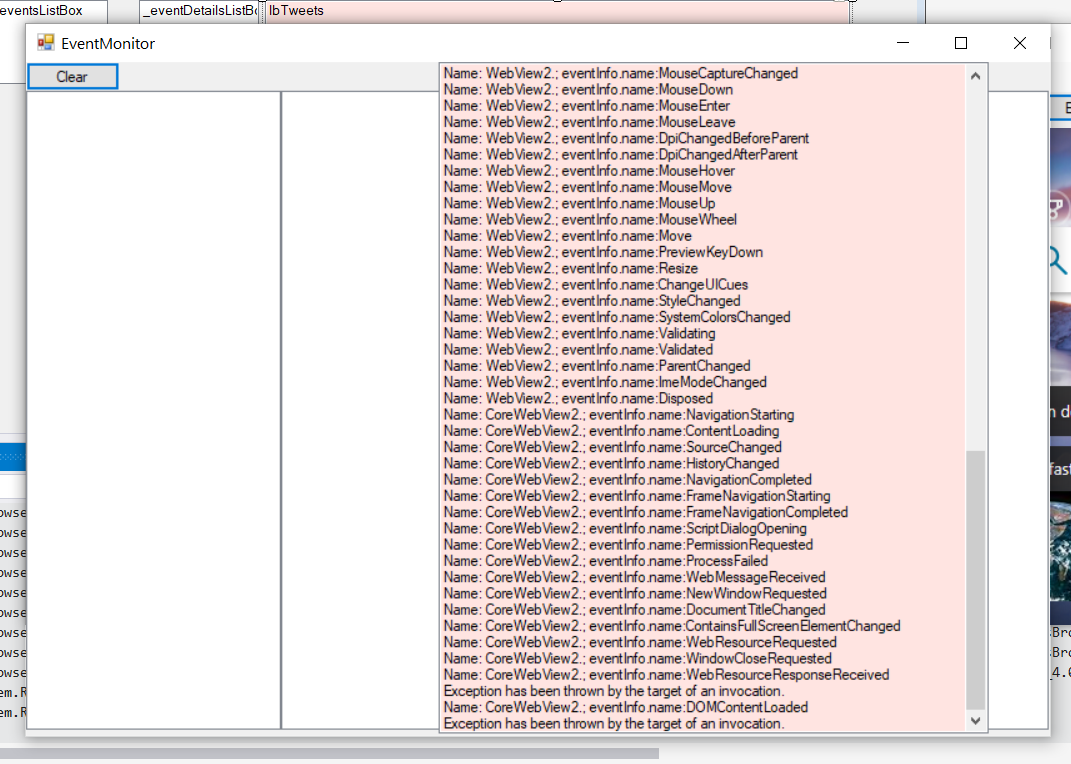
Here is a snippet of the error:

. I am so pleased. Here is my platform on Windows 10:: _> Microsoft Visual Studio Community 2019
Version 16.8.3 VisualStudio.16.Release/16.8.3+30804.86 Microsoft .NET Framework Version 4.8.04084
Installed Version: Community
Visual C++ 2019 00435-60000-00000-AA210 Microsoft Visual C++ 2019_
cheers fellow programmers. Trying to figure wtf Delegates are. lol.
Here is another screen clip of a trace when the delegates are assigned:
@HoldenPCaulfield "Tweet" is a much better name for that type of function than regular "log"! 👍
It looks like it's failing to find the CoreWebView2.WebResourceResponseReceived and CoreWebView2.DOMContentLoaded events. Those are both relatively new events, so my guess is you just need to use a newer version of the runtimethat has support for those. Can you try installing Microsoft Edge Canary or Dev? https://www.microsoftedgeinsider.com/en-us/download/
Hi Nic: Many thanks for responding to my post at GitHub. I appreciate your help. I downloaded Canary and re-ran the demo app: WebView2WindowsFormsBrowser. I get the same faults when I click on Events on the BrowserForm screen. See here: [cid:[email protected]] Essentially, the sample application works okay, but the EventMonitor form seems to have issues.
The WebView2 component I am using is as follows: [cid:[email protected]] .
Further thoughts are welcome,
Tim
From: Nic Champagne Williamson [MSFT] [email protected] Sent: Thursday, January 7, 2021 6:05 PM To: MicrosoftEdge/WebView2Samples [email protected] Cc: HoldenPCaulfield [email protected]; Mention [email protected] Subject: Re: [MicrosoftEdge/WebView2Samples] WebView2 Unable to cast COM object of type (#67)
@HoldenPCaulfieldhttps://na01.safelinks.protection.outlook.com/?url=https%3A%2F%2Fgithub.com%2FHoldenPCaulfield&data=04%7C01%7C%7C54e79e88262f4e01520108d8b360b713%7C84df9e7fe9f640afb435aaaaaaaaaaaa%7C1%7C0%7C637456575248637154%7CUnknown%7CTWFpbGZsb3d8eyJWIjoiMC4wLjAwMDAiLCJQIjoiV2luMzIiLCJBTiI6Ik1haWwiLCJXVCI6Mn0%3D%7C1000&sdata=E7mwDauZDHOmxDsitomFX5Sj9Bf8TiSHAVGMN%2BXcTnQ%3D&reserved=0 "Tweet" is a much better name for that type of function than regular "log"! 👍
It looks like it's failing to find the CoreWebView2.WebResourceResponseReceived and CoreWebView2.DOMContentLoaded events. Those are both relatively new events, so my guess is you just need to use a newer version of the runtimethat has support for those. Can you try installing Microsoft Edge Canary or Dev? https://www.microsoftedgeinsider.com/en-us/download/https://na01.safelinks.protection.outlook.com/?url=https%3A%2F%2Fwww.microsoftedgeinsider.com%2Fen-us%2Fdownload%2F&data=04%7C01%7C%7C54e79e88262f4e01520108d8b360b713%7C84df9e7fe9f640afb435aaaaaaaaaaaa%7C1%7C0%7C637456575248637154%7CUnknown%7CTWFpbGZsb3d8eyJWIjoiMC4wLjAwMDAiLCJQIjoiV2luMzIiLCJBTiI6Ik1haWwiLCJXVCI6Mn0%3D%7C1000&sdata=3D6zaO9c2HBHxceA1kmPmKM2d4M883fhMRJtvvgJDRk%3D&reserved=0
— You are receiving this because you were mentioned. Reply to this email directly, view it on GitHubhttps://na01.safelinks.protection.outlook.com/?url=https%3A%2F%2Fgithub.com%2FMicrosoftEdge%2FWebView2Samples%2Fissues%2F67%23issuecomment-756440185&data=04%7C01%7C%7C54e79e88262f4e01520108d8b360b713%7C84df9e7fe9f640afb435aaaaaaaaaaaa%7C1%7C0%7C637456575248647115%7CUnknown%7CTWFpbGZsb3d8eyJWIjoiMC4wLjAwMDAiLCJQIjoiV2luMzIiLCJBTiI6Ik1haWwiLCJXVCI6Mn0%3D%7C1000&sdata=v2dJzKgO7xG0HeeTNJJHQIBCZc8qAIZNtWqgiQFTHPQ%3D&reserved=0, or unsubscribehttps://na01.safelinks.protection.outlook.com/?url=https%3A%2F%2Fgithub.com%2Fnotifications%2Funsubscribe-auth%2FAKUDQDY2U55R2FYEY63PK3TSYY43JANCNFSM4UL3RUNA&data=04%7C01%7C%7C54e79e88262f4e01520108d8b360b713%7C84df9e7fe9f640afb435aaaaaaaaaaaa%7C1%7C0%7C637456575248647115%7CUnknown%7CTWFpbGZsb3d8eyJWIjoiMC4wLjAwMDAiLCJQIjoiV2luMzIiLCJBTiI6Ik1haWwiLCJXVCI6Mn0%3D%7C1000&sdata=hwqWT%2B5vkQF8zwkshP5Easv3%2BNfYU5XFP3Ztz%2FMJWK8%3D&reserved=0.
@HoldenPCaulfield The images were unable to load (maybe because of email) - if you respond directly on github.com you should be able to include the images again.
If the sample app continues to work fine and it's just reporting there was an exception, I think that may be By Design as expected exceptions while doing feature detection. I'll file a bug on our backlog to take a closer look though. Thanks for the report!
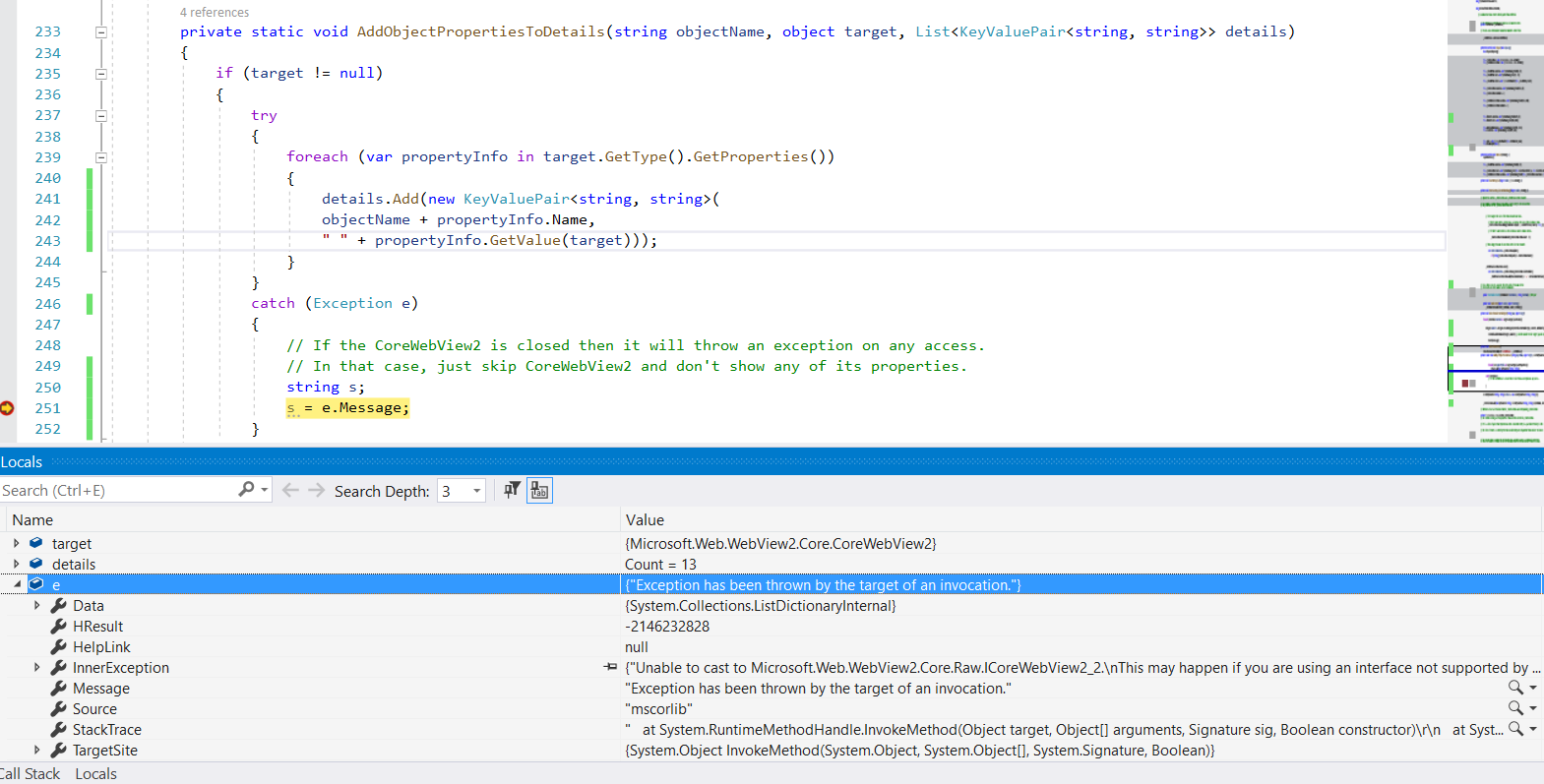
Here is a snip of where I get a fault. It seems to me that there issues in the EventMonitor class/form with the lists and with obtaining references to the WebView2 methods and properties.
Is there any update on this exception? I'm seeing this myself with the latest (stable) version.
System.InvalidCastException: Unable to cast COM object of type 'System.__ComObject' to interface type 'Microsoft.Web.WebView2.Core.Raw.ICoreWebView2Controller'. This operation failed because the QueryInterface call on the COM component for the interface with IID '{4D00C0D1-9434-4EB6-8078-8697A560334F}' failed due to the following error: No such interface supported (Exception from HRESULT: 0x80004002 (E_NOINTERFACE)).
   at System.StubHelpers.StubHelpers.GetCOMIPFromRCW(Object objSrc, IntPtr pCPCMD, IntPtr& ppTarget, Boolean& pfNeedsRelease)
   at Microsoft.Web.WebView2.Core.Raw.ICoreWebView2Controller.get_CoreWebView2()
   at Microsoft.Web.WebView2.Core.CoreWebView2Controller.get_CoreWebView2()
   at Microsoft.Web.WebView2.Wpf.WebView2.Uninitialize(Boolean browserCrashed)
   at Microsoft.Web.WebView2.Wpf.WebView2.Dispose(Boolean disposing)

This looks like it's maybe the same issue as https://github.com/MicrosoftEdge/WebView2Feedback/issues/1971. Are you using an ElementHost?
@jeremy-marcus Do you know what is calling "Dispose" in your stack? Are you manually calling it from your code, while a parent is being disposed, or is it being called by the finalizer?
We have seen issues in the past where the finalizer calls dispose on a thread different than the UI thread. Can you try calling "Dispose" on the WebView2 control from the UI thread before the finalizer gets to it? We are looking into some potential fixes that would limit this issue.
I'm going to transfer this issue to our Feedback repo. I've opened a bug on our backlog to track the potential fixes here.
Any update on this one? I'm facing it in a VSTO Word add-in. I'm using WebView2 version 1.0.1462.37 on top of .NET Framework 4.8. This is VS2022 (Version 17.4.4) if that has anything to do.
Interestingly I'm trying to call Dispose() on my WebView2 upon exit. Still this thing somehow comes up.

any solutions? i am with the exact same problem, everything works fine but when i close the app i get the error:
System.InvalidCastException: 'Unable to cast COM object of type 'System.__ComObject' to interface type 'Microsoft.Web.WebView2.Core.Raw.ICoreWebView2Controller'. This operation failed because the QueryInterface call on the COM component for the interface with IID '{4D00C0D1-9434-4EB6-8078-8697A560334F}' failed due to the following error: No such interface supported (Exception from HRESULT: 0x80004002 (E_NOINTERFACE)).'
even if i put a event on the app exit: AppDomain.CurrentDomain.ProcessExit += CurrentDomain_ProcessExit; to call dispose , i get the same error
edit===workaround
in my case i use the webview2 in a dll and run it async, to solve my problem i need to use the dispatcher of UI from the main app and then call dispose:
        MainAppUIDispacher.Invoke(() =>
        {
            Browser?.Dispose();
        });
at last for now, no more problems

I use version 1.0.2277.86 :
When I call Dispose() from the finalizer (on the GC Finalizer Thread), the exception is thrown.
When I call it from a function on Main Thread (that is called before the finalizers), the exception is not thrown.
This supports champnic's comment from Feb 10, 2022:
We have seen issues in the past where the finalizer calls dispose on a thread different than the UI thread. Can you try calling "Dispose" on the WebView2 control from the UI thread before the finalizer gets to it? We are looking into some potential fixes that would limit this issue.
Any update on this issue?

Hello there,
I have the same exception with this error message :
Unable to cast COM object of type 'System.__ComObject' to interface type 'Microsoft.Web.WebView2.Core.Raw.ICoeWebView2Environment10'. This operation failed because the QueryInterfaace call on the COM component fir the interface with ID '{EE0EB9DF-6F12-46CE-B53F-3F47B9C928E0}' failed due to the following error: No such interface supported (Exception from HRESULT : 0x80004002 (E_NOINTERFACE))
it's occurred before the CoreWebView2 initialization when i run my exe in another computer with windows 11
i use the latest runtime version

@AmirMahdyJebreily This could be due to an older runtime that doesn't support ICoreWebView2Environment10 functions. What WebView2 runtime version is on the other Win11 computer?
No i use the latest version i was download it from official download page last week and i use dotnet framework 4.8 with webview2 version : 1.0.2792.45
For the record: As suggested, I disposed the webview2 from the UI thread in the parent form's OnHandleDestroyed() and that worked for me. And I'm using 0.9.579 (for reasons of my own)
