

 MicrosoftEdge
Add 'Scroll into view' option to Source panel context menu for DOM elements
This feature request is part of the larger theme of context menus not being tailor for developer needs in DevTools #50.
By the nature of my current project, I have to manipulate DOM objects, is a sense that execution of the code highly depends on involved DOM object.
So the problem is that If you happen to have a local variable assigned to DOMElement to see where it is located within the document you need to do the following:
- Copy variable name
- paste it to Console
- Hit enter
- Open context menu on the result
- Pick Reveal in Elements panel
- Open Context menu again
- Pick 'Scroll into view' half a screen away from the current mouse position from the list of unrelated and visually similar options.
At this point, repeating the command and typing .scrollIntoView() feels line a shortcut. CUI wins over GUI.
Thank you for considering this request.
AB#39424857

Thanks for the report. I agree that wherever DOM nodes are displayed, the context menu should offer roughly the same options.
I say roughly because when you right-click on a DOM node in the Elements tool, you get an awfully long list of options, all of which might not be useful when the DOM node is displayed in the Sources tool (for example "Badge settings").
But I totally agree that "Scroll into view" or "Store as global variable" make a lot of sense in other tools.
Just to illustrate, here's the context menu when right-clicking a DOM node in the Scope panel of the Sources tool:
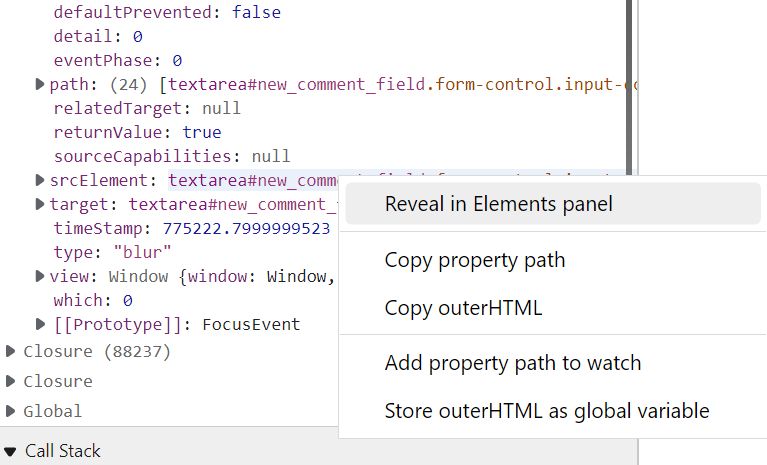
Weirdly enough, the "Store outerHTML as global variable" option is here, and it's not even an option in the Elements tool. Not sure what the value of this is. But it must have been added for a reason.
The DOM node context menu in the Console tool, however, is the same one as the Elements tool one. So that's good. This actually means you could save 1 step in your list of steps. You can either:
- Copy variable name
- Paste in console
- Hit enter
- Open context menu
- Choose Scroll into view
Or you could also do:
- In Sources tool, right click on DOM node in Scopes pane
- Click Reveal in Elements panel
- Right-click selected element
- Choose Scroll into view.
Not saying these are perfect, but hopefully they save a bit of frustration.
Let me add this to the team's backlog so we can prioritize adding the missing options to the Sources tool context menu for DOM nodes.

Thanks for your reply!
Totally agree on 'roughly the same options'. It is called context menu for a reason :).
It should be based on general idea of why devs are using the tool at all - likely to debug and test code, and quite possibly the code is somehow related to DOM stuff, because otherwise you can do the debugging in vs code.
On top of that it should be adjusted to the thing you are currently looking at and where you look at it.
Thanks for idea with scope panel, it is a bit shorted, but nevertheless, the biggest issue remains: you need to switch you context - move to another panel, loosing sight of the code, do a bunch of action there, and then find your have back to code. Huge waste on metal resources. In this sense typing out '.scrollIntoView()' is actually better, cos you stay in Source panel.
Got it, that makes sense. I actually filed an "upstream" (i.e. chromium) issue for this as this also happens in other chromium-based browsers: https://bugs.chromium.org/p/chromium/issues/detail?id=1322932