
windows-powershell-docs
 windows-powershell-docs copied to clipboard
 MicrosoftDocs
This repo is used to contribute to Windows 10, Windows Server 2016, and MDOP PowerShell module documentation.
The `SslFlags` Parameter is limited here to value 0 to 3, but in Server 2022 there are many more flags possible, checking all check-boxes in the GUI results in SslFlags...

It appears that the examples does not use secure strings for passwords. This includes parameter description. Set-WebCentralCertProvider uses ordinary strings. --- #### Document Details ⚠ *Do not edit this section....

PS C:\Users\administrator.corp> Import-Module netWnv Import-Module : The specified module 'netWnv' was not loaded because no valid module file was found in any module directory. At line:1 char:1 + Import-Module netWnv...

Clarify description. "Removes active threats" as in attempts to remediate a detected threat or as in removes the "threat" from the list of active threats and has nothing to do...

PS C:\Users\aaron> **Test-DnsServer -IPAddress 192.168.1.1** Test-DnsServer : The term 'Test-DnsServer' is not recognized as the name of a cmdlet, function, script file, or operable program. Check the spelling of the...

The valid values for "Type" in the description block are incorrect - it states that IPAddress and IPv6Address are valid - but underneath in the table it correctly states that...

### Description The [`Remove-AppxPackageAutoUpdateSettings`](https://docs.microsoft.com/powershell/module/appx/remove-appxpackageautoupdatesettings?view=windowsserver2022-ps) for Windows Server 2022 has placeholder information. https://github.com/MicrosoftDocs/windows-powershell-docs/blob/8e5c38ded70e24ca064e63dbc70705d2d6e55e08/docset/winserver2022-ps/appx/Remove-AppxPackageAutoUpdateSettings.md?plain=1#L11-L33 This is also present on the main AppX page. https://github.com/MicrosoftDocs/windows-powershell-docs/blob/8e5c38ded70e24ca064e63dbc70705d2d6e55e08/docset/winserver2022-ps/appx/Appx.md?plain=1#L69-L70 ### Screenshots 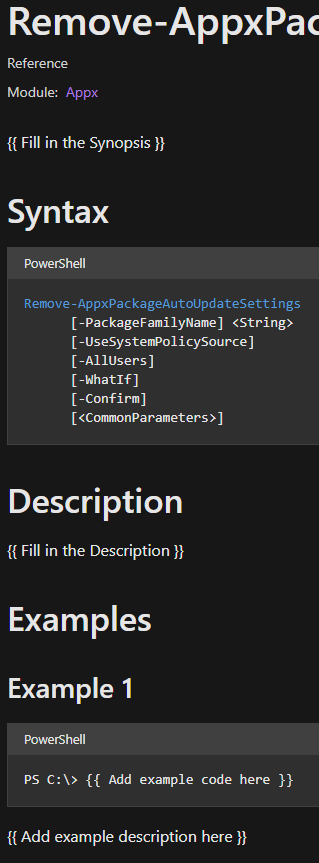 

### Description The[ `Reset-AppxPackage` syntax is formatted incorrectly](https://docs.microsoft.com/powershell/module/appx/reset-appxpackage#syntax). It shows up as: 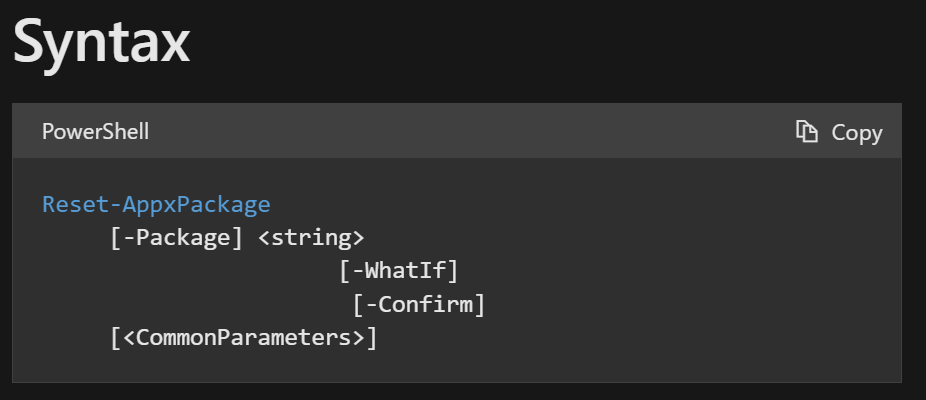
Examples for New-AppLockerPolicy fail at execution. See example below: ``` PS C:\Users\User> Get-ChildItem C:\Windows\System32\*.exe | Get-AppLockerFileInformation | New-AppLockerPolicy -RuleType Publisher, Hash -User Everyone -RuleNamePrefix System32 New-AppLockerPolicy: The input object cannot...

The acceptable values listed for the parameter -Identity are A distinguished name A GUID (objectGUID) A security identifier (objectSid) A Security Account Manager account name (sAMAccountName) I don't think Security...

Metadata
Owner
Metadata
This repo is used to contribute to Windows 10, Windows Server 2016, and MDOP PowerShell module documentation.