
windows-powershell-docs
 windows-powershell-docs copied to clipboard
 MicrosoftDocs
Copy-UserInternationalSettingsToSystem Not Present in International Module on Server 2022, Windows 10 21H2
This cmdlet is not present in Windows Server 2022 or Windows 10 21H2.
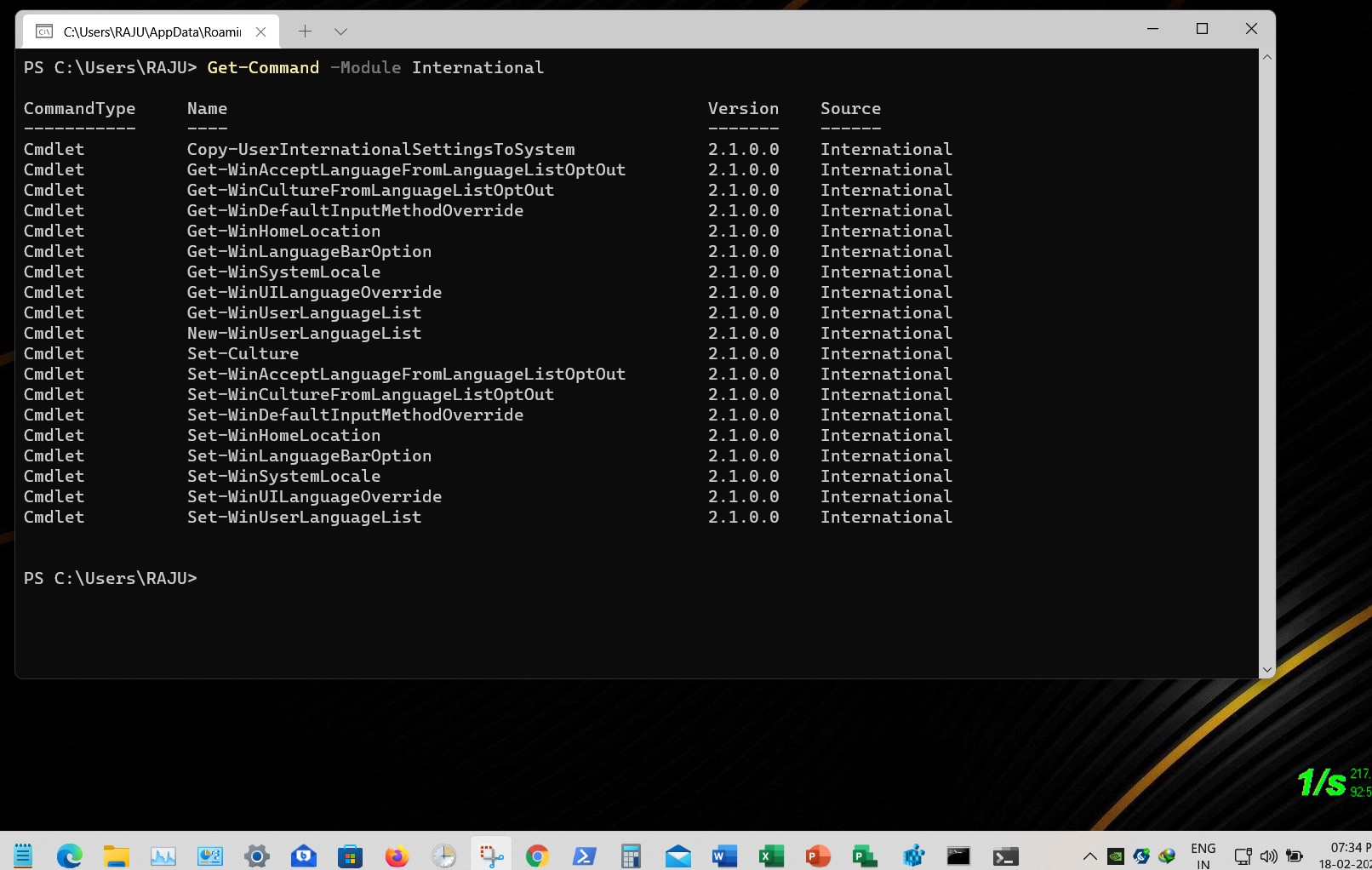
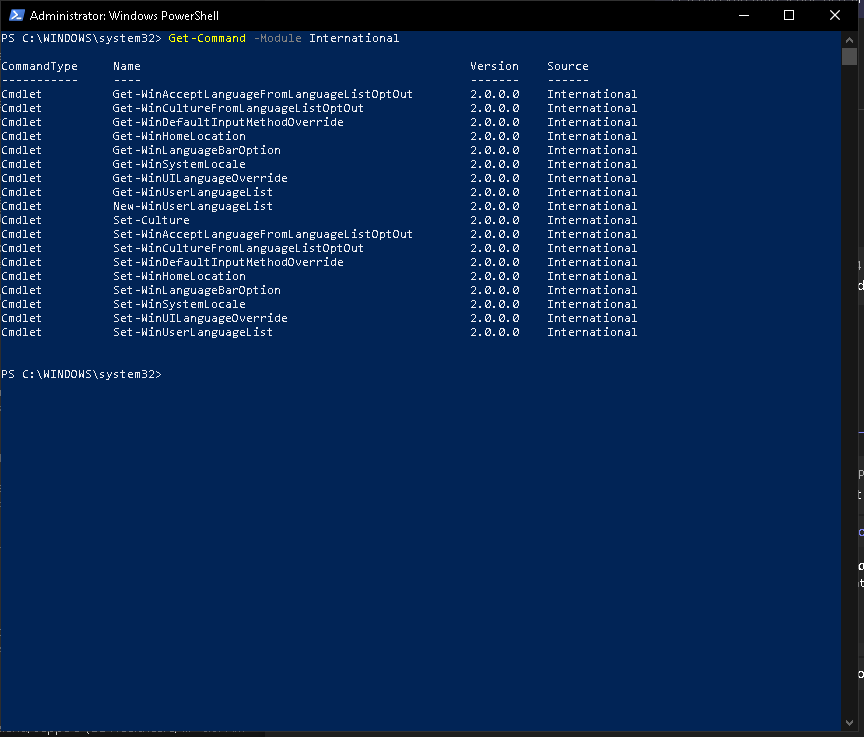
Output of Get-Command -Module International on either system results in the following output:
CommandType Name Version Source
Cmdlet Get-WinAcceptLanguageFromLanguageListOptOut 2.0.0.0 International Cmdlet Get-WinCultureFromLanguageListOptOut 2.0.0.0 International Cmdlet Get-WinDefaultInputMethodOverride 2.0.0.0 International Cmdlet Get-WinHomeLocation 2.0.0.0 International Cmdlet Get-WinLanguageBarOption 2.0.0.0 International Cmdlet Get-WinSystemLocale 2.0.0.0 International Cmdlet Get-WinUILanguageOverride 2.0.0.0 International Cmdlet Get-WinUserLanguageList 2.0.0.0 International Cmdlet New-WinUserLanguageList 2.0.0.0 International Cmdlet Set-Culture 2.0.0.0 International Cmdlet Set-WinAcceptLanguageFromLanguageListOptOut 2.0.0.0 International Cmdlet Set-WinCultureFromLanguageListOptOut 2.0.0.0 International Cmdlet Set-WinDefaultInputMethodOverride 2.0.0.0 International Cmdlet Set-WinHomeLocation 2.0.0.0 International Cmdlet Set-WinLanguageBarOption 2.0.0.0 International Cmdlet Set-WinSystemLocale 2.0.0.0 International Cmdlet Set-WinUILanguageOverride 2.0.0.0 International Cmdlet Set-WinUserLanguageList 2.0.0.0 International
Document Details
⚠ Do not edit this section. It is required for docs.microsoft.com ➟ GitHub issue linking.
- ID: ccd7281a-ec32-c07a-930c-dfbcf9f30d9b
- Version Independent ID: dd1bd3bf-f9f3-3418-7197-1c910ac7185d
- Content: Copy-UserInternationalSettingsToSystem (International)
- Content Source: docset/winserver2022-ps/international/Copy-UserInternationalSettingsToSystem.md
- Product: w11
- Technology: ****
- GitHub Login: @erik0686
- Microsoft Alias: ertorres


@erik0686 I'm a sysadmin pressed for time, mostly because of poorly implemented, poorly documented Microsoft systems :-) I read the Synopsis, Syntax and Examples - Description rarely has anything useful, except when it does such as this case. You could understand that given the document is part of winserver2022-ps and shows up when you select Windows Server 2022 PowerShell as the version, that it would be reasonable to expect it to have shipped with Windows Server 2022 at a minimum. If the documentation set isn't going to have a Windows 11 version (which helps shape my view of poorly documented systems), then might I suggest moving the Important line from being the last sentence in Description to being the first sentence in Synopsis and making it all bold to let readers know that it isn't actually part of Windows Server 2022, even though that's the version they selected on the Microsoft Docs page. I appreciate the reply and thank you for pointing out my inadequate reading skills, but can you please help make this documentation less confusing so we're not all wasting our time? Thanks.
@stryqx Thank you for the feedback! It is really helpful to understand how users experience and expect documentation to be written. I will follow up soon with a change to implement your suggestion, as I agree a sentence as important as this should be more visible to the user.
Thanks for your understanding!
@e0i Alternatively, is there a more appropriate location for a Win-11 only cmdlet?
@stryqx, just now i checked this Get-Command -Module International command on Windows 11 build no 22000.527.


This repository is for PowerShell core documentation. You seem to be looking for support, which we can't provide here.
I suggest you try posting your issue with context in one of the available community support forums.
