
windows-powershell-docs
 windows-powershell-docs copied to clipboard
 MicrosoftDocs
Not mentioning when Add-NetIPHttpsCertBinding will not work
Powershell version 5.1
It appears that there are issues with Add-NetIPHttpsCertBinding which will keep it from adding a certificate binding. We really need to know the circumstances when that procedure will work or not work.
From a quick google search it appears that others have problems making Add-NetIPHttpsCertBinding work.
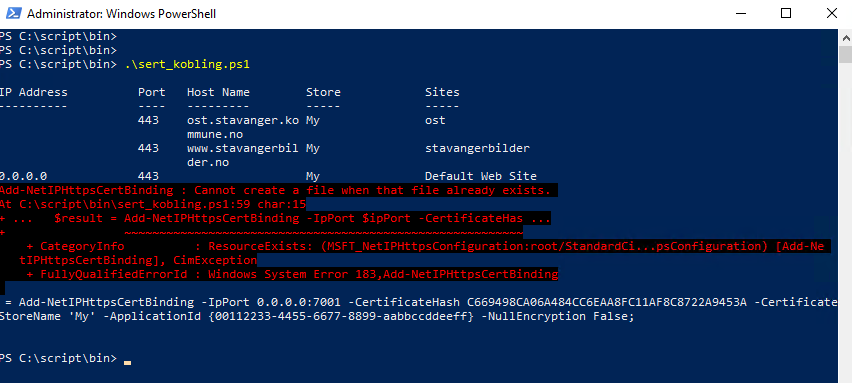
I use Get-ChildItem -path IIS:\SSLbindings*; to verify that there is no certificate bound to the port I'm trying to bind the certificate to.
The screenshot shows the command line. I just copied the line and added double quotes to make it printable.
A netsh command will have the same problem when executed in the same process, but it will still create the binding. SSL Certificate add failed, Error: 183 Cannot create a file when that file already exists.
Document Details
⚠ Do not edit this section. It is required for docs.microsoft.com ➟ GitHub issue linking.
- ID: 5a15eeaa-604e-1620-2927-370749151835
- Version Independent ID: ad1f5a0d-4fac-d809-f683-ebed799d70da
- Content: Add-NetIPHttpsCertBinding (NetworkTransition)
- Content Source: docset/winserver2022-ps/networktransition/Add-NetIPHttpsCertBinding.md
- Product: w10
- Technology: windows
- GitHub Login: @JasonGerend
- Microsoft Alias: jgerend

Hi @Tarjei-stavanger
Thank you for trying to make MicrosoftDocs a better place.
Upon reading the article description there is a line that says "This cmdlet does not work if there is already a certificate binding on the computer.". I believe this is related to the error message.

I have already pointed out that I have checked that there is no certificate bound to the port.
Please pay attention.
From: Onur @.> Sent: Friday, June 24, 2022 11:41 PM To: MicrosoftDocs/windows-powershell-docs @.> Cc: Tarjei Jensen @.>; Mention @.> Subject: Re: [MicrosoftDocs/windows-powershell-docs] Not mentioning when Add-NetIPHttpsCertBinding will not work (Issue #2872)
Reply to this email directly, view it on GitHubhttps://eur03.safelinks.protection.outlook.com/?url=https%3A%2F%2Fgithub.com%2FMicrosoftDocs%2Fwindows-powershell-docs%2Fissues%2F2872%23event-6876965573&data=05%7C01%7Ctarjei.jensen%40stavanger.kommune.no%7Cc5a107fca9bb4b67784a08da562a4df5%7C8cb94f174b6045d6b279cd88076e5b48%7C0%7C0%7C637917036937985790%7CUnknown%7CTWFpbGZsb3d8eyJWIjoiMC4wLjAwMDAiLCJQIjoiV2luMzIiLCJBTiI6Ik1haWwiLCJXVCI6Mn0%3D%7C3000%7C%7C%7C&sdata=LmrcdCSrjYDMCuKZ7dOlJnpw0AbeioaXDUZiJ4NG34U%3D&reserved=0, or unsubscribehttps://eur03.safelinks.protection.outlook.com/?url=https%3A%2F%2Fgithub.com%2Fnotifications%2Funsubscribe-auth%2FATVQGCTTPIKCL654O7CNHP3VQYTQTANCNFSM5NLGBUCA&data=05%7C01%7Ctarjei.jensen%40stavanger.kommune.no%7Cc5a107fca9bb4b67784a08da562a4df5%7C8cb94f174b6045d6b279cd88076e5b48%7C0%7C0%7C637917036938142010%7CUnknown%7CTWFpbGZsb3d8eyJWIjoiMC4wLjAwMDAiLCJQIjoiV2luMzIiLCJBTiI6Ik1haWwiLCJXVCI6Mn0%3D%7C3000%7C%7C%7C&sdata=6BcTv5Obk2o2eXO8h9N86MNg3uZsbGJBBSbSzBsZhKk%3D&reserved=0. You are receiving this because you were mentioned.Message ID: @.@.>>
Hei @Tarjei-stavanger, does the certificate you are using have Subject Alternate Names (SAN)?

@Tarjei-stavanger We appreciate any feedback that improves the content in the Microsoft docs but we haven't had any response from you so we are going to close this issue.
Please feel free to re-open this issue if there is a specific area of the docs that we can improve or make better. Thank you.

I'm pretty certain that I answered that the certificate had a Subject Alternate Name. However I might have forgotten to save the answer or it got lost somewhere. Sorry about that.
The certificate comes from Let's Encrypt and contains a Subject Alternative Name.