
windows-powershell-docs
 windows-powershell-docs copied to clipboard
 MicrosoftDocs
Better example for reviewing certificate detail
For "Example 2", Instead of generating a file which you then have to leave PowerShell to review, I suggest adding the following example to review the currently assigned certificate, expiration date, etc:
$CertInBase64 = New-AdfsAzureMfaTenantCertificate -TenantID <your tenant ID>
[Security.Cryptography.X509Certificates.X509Certificate2]([System.Convert]::FromBase64String($CertInBase64))
This also applies to the example on Set-AdfsAzureMfaTenant / https://docs.microsoft.com/en-us/powershell/module/adfs/set-adfsazuremfatenant?view=windowsserver2019-ps
Document Details
⚠ Do not edit this section. It is required for docs.microsoft.com ➟ GitHub issue linking.
- ID: 3a4fa05f-5646-76a9-c793-65729f957df5
- Version Independent ID: cfefffa6-78f0-124b-d91d-95f0bbecfa98
- Content: New-AdfsAzureMfaTenantCertificate (ADFS)
- Content Source: docset/winserver2019-ps/adfs/New-AdfsAzureMfaTenantCertificate.md
- Product: w10
- Technology: windows
- GitHub Login: @JasonGerend
- Microsoft Alias: jgerend

@Mike-Crowley Thank you for your feedback. We have made changes to the document via PR#https://github.com/MicrosoftDocs/windows-powershell-docs/pull/2813
Thanks Sri

I don't believe you've transcribed my example properly.
- Mike Crowley
From: Onur @.> Sent: Monday, June 6, 2022 1:15:51 AM To: MicrosoftDocs/windows-powershell-docs @.> Cc: Mike Crowley @.>; Mention @.> Subject: Re: [MicrosoftDocs/windows-powershell-docs] Better example for reviewing certificate detail (Issue #2736)
Closed #2736https://github.com/MicrosoftDocs/windows-powershell-docs/issues/2736 as completed.
— Reply to this email directly, view it on GitHubhttps://github.com/MicrosoftDocs/windows-powershell-docs/issues/2736#event-6750278164, or unsubscribehttps://github.com/notifications/unsubscribe-auth/ABRLBZMUVTNZW6FW7THY3PDVNWCQPANCNFSM5GHQXXJQ. You are receiving this because you were mentioned.Message ID: @.***>
@Mike-Crowley We have a PR open for the change - https://github.com/MicrosoftDocs/windows-powershell-docs/pull/3098
Thanks Sri
To make it easier for you to submit feedback on articles on learn.microsoft.com, we're transitioning our feedback system from GitHub Issues to a new experience.
As part of the transition, this GitHub Issue will be moved to a private repository. We're moving Issues to another repository so we can continue working on Issues that were open at the time of the transition. When this Issue is moved, you'll no longer be able to access it.
If you want to provide additional information before this Issue is moved, please update this Issue before December 15th, 2023.
With the new experience, you no longer need to sign in to GitHub to enter and submit your feedback. Instead, you can choose directly on each article's page whether the article was helpful. Then you can then choose one or more reasons for your feedback and optionally provide additional context before you select Submit.
Here's what the new experience looks like.
Note: The new experience is being rolled out across learn.microsoft.com in phases. If you don't see the new experience on an article, please check back later.
First, select whether the article was helpful:
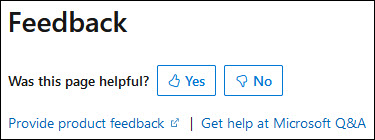
Then, choose at least one reason for your feedback and optionally provide additional details about your feedback:
| Article was helpful | Article was unhelpful |
|---|---|
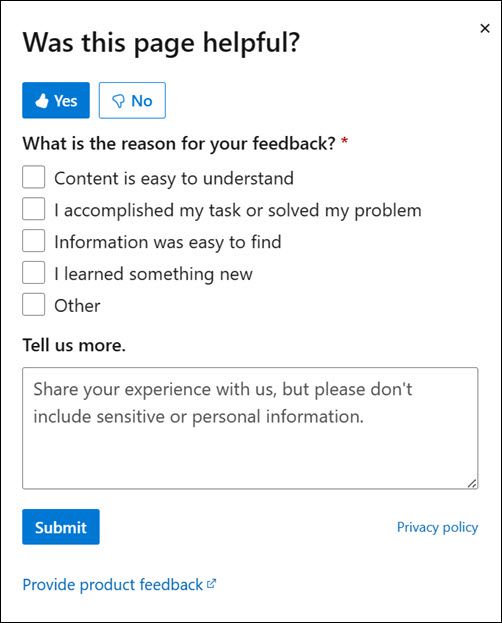 |
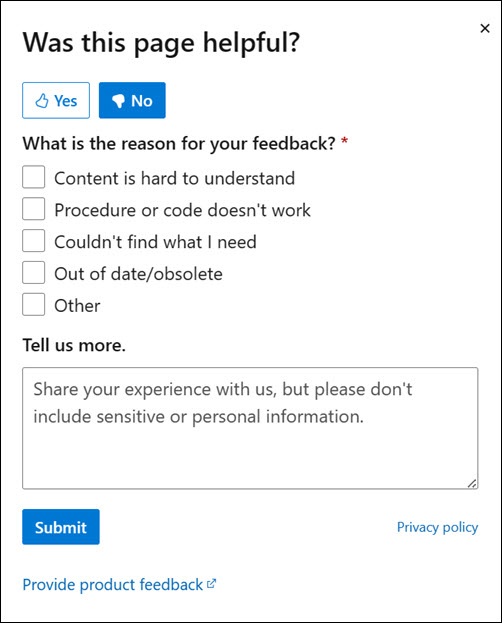 |
Finally, select Submit and you're done!
